# React Native 动画研究
> 本次专题文章的题目为《ReactNative 动画研究》,既然叫研究,那我们就争取一次将 RN 动画相关的内容都说清楚,提出问题-论证问题-解决问题的方式来研究 ...
- 发布日期: 2016-06-05
- Author: Tw93
- HTML: https://tw93.fun/2016-06-05/thinking-about-react-native-animated.html
- English translation: https://tw93.fun/en/2016-06-05/thinking-about-react-native-animated.md
- 全部文章: https://tw93.fun/posts.md
---
本次专题文章的题目为《ReactNative动画研究》,既然叫**研究**,那我们就争取一次将RN动画相关的内容都说清楚,提出问题-论证问题-解决问题的方式来研究。
### 问题
- ReactNative动画支持的怎么样?
- ReactNative的动画使用起来方便吗?
- ReactNative动画的性能和H5性能相比怎么样?
- ReactNative动画的性能怎么优化?
### RN动画支持
 从上面的MineNode我们可以看出RN中有3个地方可以使用动画:
- 用于创建更精细的交互控制的动画**Animated**;
- 用于全局的布局动画**LayoutAnimation**;
- 用于构建**Navigator**不同页面切换的动画;
此篇文章主要是讲**Animated**相关的内容,平时动画中用得最多的也是它,其他两个通过文档可以很容易的使用。
### RN动画的使用
一个**明天不上班的**的动画实现,同时从小变大并且旋转,我们可以从注释中看到RN动画的实现步骤,代码[Tw93 Gist](https://gist.github.com/tw93/c02b2e864aa8e1c9048d17b649f7a2ea)如下:
```javascript
import React, {Component} from 'react';
import {
AppRegistry,
StyleSheet,
Text,
View,
Animated, //使用Animated组件
Easing, //引入Easing渐变函数
} from 'react-native';
class ReactNativeDemo extends Component {
constructor(props: any) {
super(props);
//使用Animated.Value设定初始化值(缩放度,角度等等)
this.state = {
bounceValue: new Animated.Value(0),
rotateValue: new Animated.Value(0),
};
}
componentDidMount() {
//在初始化渲染执行之后立刻调用动画执行函数
this.startAnimation();
}
startAnimation() {
this.state.bounceValue.setValue(0);
this.state.rotateValue.setValue(0);
Animated.parallel([
//通过Animated.spring等函数设定动画参数
//可选的基本动画类型: spring, decay, timing
Animated.spring(this.state.bounceValue, {
toValue: 3, //变化目标值
friction: 20, //friction 摩擦系数,默认40
}),
Animated.timing(this.state.rotateValue, {
toValue: 1,
duration: 800,
easing: Easing.out(Easing.quad),
}),
//调用start启动动画,start可以回调一个函数,从而实现动画循环
]).start(()=>this.startAnimation());
}
render() {
return (
);
}
}
const styles = StyleSheet.create({
container: {
flex: 1,
justifyContent: 'center',
alignItems: 'center',
}
});
```
从上面demo可以看出,**动画的使用逻辑还算清晰,虽然比不上css3动画编写简单,同时不需要二次分装,直接向上面使用即可**。
具体的效果是这样:

### RN动画和H5动画对比
- RN 中的动画均为 JavaScript 动画,即通过 JavaScript 代码控制图像的各种参数值的变化,从而产生时间轴上的动画效果。 RN通过封装一个Animated的元素,内部通过数据绑定和DOM操作变更元素,结合React的生命周期完善内存管理,解决条件竞争问题,对外表现则与原生组件相同,实现了高效流畅的动画效果。
- CSS3动画vs ReactNative动画录制:
{::nomarkdown}
{:/nomarkdown}
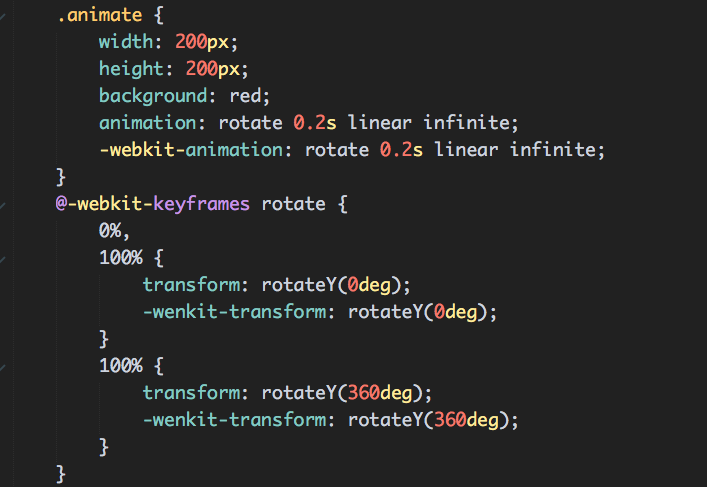
- 上述动画css3使用animation: rotate 0.2s linear infinite;实现:
- RN采用如下实现:

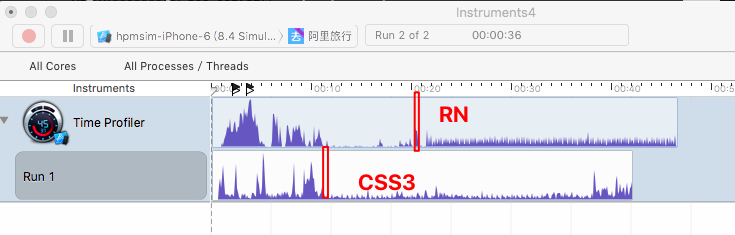
- 关于性能测试都采用instruments来测试Time Profiler数据,其中红线是动画开始时候,**从图中可以看出两者消耗都低,但是css3动画的性能稍微优于RN的动画**。
### 综合
#### React Native的动画支持度还是很广
- CSS3可以实现的动画RN基本上可以实现,同时还包装了很多类似语法糖的东西,譬如3种动画类型(spring、decay、timing),Interpolation插值函数、4种动画组合(同时、顺序、错峰、延迟)、动画执行回调、跟踪动态值、Animated.event输入事件、响应当前的动画值、等功能;
- 关于React Native 支持的Easing类型可以到源码中去找符合自己项目需求的动画类型,[Easing.js](https://github.com/facebook/react-native/blob/master/Libraries/Animated/src/Easing.js);
- Navigator页面切换的动画也很丰富,我们可以从上面的mindNode找到所支持的切换动画,同样也可以从源码中找到它支持的类型,[NavigatorSceneConfigs.js](https://github.com/facebook/react-native/blob/master/Libraries/CustomComponents/Navigator/NavigatorSceneConfigs.js);
- 对于特别复杂的动画,可以使用[react-native-animatable](https://github.com/oblador/react-native-animatable)补充多余的动画类型;
- - 对于有些组件的动画,譬如数据图表的绘制,建议直接使用RN绘图库[ART](https://github.com/facebook/react-native/tree/master/Libraries/ART)实现,[react-native-svgkit](https://github.com/brentvatne/react-native-svgkit);
#### React Native编写使用起来也很有方便,具有逻辑性
1. 使用基本的Animated组件,如Animated.View、Animated.Image、Animated.Text和其他(使用AnimatedImplementation来包装);
2. 使用Animated.Value设定一个或多个初始化值,如位置属性、透明属性、角度属性等;
3. 将初始化值绑定到动画目标的属性上,如style;
4. 通过动画类型Api设定动画参数,如spring、decay、timing三种动画类型;
5. 调用start启动动画,同时可以在start里面回调相关功能;
#### React Native动画性能没有那么差,或者说比想象中要好
##### for Animated
- 通过封装一个Animated的元素;
- 内部通过数据绑定和DOM操作变更元素;
- 结合React的生命周期完善内存管理,解决条件竞争问题;
- 对外表现则与原生组件相同,实现了高效流畅的动画效果;
##### For Navigator页面切换动画不流畅
- 使用InteractionManager在转场动画的过程中,使新页面只渲染必要的少量的内容。
- InteractionManager.runAfterInteractions只有一个函数类型的参数,当转场动画结束,这个回调函数就会被触发(所有基于AnimatedAPI的动画都会触发InteractionManager.runAfterInteractions)。
### 参考
- [https://facebook.github.io/react-native/docs/animations.html#content](https://facebook.github.io/react-native/docs/animations.html#content)
- [https://facebook.github.io/react-native/docs/navigator.html#content](https://facebook.github.io/react-native/docs/navigator.html#content)
- [https://facebook.github.io/react-native/docs/layoutanimation.html#content](https://facebook.github.io/react-native/docs/layoutanimation.html#content)
- [ReactNative Animated动画详解 - Web前端腾讯AlloyTeamBlog](https://www.google.com.hk/url?sa=t&rct=j&q=&esrc=s&source=web&cd=5&cad=rja&uact=8&ved=0ahUKEwjghpGciPnLAhVGkywKHQebDBwQFgg4MAQ&url=%68%74%74%70%3a%2f%2f%77%77%77%2e%61%6c%6c%6f%79%74%65%61%6d%2e%63%6f%6d%2f%32%30%31%36%2f%30%31%2f%72%65%61%63%74%6e%61%74%69%76%65%2d%61%6e%69%6d%61%74%65%64%2f&usg=AFQjCNFHs4H5NFeDSA60uU1AiwE4s3DDtA&sig2=co4jsVL_5KxI5g-Ug0eKBQ)
- [react-native-animation-book](http://browniefed.com/react-native-animation-book/)
从上面的MineNode我们可以看出RN中有3个地方可以使用动画:
- 用于创建更精细的交互控制的动画**Animated**;
- 用于全局的布局动画**LayoutAnimation**;
- 用于构建**Navigator**不同页面切换的动画;
此篇文章主要是讲**Animated**相关的内容,平时动画中用得最多的也是它,其他两个通过文档可以很容易的使用。
### RN动画的使用
一个**明天不上班的**的动画实现,同时从小变大并且旋转,我们可以从注释中看到RN动画的实现步骤,代码[Tw93 Gist](https://gist.github.com/tw93/c02b2e864aa8e1c9048d17b649f7a2ea)如下:
```javascript
import React, {Component} from 'react';
import {
AppRegistry,
StyleSheet,
Text,
View,
Animated, //使用Animated组件
Easing, //引入Easing渐变函数
} from 'react-native';
class ReactNativeDemo extends Component {
constructor(props: any) {
super(props);
//使用Animated.Value设定初始化值(缩放度,角度等等)
this.state = {
bounceValue: new Animated.Value(0),
rotateValue: new Animated.Value(0),
};
}
componentDidMount() {
//在初始化渲染执行之后立刻调用动画执行函数
this.startAnimation();
}
startAnimation() {
this.state.bounceValue.setValue(0);
this.state.rotateValue.setValue(0);
Animated.parallel([
//通过Animated.spring等函数设定动画参数
//可选的基本动画类型: spring, decay, timing
Animated.spring(this.state.bounceValue, {
toValue: 3, //变化目标值
friction: 20, //friction 摩擦系数,默认40
}),
Animated.timing(this.state.rotateValue, {
toValue: 1,
duration: 800,
easing: Easing.out(Easing.quad),
}),
//调用start启动动画,start可以回调一个函数,从而实现动画循环
]).start(()=>this.startAnimation());
}
render() {
return (
);
}
}
const styles = StyleSheet.create({
container: {
flex: 1,
justifyContent: 'center',
alignItems: 'center',
}
});
```
从上面demo可以看出,**动画的使用逻辑还算清晰,虽然比不上css3动画编写简单,同时不需要二次分装,直接向上面使用即可**。
具体的效果是这样:

### RN动画和H5动画对比
- RN 中的动画均为 JavaScript 动画,即通过 JavaScript 代码控制图像的各种参数值的变化,从而产生时间轴上的动画效果。 RN通过封装一个Animated的元素,内部通过数据绑定和DOM操作变更元素,结合React的生命周期完善内存管理,解决条件竞争问题,对外表现则与原生组件相同,实现了高效流畅的动画效果。
- CSS3动画vs ReactNative动画录制:
{::nomarkdown}
{:/nomarkdown}
- 上述动画css3使用animation: rotate 0.2s linear infinite;实现:

- RN采用如下实现:

- 关于性能测试都采用instruments来测试Time Profiler数据,其中红线是动画开始时候,**从图中可以看出两者消耗都低,但是css3动画的性能稍微优于RN的动画**。

### 综合
#### React Native的动画支持度还是很广
- CSS3可以实现的动画RN基本上可以实现,同时还包装了很多类似语法糖的东西,譬如3种动画类型(spring、decay、timing),Interpolation插值函数、4种动画组合(同时、顺序、错峰、延迟)、动画执行回调、跟踪动态值、Animated.event输入事件、响应当前的动画值、等功能;
- 关于React Native 支持的Easing类型可以到源码中去找符合自己项目需求的动画类型,[Easing.js](https://github.com/facebook/react-native/blob/master/Libraries/Animated/src/Easing.js);
- Navigator页面切换的动画也很丰富,我们可以从上面的mindNode找到所支持的切换动画,同样也可以从源码中找到它支持的类型,[NavigatorSceneConfigs.js](https://github.com/facebook/react-native/blob/master/Libraries/CustomComponents/Navigator/NavigatorSceneConfigs.js);
- 对于特别复杂的动画,可以使用[react-native-animatable](https://github.com/oblador/react-native-animatable)补充多余的动画类型;
- - 对于有些组件的动画,譬如数据图表的绘制,建议直接使用RN绘图库[ART](https://github.com/facebook/react-native/tree/master/Libraries/ART)实现,[react-native-svgkit](https://github.com/brentvatne/react-native-svgkit);
#### React Native编写使用起来也很有方便,具有逻辑性
1. 使用基本的Animated组件,如Animated.View、Animated.Image、Animated.Text和其他(使用AnimatedImplementation来包装);
2. 使用Animated.Value设定一个或多个初始化值,如位置属性、透明属性、角度属性等;
3. 将初始化值绑定到动画目标的属性上,如style;
4. 通过动画类型Api设定动画参数,如spring、decay、timing三种动画类型;
5. 调用start启动动画,同时可以在start里面回调相关功能;
#### React Native动画性能没有那么差,或者说比想象中要好
##### for Animated
- 通过封装一个Animated的元素;
- 内部通过数据绑定和DOM操作变更元素;
- 结合React的生命周期完善内存管理,解决条件竞争问题;
- 对外表现则与原生组件相同,实现了高效流畅的动画效果;
##### For Navigator页面切换动画不流畅
- 使用InteractionManager在转场动画的过程中,使新页面只渲染必要的少量的内容。
- InteractionManager.runAfterInteractions只有一个函数类型的参数,当转场动画结束,这个回调函数就会被触发(所有基于AnimatedAPI的动画都会触发InteractionManager.runAfterInteractions)。
### 参考
- [https://facebook.github.io/react-native/docs/animations.html#content](https://facebook.github.io/react-native/docs/animations.html#content)
- [https://facebook.github.io/react-native/docs/navigator.html#content](https://facebook.github.io/react-native/docs/navigator.html#content)
- [https://facebook.github.io/react-native/docs/layoutanimation.html#content](https://facebook.github.io/react-native/docs/layoutanimation.html#content)
- [ReactNative Animated动画详解 - Web前端腾讯AlloyTeamBlog](https://www.google.com.hk/url?sa=t&rct=j&q=&esrc=s&source=web&cd=5&cad=rja&uact=8&ved=0ahUKEwjghpGciPnLAhVGkywKHQebDBwQFgg4MAQ&url=%68%74%74%70%3a%2f%2f%77%77%77%2e%61%6c%6c%6f%79%74%65%61%6d%2e%63%6f%6d%2f%32%30%31%36%2f%30%31%2f%72%65%61%63%74%6e%61%74%69%76%65%2d%61%6e%69%6d%61%74%65%64%2f&usg=AFQjCNFHs4H5NFeDSA60uU1AiwE4s3DDtA&sig2=co4jsVL_5KxI5g-Ug0eKBQ)
- [react-native-animation-book](http://browniefed.com/react-native-animation-book/)
 从上面的MineNode我们可以看出RN中有3个地方可以使用动画:
- 用于创建更精细的交互控制的动画**Animated**;
- 用于全局的布局动画**LayoutAnimation**;
- 用于构建**Navigator**不同页面切换的动画;
此篇文章主要是讲**Animated**相关的内容,平时动画中用得最多的也是它,其他两个通过文档可以很容易的使用。
### RN动画的使用
一个**明天不上班的**的动画实现,同时从小变大并且旋转,我们可以从注释中看到RN动画的实现步骤,代码[Tw93 Gist](https://gist.github.com/tw93/c02b2e864aa8e1c9048d17b649f7a2ea)如下:
```javascript
import React, {Component} from 'react';
import {
AppRegistry,
StyleSheet,
Text,
View,
Animated, //使用Animated组件
Easing, //引入Easing渐变函数
} from 'react-native';
class ReactNativeDemo extends Component {
constructor(props: any) {
super(props);
//使用Animated.Value设定初始化值(缩放度,角度等等)
this.state = {
bounceValue: new Animated.Value(0),
rotateValue: new Animated.Value(0),
};
}
componentDidMount() {
//在初始化渲染执行之后立刻调用动画执行函数
this.startAnimation();
}
startAnimation() {
this.state.bounceValue.setValue(0);
this.state.rotateValue.setValue(0);
Animated.parallel([
//通过Animated.spring等函数设定动画参数
//可选的基本动画类型: spring, decay, timing
Animated.spring(this.state.bounceValue, {
toValue: 3, //变化目标值
friction: 20, //friction 摩擦系数,默认40
}),
Animated.timing(this.state.rotateValue, {
toValue: 1,
duration: 800,
easing: Easing.out(Easing.quad),
}),
//调用start启动动画,start可以回调一个函数,从而实现动画循环
]).start(()=>this.startAnimation());
}
render() {
return (
从上面的MineNode我们可以看出RN中有3个地方可以使用动画:
- 用于创建更精细的交互控制的动画**Animated**;
- 用于全局的布局动画**LayoutAnimation**;
- 用于构建**Navigator**不同页面切换的动画;
此篇文章主要是讲**Animated**相关的内容,平时动画中用得最多的也是它,其他两个通过文档可以很容易的使用。
### RN动画的使用
一个**明天不上班的**的动画实现,同时从小变大并且旋转,我们可以从注释中看到RN动画的实现步骤,代码[Tw93 Gist](https://gist.github.com/tw93/c02b2e864aa8e1c9048d17b649f7a2ea)如下:
```javascript
import React, {Component} from 'react';
import {
AppRegistry,
StyleSheet,
Text,
View,
Animated, //使用Animated组件
Easing, //引入Easing渐变函数
} from 'react-native';
class ReactNativeDemo extends Component {
constructor(props: any) {
super(props);
//使用Animated.Value设定初始化值(缩放度,角度等等)
this.state = {
bounceValue: new Animated.Value(0),
rotateValue: new Animated.Value(0),
};
}
componentDidMount() {
//在初始化渲染执行之后立刻调用动画执行函数
this.startAnimation();
}
startAnimation() {
this.state.bounceValue.setValue(0);
this.state.rotateValue.setValue(0);
Animated.parallel([
//通过Animated.spring等函数设定动画参数
//可选的基本动画类型: spring, decay, timing
Animated.spring(this.state.bounceValue, {
toValue: 3, //变化目标值
friction: 20, //friction 摩擦系数,默认40
}),
Animated.timing(this.state.rotateValue, {
toValue: 1,
duration: 800,
easing: Easing.out(Easing.quad),
}),
//调用start启动动画,start可以回调一个函数,从而实现动画循环
]).start(()=>this.startAnimation());
}
render() {
return (