Can We Do Better Than The Click?
Categories: Study
Original article from: Browser Input Events: Can We Do Better Than The Click?
Responding to user input is the core of our interface development. To build responsive Web products, understanding how touch, mouse, pointer, keyboard operations and browsers work is the key to solving the problem. You may have experienced a 300-millisecond delay in mobile browsers or wrestled with touchmove versus scrolling.
In this article, we will introduce event cascading and use this knowledge to implement a demo of a tap click event, which supports multiple input methods without violating the proxy browser rules like Opera Mini.
Overview
The three main interaction methods currently used to interact with the Web are: digital cursor (mouse), haptic (direct touch or stylus), and keyboard. In JavaScript we can use them through Touch Events, Mouse Events, Pointer Events and Keyboard Events. In this article we mainly discuss touch and mouse-based interaction, although there are keyboard events that have formed standards, such as click and submit events.
You most likely have already implemented handlers for mouse and touch events. In the past, our recommended practice was like this:
/** DO NOT EVER DO THIS! */
$('a', ('ontouchstart' in window)?'touchend':'click',handler);
Microsoft has been responsible for creating a better, more promising “Pointer Events” event model specification. Pointer events are an abstract input mechanism and are now a W3C recommendation standard. Pointer events bring flexibility to the user agent (UA) and provide a rich input mechanism for an event system. Mouse, touch, and stylus are easy-to-think-of input methods today, but implementation extending to myo and Ring is also achievable. Although Web developers seem excited about these, not all browser developers think so. For example, Apple and Google currently have no plans to implement pointer events. Google’s decision is not their final decision, but currently there is no active work on pointer events. Input through polyfills and use of pointer events and alternative solutions will become part of the equation, which may ultimately play a decisive role. Apple issued a statement against pointer events in 2012, and I haven’t received any public response from Safari engineers yet.
Event Cascading
When a user taps an element on a mobile device, the browser triggers a series of events:
touchstart → touchend → mouseover → mousemove → mousedown → mouseup → click
This is due to the backward compatibility of the Web. Pointer events adopt an alternative plan to trigger event inline compatibility:
mousemove → pointerover → mouseover → pointerdown → mousedown → gotpointercapture → pointerup → mouseup → lostpointercapture → pointerout → mouseout → focus → click
Event specifications allow user agents to implement compatibility events in different ways. Patrick Lauke and Peter-Paul Koch maintain extensive reference materials on this subject (resource links are at the bottom of the article). The following images show event strings for the following behaviors:
- Tapping an element for the first time,
- Tapping an element for the second time,
- Tapping to close an element,
Note: The event stack deliberately ignores focus and blur events to fit this stack.
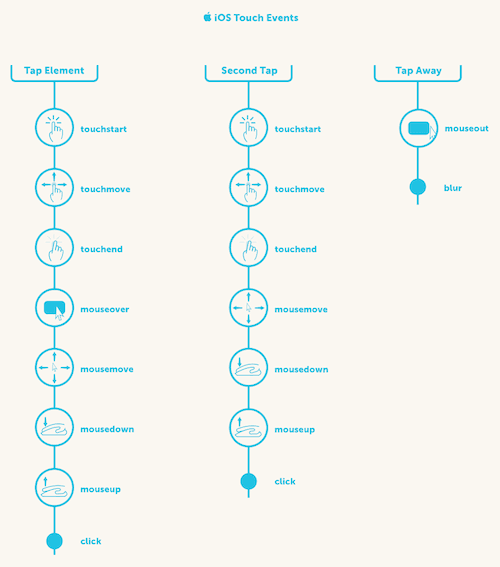
Event cascade of tapping an element twice and releasing on iOS devices
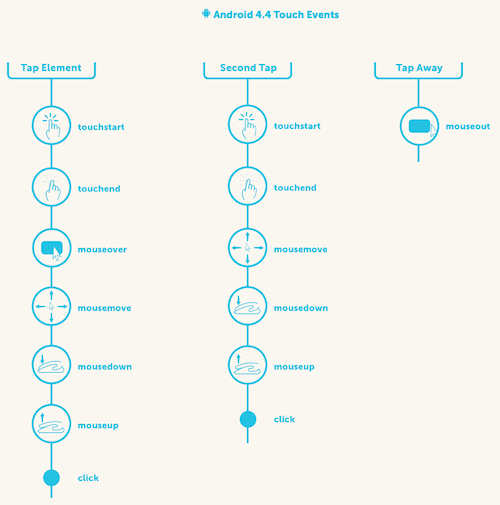
Event cascade of tapping an element twice and releasing on Android 4.4 devices
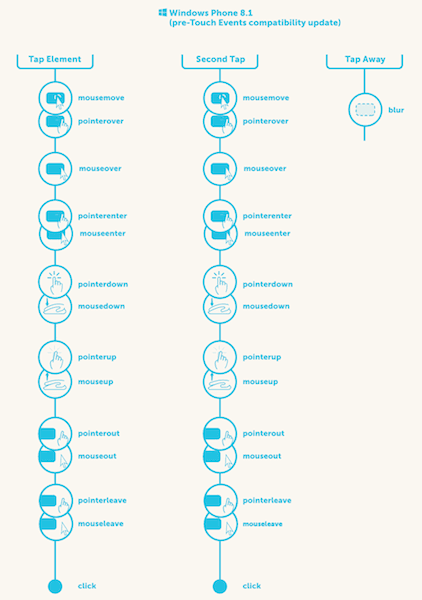
Event cascade of tapping an element twice then releasing on Internet Explorer 11 (in compatible touch event implementation)
Applying Event Cascading
Due to the work of browser engineers, most currently built desktop websites “just work”. Although cascading looks a bit rough, establishing mouse events is our conservative practice for how we normally work. Of course, the 300ms delay problem is more notorious than the interaction between scrolling and touchmove and pointermove events, as well as browser rendering issues. Avoiding the 300ms delay is easy if:
- We only optimize for modern Android and desktop Chrome, starting the function of disabling delay by using
<meta name="viewport" content="width=device-width">. - We only optimize for iOS devices, where the user has an explicit click, not a fast click or long press, just a good, normal, explicit click on an element.
If our goal is to build a Web application that can rival native applications in user experience, then we need to reduce the latency of interaction responses. To achieve this goal, we need to create our own composite events (click, double-click) on primitive events (such as down, move, up). Of course, we also need to provide broad and feasible support for fallback handling of local events.
Doing this requires a lot of code and knowledge. To avoid the 300ms delay in browsers, we need to handle self-interaction throughout the life cycle. For a given {type} down event, we need to bind all required events to complete this function. When the interaction is finished, we need to clean up the starting events we unbound.
Website developers, you are the only one who knows whether the page should zoom or whether another double-click event must wait. If only you need to postpone the callback, you should allow a scheduled action to delay.
In the following links, you will find a small, independent tap event Demo to create a multi-input, low-latency tap click event. Polymer-gestures is a library produced for tap clicks and other events. Although the name has Polymer, it is independent of the Polymer library and easily isolated.
To be clear, implementing this from scratch is a bad idea. The following should only be used for education and not for production environments. Libraries for production environments already exist, such as: FastClick, polymer-gestures and Hammer.js.
- Demo: The tap event
- Code: taps.js
Important Parts
Bind your initial events where everything starts. The pattern for handling multi-input below is considered a safe way.
/**

* If there are pointer events, let the platform handle the input
* mechanism abstraction. If not, then it’s on you to handle
* between mouse and touch events.
 */

if (hasPointer) {
  tappable.addEventListener(POINTER_DOWN, tapStart, false);
  clickable.addEventListener(POINTER_DOWN, clickStart, false);
}

else {
  tappable.addEventListener('mousedown', tapStart, false);
  clickable.addEventListener('mousedown', clickStart, false);

  if (hasTouch) {
    tappable.addEventListener('touchstart', tapStart, false);
    clickable.addEventListener('touchstart', clickStart, false);
  }
}

clickable.addEventListener('click', clickEnd, false);
Binding touch events requires a compromise with rendering performance, even if they don’t do anything. To reduce this impact, it is usually recommended to bind tracking events at the beginning of the handler. Don’t forget to clean up your environment and unbind tracking events after completing your event handling.
/**

* On tapStart we want to bind our move and end events to detect
* whether this is a “tap” action.
* @param {Event} event the browser event object
 */

function tapStart(event) {
  // bind tracking events. “bindEventsFor” is a helper that automatically
  // binds the appropriate pointer, touch or mouse events based on our
  // current event type. Additionally, it saves the event target to give
  // us similar behavior to pointer events’ “setPointerCapture” method.

  bindEventsFor(event.type, event.target);
  if (typeof event.setPointerCapture === 'function') {
    event.currentTarget.setPointerCapture(event.pointerId);
  }

  // prevent the cascade
  event.preventDefault();

  // start our profiler to track time between events
  set(event, 'tapStart', Date.now());
}

/**

* tapEnd. Our work here is done. Let’s clean up our tracking events.
* @param {Element} target the html element
* @param {Event} event the browser event object
 */

function tapEnd(target, event) {
  unbindEventsFor(event.type, target);
  var _id = idFor(event);
  log('Tap', diff(get(_id, 'tapStart'), Date.now()));
  setTimeout(function() {
    delete events[_id];
  });
The rest of the code should be well self-explanatory. In fact, it has a lot of bookkeeping. Implementing custom gestures requires you to work closely with the browser event system. To save your injury and heartache, do not do things in your own codebase. Instead you should build or use a powerful abstraction, such as Hammer.js, jQuery polyfill’s Pointer Events or polymer-gestures.
Summary
Some events that used to be clear are now ambiguous. In the past, the click event referred to one and only one thing, but now on touch screens it needs to distinguish between double-clicking, scrolling or other operating system gestures.
The good news is that we now understand the event cascade and interaction between many user habits and browser responses. Through the primitives recognized at work, we can make better decisions for our users and the future of the Web in our own projects.
What unexpected problems have you encountered when building multi-device websites? What methods have you taken to solve the numerous interaction modes on the Web?
Reference Links
- “Pointer Events Finalized, But Apple’s Lack of Support Still a Deal Breaker,”Peter Bright
- Getting Touchy: An Introduction to Touch and Pointer Events, including slides and talk Patrick E. Lauke
- “Apple’s Web?” by Tim Kadlec
- “Avoiding the 300ms Click Delay, Accessibly,” Tim Kadlec
- “Touch taple,” Peter-Paul Koch
- “Making the Web ‘Just Work’ With Any Input: Mouse, Touch, and Pointer Events,” Jacob Rossi
- FastClick library
- Hammer.js
- polymer-gestures
- Pointer EventsjQuery polyfill
- “Implement Custom Gestures,” Google Developers