SVG New Driver's Guide
Categories: Study
TL,TR
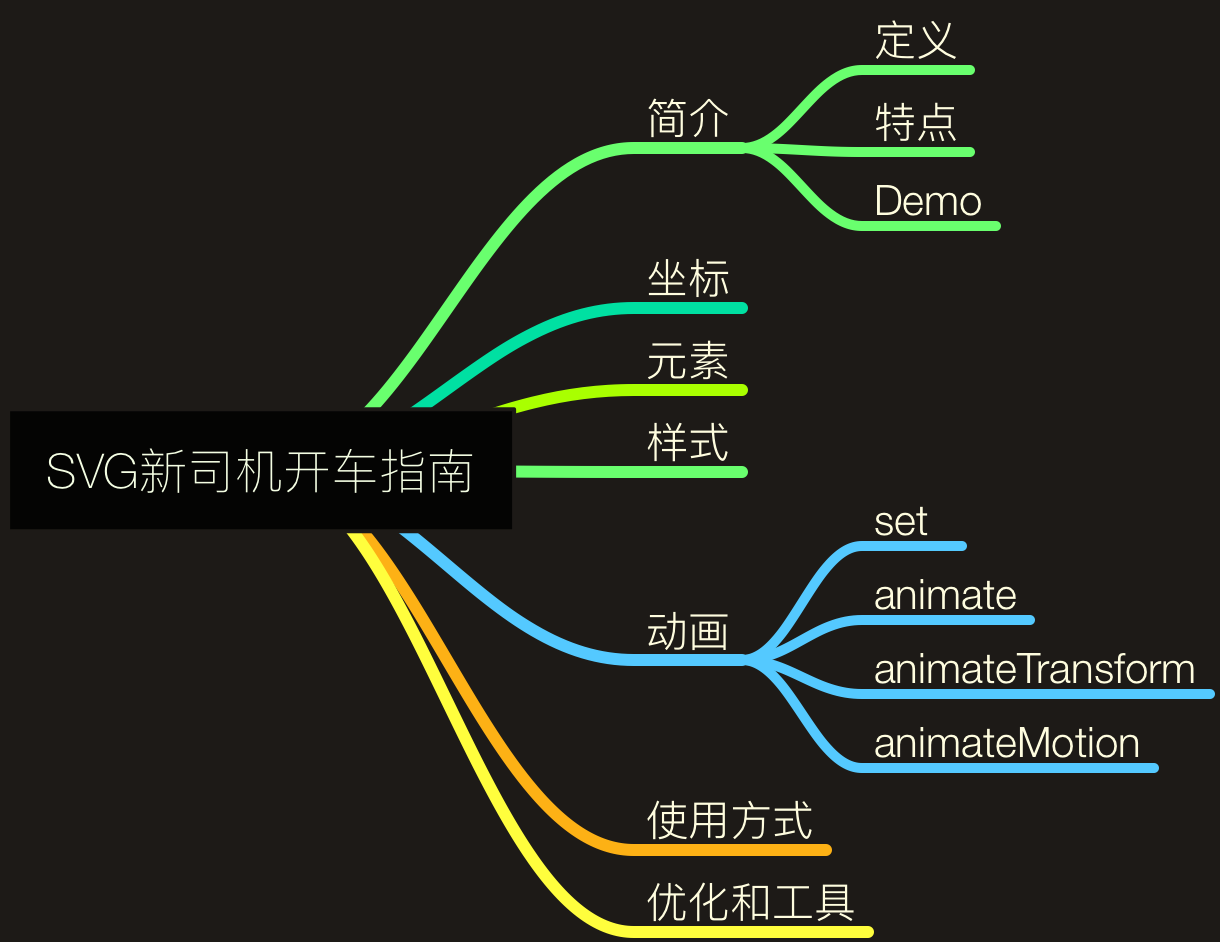
SVG related features are much stronger than imagined. This article first introduces the relevant definitions, characteristics and Demo of SVG. Next, it will introduce its relevant syntax and animation. Finally, tell everyone how to use and optimize SVG.
Ensure that everyone can drive on the road within an hour….. Too late to explain, get on the bus quickly…..
1. Introduction
Definition
SVG (Scalable Vector Graphics) is an abbreviation for Scalable Vector Graphics. It is a graphics format based on Extensible Markup Language XML to describe two-dimensional vector graphics. It is formulated by W3C and is an open standard.
Features
Now we can use PNG, JPG to display static pictures, use CSS3, JS or GIF to represent animations, and use Canvas to draw pictures if we are more powerful. So why use SVG?
- Compared with PNG and GIF, file size is smaller and compressibility is strong;
- Because it is described by XML, it can be easily read and modified, and has stronger descriptiveness;
- Under amplification or changing size, its graphic quality will not be lost. It has nothing to do with resolution and is scalable;
- SVG is future-oriented (W3C standard), and browser compatibility is good;
- Using CSS and JS can be very convenient to control, and path animation can be easily described;
- Compared with Canvas
- Canvas is based on pixels, provides 2D drawing functions, is an HTML element type, depends on HTML, and can only draw graphics through scripts. Canvas provides relatively primitive functions, suitable for pixel processing, dynamic rendering and large data volume drawing application scenarios;
- SVG is vector, provides a series of graphic elements (Rect, Path, Circle, Line …), and complete animation, event mechanism. It can be used independently or embedded in HTML. SVG became an international standard very early, with more complete functions, suitable for static picture display, high-fidelity document viewing and printing application scenarios;
Demo
What fun things can be made using SVG?

Last week, the team had a small hackthon, which was to draw this Loading GIF through code. Then learned while using SVG to write a same loading. Volume changed from previous GIF’s 33KB to 864B SVG. Details see below:
See the Pen Loading Animation by Tw93 (@tw93) on CodePen.
Some other interesting SVGs can be viewed at 30 Awesome SVG Animation For Your Inspiration.
2. Coordinate Positioning
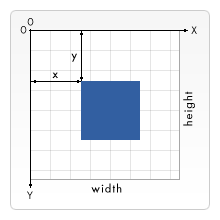
Before learning SVG syntax, we can understand SVG’s coordinate positioning. This coordinate system is opposite to the drawing coordinates we learned when we were young, but it is positioned in the following way in HTML. That is taking the top left corner of the page as (0,0) coordinate point, coordinates in pixels, x-axis positive direction is to the right, y-axis positive direction is down.
3. Elements
Basic Shapes
SVG provides many basic elements that can be used to draw basic shapes, such as rectangle, circle, ellipse, polygon, polyline, line, path, etc. At the same time, these basic shapes can be combined to draw complex images.

The display effect of the above basic shapes can be represented by these codes, detailed as follows:
See the Pen SVG Basic_Shapes by Tw93 (@tw93) on CodePen.
Other Important Elements
- svg: The root element of SVG, and can be nested within each other;
- g: Used to group elements in SVG. After grouping, it can be seen as a separate shape, transformed uniformly. At the same time, the style of the g element can be inherited by sub-elements, but it has no X, Y attributes, but can be moved by transform;
- def: Used to define reusable elements in SVG. def elements will not be directly displayed, can be referenced by use elements;
- use: Use it to reuse def elements, also including
, elements. Use <use xlink: href="#id"/> to call; - text: Can be used to achieve that kind of “Word Art” in word, a very magical function;
- image: Use it to nest corresponding pictures in SVG, and can do corresponding processing on and around the picture;
4. Style
Can be analogous to the process of cutting pages, we need to stroke, fill color, sometimes add gradient effect, transformation, clipping, etc. effects to the boxes we draw.
Outline stroke
stroke is used to set the color of the drawn object line, at the same time stroke has the following attributes:
- stroke-width: set outline width;
- stroke-linecap: set rendering method at the end of outline, value has butt (cut off directly), square (keep a little cut off), round (arc cut off) 3 setting values;
- stroke-linejoin: used to set connection method between two lines, value has miter (sharp corner connection), round (arc connection), bevel (cut off connection) 3 setting values;
- stroke-opacity: used to set stroke opacity;
- stroke-dasharray + stroke-dashoffset: stroke-dasharray used to render SVG shape stroke with dashed line, need to provide a number array to describe, define length of dash and space; stroke-dashoffset used to set start point in dashed line pattern;
Fill fill
fill is used to describe color inside SVG object, besides there are the following two attributes:
- fill-opacity: used to set fill color opacity;
- fill-rule: used to set fill method, value has nonzero, evenodd two values;
- nonzero: Draw a ray from a point in any direction. Every time the path in the shape crosses this ray, if the path crosses the ray from left to right, the counter adds 1. If the path crosses the ray from right to left, the counter subtracts 1. When the total number of counters is 0, the point is considered outside the path. If the counter is non-zero, the point is considered inside the path;
- evenodd: Draw a ray from a point in any direction. Every time the path crosses the ray, the counter adds 1. If the total number is even, the point is outside. If the total count is odd, the point is inside the shape;
Transform transform
This attribute is similar to transform in css3. There are translate, rotate, scale, skew (skewX and skew functions make x-axis and y-axis inclined), matrix (matrix transformation, please associate with college linear algebra 😂😂😂) these transformations. At the same time, they can be combined for transformation.
There are also gradient, mask, clipping and other attributes. For details, please refer to: linearGradient, mask, clipPath.
5. Animation
Animation elements in SVG are mainly divided into the following 4 categories, which can also be combined freely.
- set: Used to set delay, for example, set element position color change after 5s, but this element has no animation effect;
- animate: Basic animation attribute, used to implement single attribute animation transition effect;
- animateTransform: Implement transform animation effect, can be analogous to transform in CSS3;
- animateMotion: Implement path animation effect, let element move along corresponding path;
After having elements, corresponding attributes are also needed to represent animation characteristics, such as: element attribute name to be animated, start value, end value, change value, start time, end time, repeat times, animation speed curve function etc.

There are many places in animation that are fresh. Everyone can try more.
See the Pen SVG animation by Tw93 (@tw93) on CodePen.
6. Usage Method
We can use the following 4 common ways to load our SVG. Here SVG can be converted to base64 way.
Via Img Tag
<img src="tw93.svg" alt="Hello SVG" height="65" width="68">Via CSS background
.logo {
  background: url("data:image/svg+xml;base64,[data]");
}
Via object
<object type="image/svg+xml" data="data:image/svg+xml;base64,[data]">
  fallback
</object>
Directly embedded in Html
<svg xmlns="http://www.w3.org/2000/svg" viewBox="0 0 68 65">
  <path fill="#1A374D" d="M42 27v-20c0-3.7-3.3-7-7-7s-7 3.3-7 7v21l12 15-7 15.7c14.5 13.9 35 2.8 35-13.7 0-13.3-13.4-21.8-26-18zm6 25c-3.9 0-7-3.1-7-7s3.1-7 7-7 7 3.1 7 7-3.1 7-7 7z"/>
  <path d="M14 27v-20c0-3.7-3.3-7-7-7s-7 3.3-7 7v41c0 8.2 9.2 17 20 17s20-9.2 20-20c0-13.3-13.4-21.8-26-18zm6 25c-3.9 0-7-3.1-7-7s3.1-7 7-7 7 3.1 7 7-3.1 7-7 7z"/>
 </svg>
The first three methods are commonly used when SVG pictures are finalized and rarely changed. Through independent SVG files, better management can be carried out, and HTML elements can be reduced at the same time; embedded way is commonly used when SVG needs to be modified frequently or has not been determined, more flexible modification and maintenance.
7. Optimization and Tools
SVGO
SVG Optimizer is a Nodejs-based tool for optimizing SVG vector graphics files.
SVGO is a relatively powerful tool for compressing and optimizing SVG. It can remove useless information in the SVG we write, and compress the code at the same time. Project address: https://github.com/svg/svgo.

SVGOMG
SVGOMG is SVGO’s visual interface tool. Very convenient to operate, and also provides some other useful functions. Display address: SVGOMG - SVGO’s Missing GUI

Snap.svg
The JavaScript SVG library for the modern web.
Snap.svg is a JavaScript library that makes manipulating SVG as intuitive as using jQuery with the DOM. It makes crafting complex interactive SVG animations straightforward, backed by exceptionally thorough documentation. Highly recommended for anyone wanting to dive deeper. Check out the project at Snap.svg. The demo below is built with Snap.svg:
See the Pen Interactive Illustration via Snap by Tw93 (@tw93) on CodePen.
Convert image to the SVG format
We can convert ordinary pictures to SVG format through this conversion platform. But the conversion result here may not be what we want, but it can be regarded as a semi-finished product. On this basis, adjust and optimize, finally achieve SVG conversion. Platform address: http://image.online-convert.com/convert-to-svg
End. Welcome everyone to give advice and discuss.