iOS Comb for Front-end (Part 1)
Categories: Study

Photographed at Hangzhou West Lake Apple Store on 20161020
Preface
Last Double Eleven started contacting iOS related learning to troubleshoot some Weex performance problems. Coincidentally started slowly participating in iOS business development in January this year. Take this opportunity to organize some basic knowledge in iOS development, for memo. Meanwhile aim to let front-end students understand iOS code when encountering in the future through series articles, facilitating better understanding of some principles on terminal.
Outline
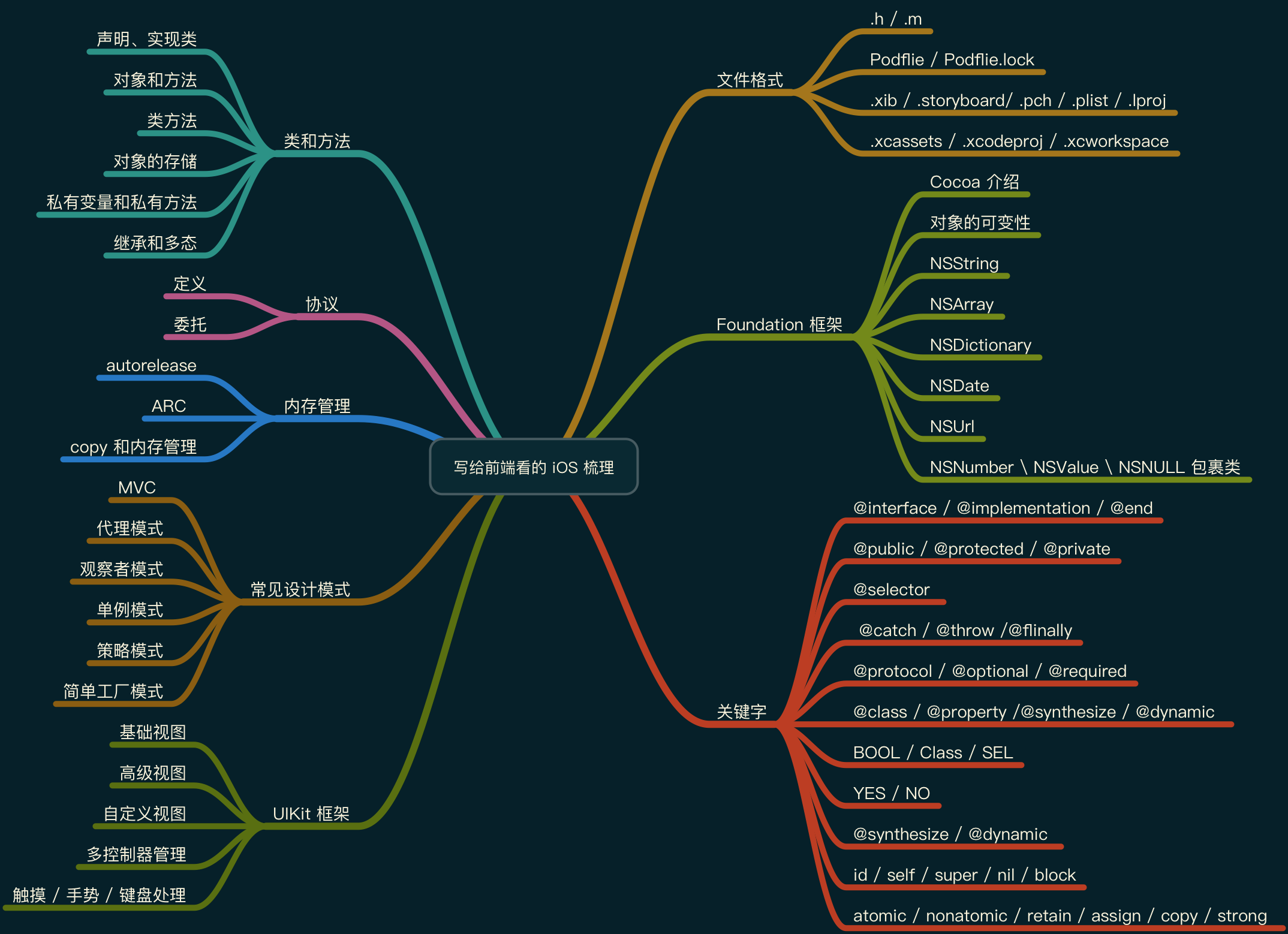
《Part 1》mainly tells about file formats encountered in iOS development process and commonly used classes in Foundation framework. 《Part 2》and 《Part 3》are being organized
File Format
- .h: Header file also called interface file, providing externally accessible interface, containing declaration of class, method and property, equivalent to User Manual of class
- .m: Implementation file, used to implement methods declared in
.h, equivalent to Engineering Details of class - Podflie: Package management file, used to define third-party libraries needed by project, analogous to
package.json - Podflie.lock: Dependency library lock file, records every installed version of pod needed to be installed, facilitating team collaboration package unification, analogous to
package-lock.json - .xib: Visualization file, a lightweight file used to describe Local Interface
- .storyboard: Interface layout file, carrying view controls corresponding to UIView
- .pch: Precompiled header file, compile code that “won’t be modified often” in a project in advance and put into pch, used to store Public Macros, store Public Header Files, also can Manage Log Output
- .plist: Property list file, a file used to store serialized objects, usually used to Store User Settings or some bundled information, also one of data persistence solutions
- .lproj: Multi-language localization folder, i.e. define a set of resources separately for each language, containing images, text, Storyboard, Xib files
- .xcassets: Image resource file, used to store image resources
- .xcodeproj: Xcode project file, storing various configuration parameters of Xcode project
- .xcworkspace: Xcode project file, new file generated after using pod install, can see project files and pods dependency packages at the same time after opening
Foundation Framework
Brief Introduction
First introduce Cocoa. Cocoa is a set of framework and runtime support in OS X and iOS (Cocoa Touch), i.e. API application program interface, can be analogous to MFC in VC.
Cocoa among which most important are UIKit (AppKit for OSX) and Foundation. Positions of two frameworks in system as shown below, meanwhile can see positions of common frameworks.
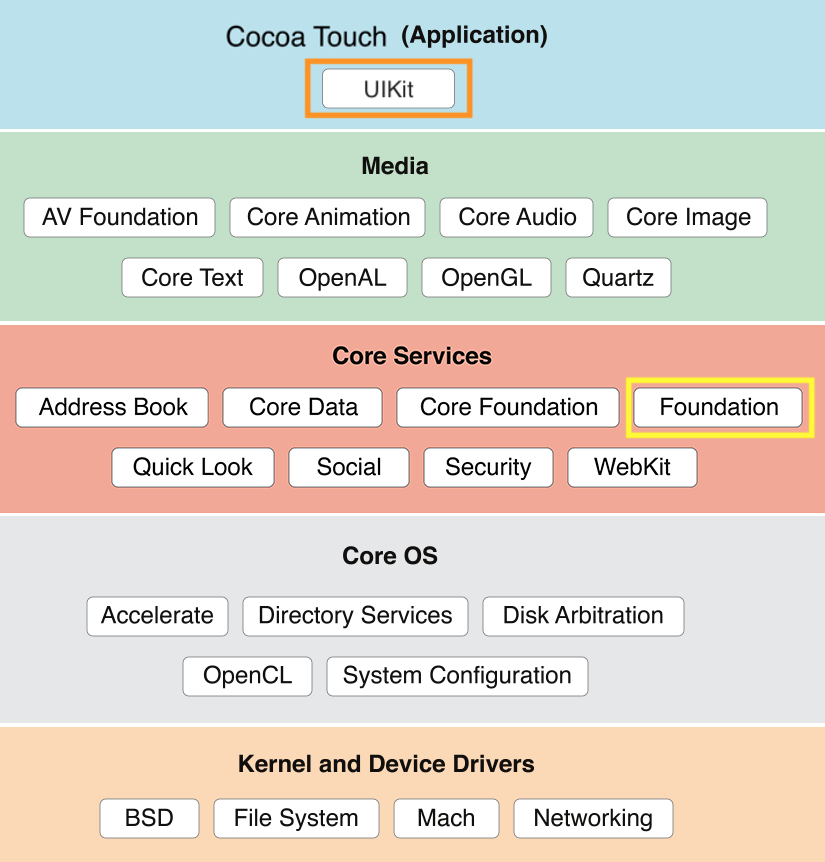
Among them UIKit is mainly used for iOS interface construction, detailed later.
Foundation framework provides basic layer functions for our framework and App development, used to access basic data types, collections and operating system services, including follows:
- Data Storage and Persistence: NSArray, NSDictionary and NSSet provide storage for OC objects of any class
- Text and String Processing: NSCharacterSet used for various string operations in NSString and NSScanner classes
- File Processing: NSFileManager class provides large amount of methods for file operation checking
- Date and Time: NSDate, NSTimeZone and NSCalendar classes
- URL Operation: Provide a set of classes and protocols to handle URL access
- Exception Handling: NSException class
Foundation can be imagined as a native public Util library in JS, But no…
Before Start
What does @ do in OC?
- Usually a
@is added before string, used to convert a C language string to string object NSString in OC @symbol. Most keywords in OC start with@, such as@interface,@implementation,@end@classetc.
What is NS prefix before many classes?
- Namespace is not supported in OC, so can only avoid naming conflict by adding prefix this earthy method. So often use 3 uppercase letters (2 occupied by Apple), can distinguish by e.g. developer name, company name or method name etc.
- NS stands for NeXTSTEP, operating system developed for NeXT company. NeXT is company name created by Jobs when leaving Apple in 1985. Later after being acquired back, many achievements were absorbed into OSX foundation
- Similar ones are, CF == Core Foundation; CG == CoreGraphics.frameworks; CA == CoreAnimation.frameworks; UI == UIKit etc. representation
Object Mutability
Classes in OC can be divided into mutable class and immutable class. Here immutable refers to storage space occupied by string in memory is fixed, and stored content cannot change, conversely mutable means occupied space can be unfixed, content can be modified; this is very different from flexible JS, but I prefer to distinguish data types into mutable and immutable, also convenient for subsequent maintenance and extension.
For classes determined not to change, it only possesses due attribute methods. Mutable classes inherit original immutable classes, then add mutable method attributes to realize mutability.
Mutable class is subclass of immutable class, meanwhile instance objects of all mutable classes can be used as instance objects of immutable classes.
NSString
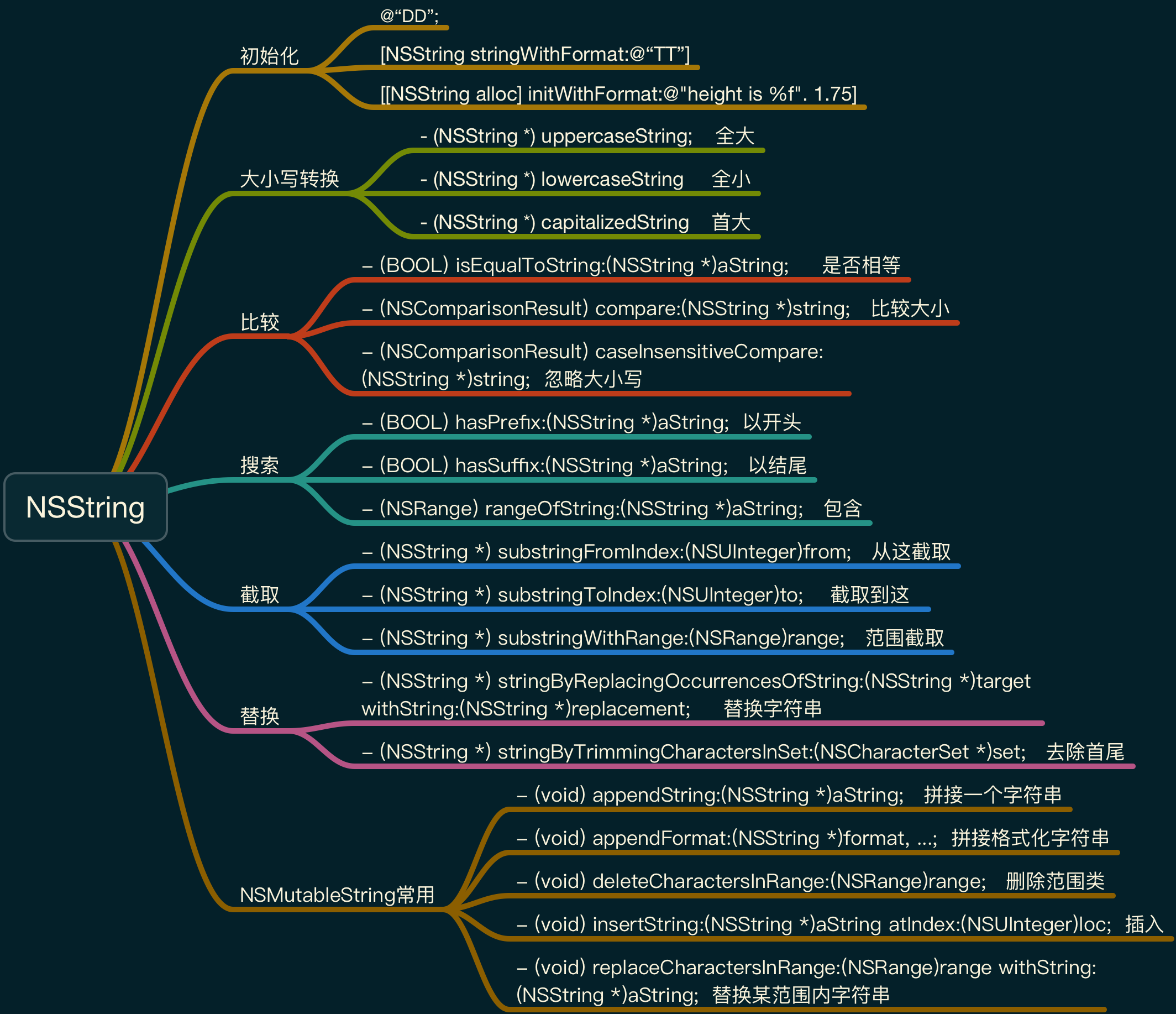
Use NSString to represent string in OC. Mutable NSMutableString inherits immutable NSString class, like a string linked list, can perform Add Delete Modify operations on it.
NSArray
Use NSArray to represent array class in OC. Here need to note it is not like JS array can store any type. Only OC objects can be stored in NSArray, meanwhile also immutable. If need to change array, need to use its subclass NSMutableArray.
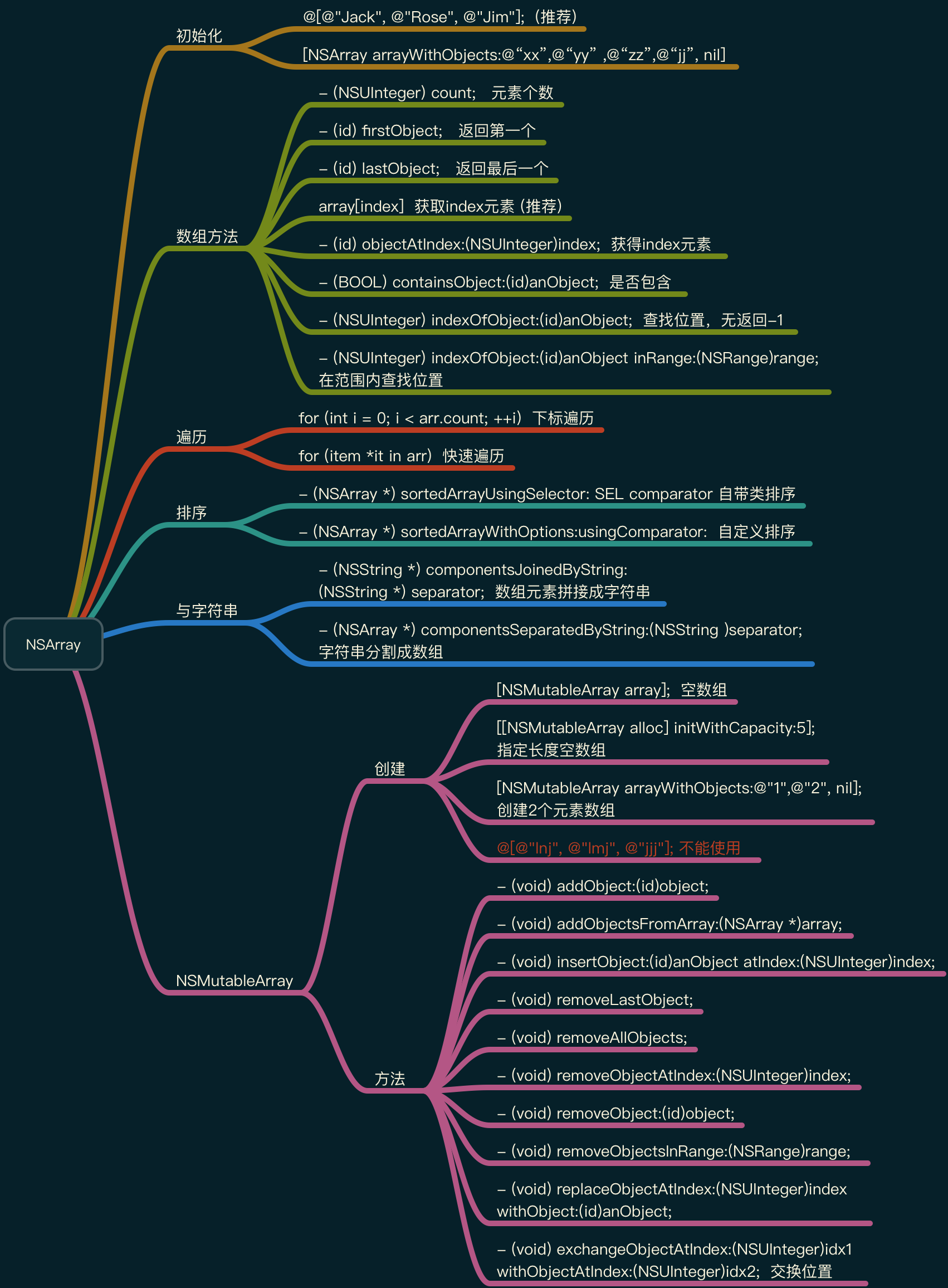
Array created by arrayWithObjects way remember to add nil at the last item, so for convenience more recommend directly use @[@"lnj", @"lmj", @"jjj"] way to create, but because generated is immutable array, so do not create like this in NSMutableArray.
Many array operation methods are roughly same compared with JS, but NSMutableArray provides some richer methods than JS, including swap two element positions this kind of method needing to write by self. That is often when writing can check document first to see if there is this method, often can find from inside.
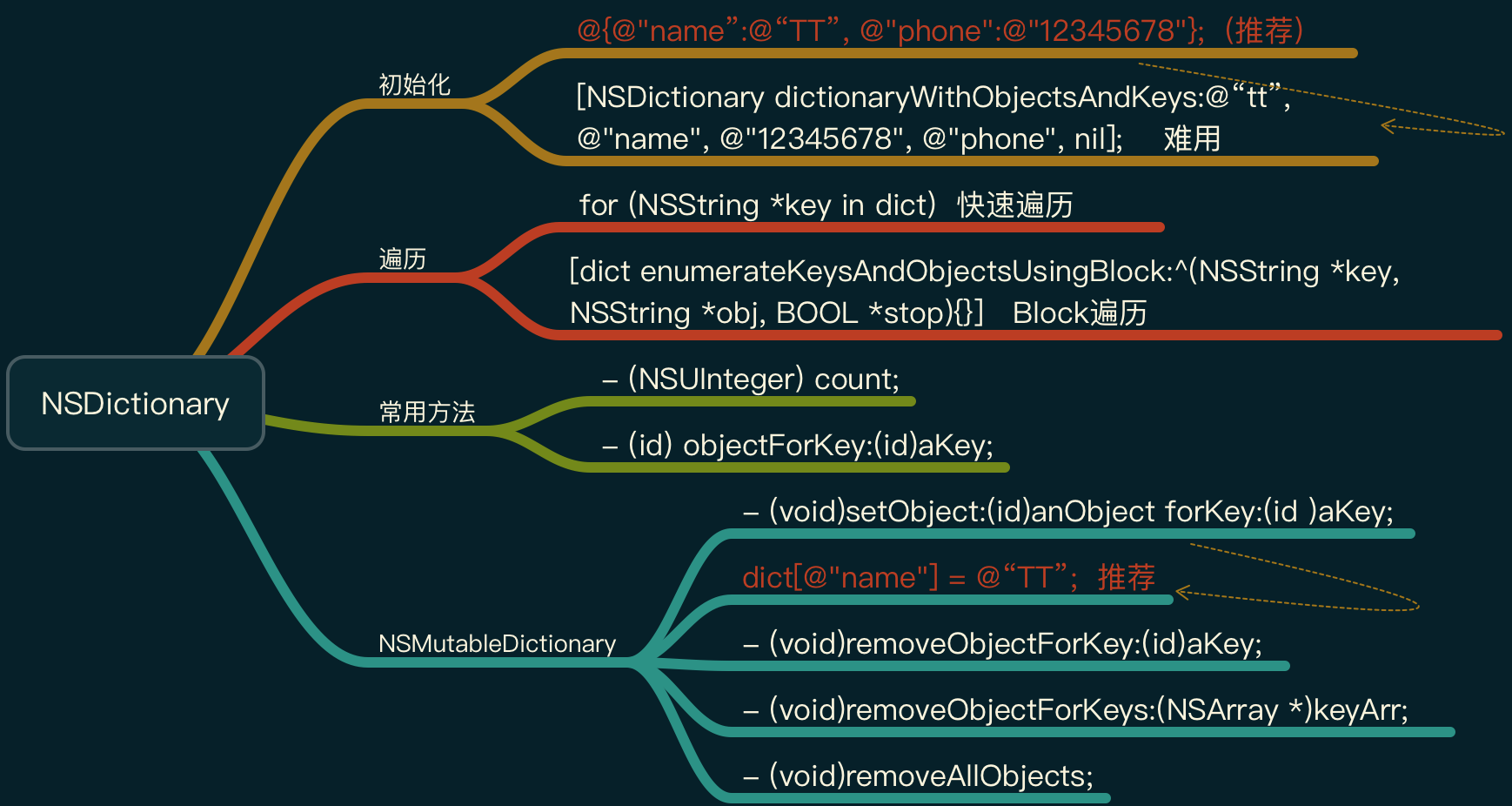
NSDictionary
Front-end students hearing Dictionary this word for the first time might be somewhat strange. Can analogize Object in JS, Map in Java. Data in dictionary is also saved by key-value pairs.
NSDictionary belongs to immutable dictionary class. Generally can only be used for query after creation, cannot perform modification operation on it. Want to modify need to use NSMutableDictionary class.
NSDate
NSDate can be used to represent time, used to perform some common date time processing. Its usage is also very similar to JS Date. [NSDate date] returns current time. But Foundation processing on formatting date time is much more elegant than js, directly call its built-in method is ok.
Cooperating with NSDateFormatter class can format date. stringFromDate used for NSDate to NSString, dateFromString used for NSString to NSData:
//NSDate to NSString
NSDate *now = [NSDate date];
NSDateFormatter*formatter = [[NSDateFormatter alloc] init];
formatter.dateFormat = @"yyyy-MM-dd HH:mm:ss";
NSString *str = [formatter stringFromDate:now];
NSLog(@"%@", str);

// NSString to NSDate
NSString *str = @"2018-02-08 11:53:12";
NSDateFormatter*formatter = [[NSDateFormatter alloc] init];
formatter.dateFormat = @"yyyy-MM-dd HH:mm:ss";
NSDate *date = [formatter dateFromString:str];
NSLog(@"%@", date);
If want to process more complex content on time date, also can leverage NSCalendar class enrich our processing:
NSDate *date = [NSDate date];
NSCalendar*calendar = [NSCalendar currentCalendar];
// Utilize calendar object to get year month day hour minute second
NSCalendarUnit type = NSCalendarUnitYear
                    | NSCalendarUnitMonth
                    | NSCalendarUnitDay
                    | NSCalendarUnitHour
                    | NSCalendarUnitMinute
                    | NSCalendarUnitSecond;
// cmps includes year, month, day, hour, minute, second attributes
NSDateComponents *cmps = [calendar components:type fromDate:date];
Compare date, can directly use following method:
- (NSDateComponents *)components:(NSCalendarUnit)unitFlags
fromDate:(NSDate*)startingDate
      toDate:(NSDate *)resultDate
      options:(NSCalendarOptions)opts;
From above, many methods in OC are very very long, and also express meaning represented by each parameter, won’t appear error correspondence situation.
NSURL
Writing front-end for long will slowly feel URL is an online link H5 address. Actually not. URL (Uniform Resource Locator) Chinese meaning is uniform resource locator. Besides http protocol, there are https/ftp/file protocols used to access a resource.
In OC, when operating URL should use dedicated NSURL class, and not recommend treating URL as string to manual parse.
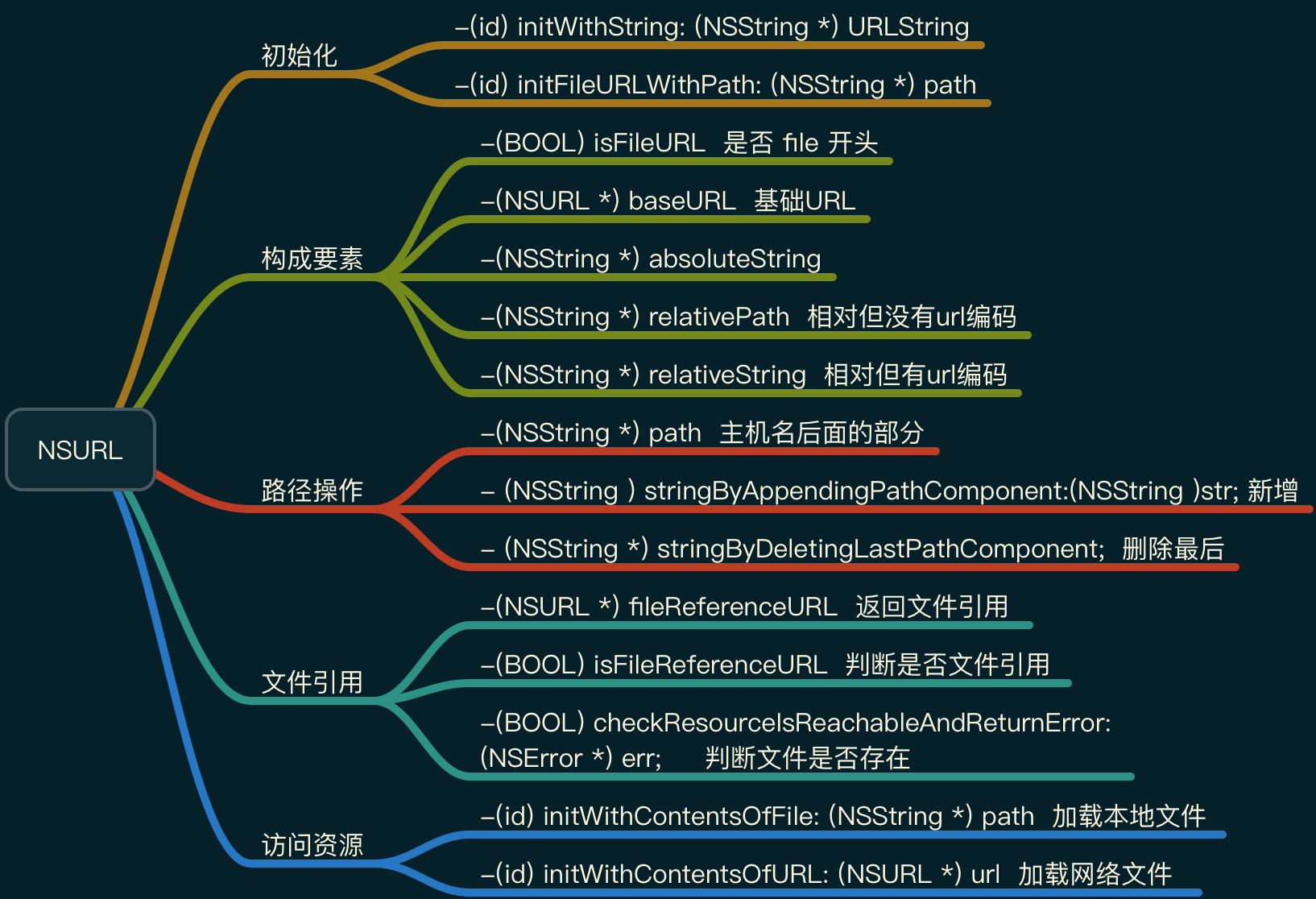
With subsequent upgrade, many file input output places in OS also started to use NSURL. That is slowly treating network as part of OS.
NSNumber \ NSValue \ NSNULL Wrapper Class
Collection classes (NSArray\NSDictionary\NSset) in Cocoa Fundation framework can only put in objects. Front-end students might be very unaccustomed at beginning. If want to put in int\float\double\bool etc. basic types, need to wrap them into OC objects then put in. Here need to use NSNumber wrapper class, then can indirectly put basic types in.
// Directly add @ in front can create a NSNumber object type
@10;
@10.5;
@YES;
@(num);

// NSNumber class extract basic type

- (char)charValue;
- (int)intValue;
- (double)doubleValue;
- (BOOL)boolValue;
But for complex data types like structure, pointer, NSNumber also cannot wrap. Here need to use NSValue class. It is parent class of NSNumber, can wrap any type into object.
// Structure wrapper, e.g. NSPoint, NSSize, NSRect

- (NSValue *)valueWithPoint:(NSPoint)point;
//Extract previously wrapped structure from NSValue object
- (NSPoint)pointValue;
Cannot put nil into array dictionary above by yourself, because inside has meaning of end. But sometimes we indeed need a special object to represent null value. Here need NSNULL. Can define via class method +(NSNull *)null. Meanwhile can judge whether it is NSNull via if(obj==[NSNull null]).
In actual development rarely use NSNull, and generally habit won’t judge this separately (default everyone doesn’t use), so using it will also be very dangerous (mostly use nil, nil can receive any message, but NSNull can’t, difference between two features may cause crash).
Summary
Through above article, at most can only let everyone have some understanding of OC programming, can’t talk about depth. More hope front-end deep understanding and optimization for H5/Weex don’t limit to the thinnest layer on top. Can completely connect to underlying loading, rendering, image library, network library etc. to optimize.
From language level, OC and JS are quite interesting. Variable/method naming styles are exactly opposite. Apple encourages developers program naming try to use full English name and as detailed as possible. Through seeing method and variable know what it does. Reading well written iOS is like reading prose. For example -(NSArray *) componentsSeparatedByString:(NSString )separator; split string. In JS directly solved through str.split(). More front-end developers accustomed to short naming, because need download from network. Although compression tool will do, but everyone also accustomed to short naming to represent. Due to compiled language reason, many errors in writing OC process can be found in compilation process. Meanwhile running speed is fast. Also Apple did many things for developers, including engineering system. So actually writing iOS has less room to play than front-end; conversely JS is interpreted, performance relies more on engine. Plus language dynamic, writing is also cool. Many strange tricks can be used. Plus development of Node, letting it do many interesting things.
Each has advantages. Like Web’s speed and openness, also love iOS’s elegant experience and unification.