JS in iOS
Categories: Study
Recently I’ve been studying how JavaScript interacts with iOS across four key dimensions: why frontend tech alone isn’t enough on mobile, JavaScriptCore communication mechanisms, Objective-C Runtime internals, and how to dynamically adjust native iOS logic via JS. My goal is to help both frontend and native engineers understand cross-platform foundations, and see what powerful capabilities unlock when combining both worlds.
Why Frontend Tech Alone Isn’t Enough on Mobile
Since graduating and building software across mobile web, React Native, Weex, and native iOS, one conclusion became increasingly clear:
Relying solely on frontend web technologies cannot deliver the performance and experience that modern mobile users expect.
Why does a pure web approach fall short on mobile?
Web developers know this pain intimately: try implementing native-feeling image uploads or camera interactions purely in mobile Safari, and performance immediately suffers. But if a native developer tells you, “I wired up a bridge — just call Bridge.uploadImg() to invoke native photo selection,” you breathe a sigh of relief and get back to building.
Similarly, switching an in-app webview from UIWebView to WKWebView does more for smoothness and scrolling performance than weeks spent fine-tuning CSS touch scrolling.
How do modern frontend engineers tackle mobile requirements?
They leverage native mobile capabilities: using frameworks like Weex or React Native to render native UI components, wrapping web applications into Mini Programs, or using hybrid container optimizations (offline caching, preheating, and native bridges) to extend web apps with native power.
Here, the bridge is the connective tissue that unifies the web and native stacks:

Next, give the above solution through JSCore principle and communication mechanism section.
JSCore Principle and Communication Mechanism
What is JSCore?
Everyone knows that browser kernel modules are mainly composed of rendering engine and JS engine. JSCore is a kind of JS engine.
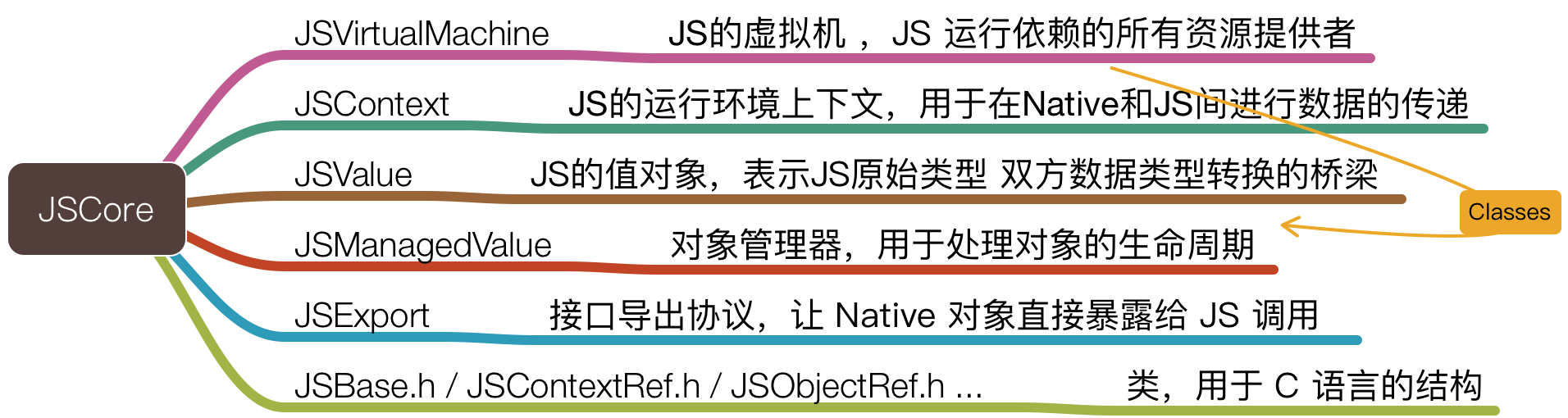
Apple encapsulated WebKit’s JS engine with OC, providing a set of JS running environment and bridge for conversion between Native and JS data types, commonly used for mutual calling between OC and JS code. This also means it can execute JS independently from rendering.
JSCore mainly includes the following classes, protocols, class structures:
How does JSCore run?
Can understand how each module runs through the following JSCore framework structure diagram and the above description.
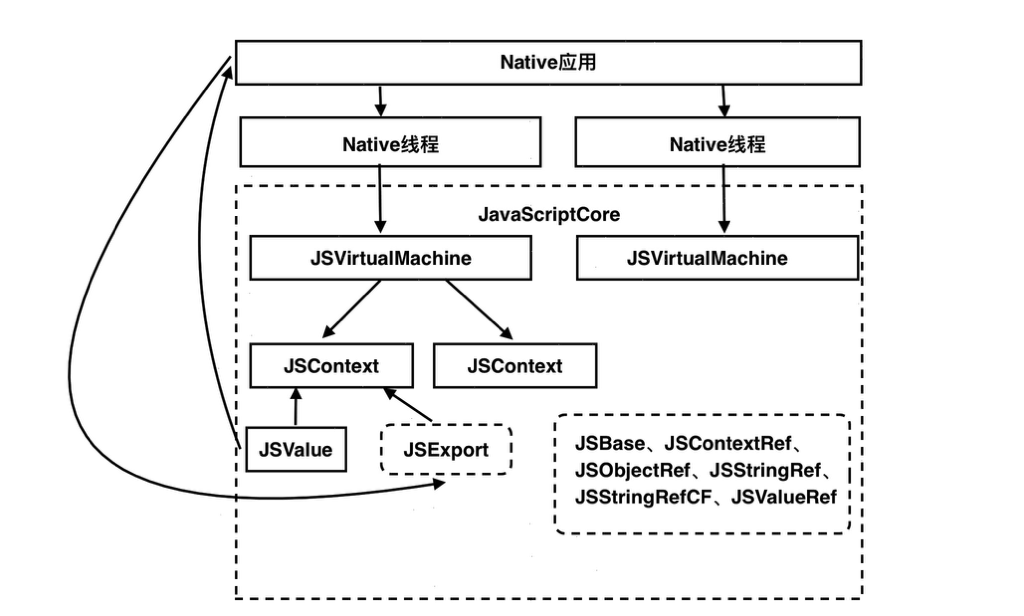
From the above figure we can see such a process:
In Native applications, we can open multiple threads to asynchronously execute our different requirements, which means we can create multiple JSVirtualMachine virtual machines (runtime resource providers), independent of each other without affecting, so we can execute different JS tasks in parallel.
In a JSVirtualMachine, multiple JSContexts (JS execution environment context) can also be associated, and data transfer communication with Native is carried out through JSValue (value object). At the same time, through JSExport (protocol), methods and properties of classes in Native that comply with this parsing can be converted to JS interfaces for calling.
JS and OC Data Type Interchange
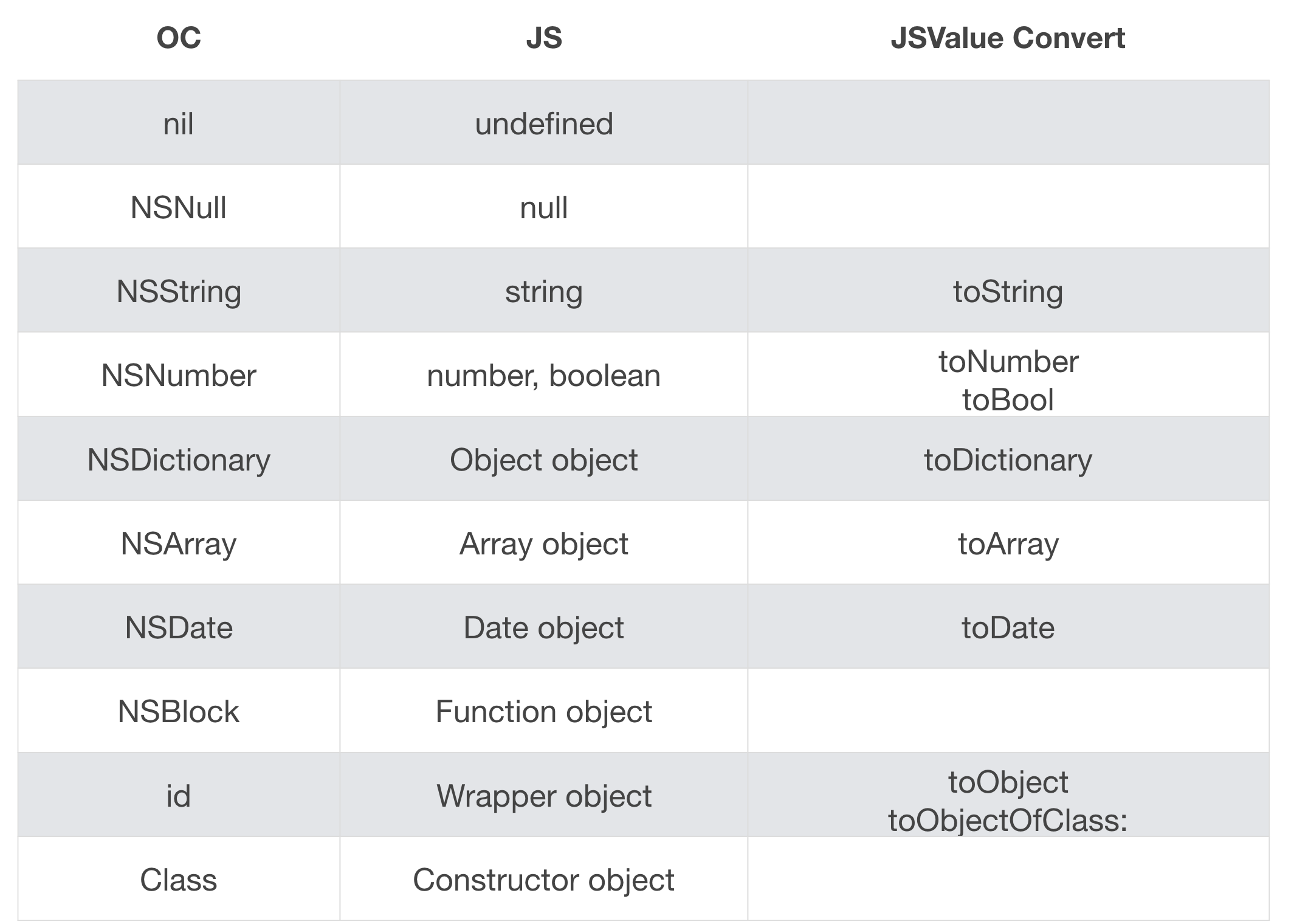
From the previous section, we know JSValue can be used for barrier-free data conversion between JS and OC. Main principle is JSValue provides the following methods to facilitate conversion of various types for both sides.
Execute JS code in iOS
We can execute a piece of JS script in JSCore through evaluateScript. Utilizing this feature we can do some multi-end logic unification things.
  // Execute a piece of JavaScript script
  -(JSValue *)evaluateScript:(NSString*)script;
For example, in business, 3 ends (iOS, Android, H5) have a fairly complex but same principle price calculation logic. General practice is 3 ends write a set with their own languages. Doing so is not only troublesome, low efficiency but also logic is not necessarily unified. Meanwhile using OC to implement complex calculation logic is not as flexible and efficient as JS.
Here we can use Execute JS code feature, extract this logic into a JS method, just pass in specific input parameters, directly return price. In this way, 3 ends can use this logic at the same time, and can also put it to remote end for dynamic update and maintenance.
Roughly implemented like this:
  // Execute JS in iOS
  JSContext *jsContext = [[JSContext alloc] init];
  [jsContext evaluateScript:@"var num = 500"];
  [jsContext evaluateScript:@"var computePrice = function(value){ return value * 2 }"];
JSValue*value = [jsContext evaluateScript:@"computePrice(num)"];
  int  intVal = [value  toInt32];
  NSLog(@"Calculation result is %d", intVal);
Operation result is:
2018-03-16 20:20:28.006282+0800 JSCoreDemo[4858:196086] ========Execute JS code in iOS========
2018-03-16 20:20:28.006517+0800 JSCoreDemo[4858:196086] Calculation result is 1000
I think it can also be used in regular validation, animation functions, 3D rendering modeling and other data calculation aspects.
Call JS method in iOS
After talking about executing JS code in iOS, next introduce how to call JS methods in H5 in iOS.
For example, we have a global method called nativeCallJS in H5. We can get this method through execution environment context jsContext[@"nativeCallJS"] and call it, similar to this:
 // Html has a JS global method
  <script type="text/javascript">
    var nativeCallJS = function (parameter) {
      alert(parameter);
    };
  </script>
// Run JS method in iOS
JSContext *jsContext = [webView valueForKeyPath:@"documentView.webView.mainFrame.javaScriptContext"];
JSValue *jsMethod = jsContext[@"nativeCallJS"];
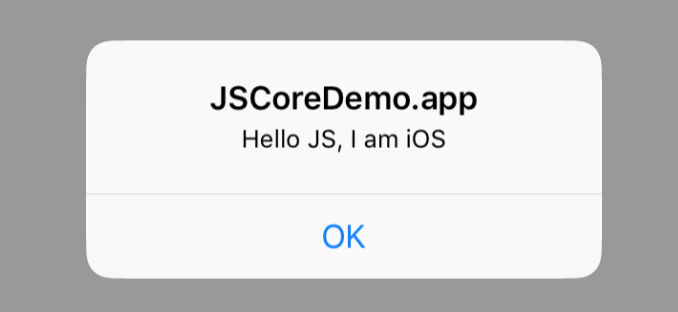
[jsMethod callWithArguments:@[ @"Hello JS, I am iOS" ]];Finally our running result can see Native executed H5 Alter layer:
Utilizing this feature we can let iOS get some H5 information to process something he wants to process, for example, first expose information in global, obtain version number used, running environment information, terminal active processing logic (clear cache, control running) and other things by calling method.
Call iOS method in JS
For frontend engineers, this is by far the most common use case: invoking native device capabilities via JS to fill the gaps in mobile web views.
Here need to combine with webview related feature @"documentView.webView.mainFrame.javaScriptContext", pass the method called by H5 to JSCore context with Block named jsCallNative(method name).
For example, a button click callback in our H5 is to call a client method, and output input parameters in the method, roughly implemented like this:
 // Html button click calls an OC method
  <button type="button"
      onclick="jsCallNative('Hello iOS', 'I am JS');">Call OC Code</button>
//Block passed to JavaScript context named "jsCallNative"
JSContext *jsContext = [webView valueForKeyPath:
@"documentView.webView.mainFrame.javaScriptContext"];
jsContext[@"jsCallNative"] = ^() {
NSArray*args = [JSContext currentArguments];
for (JSValue *obj in args) {
NSLog(@"%@", obj);
}
};Final output is like this:
2018-03-16 20:51:25.590749+0800 JSCoreDemo[4970:219245] ========Call iOS method in JS========
2018-03-16 20:51:25.591155+0800 JSCoreDemo[4970:219245] Hello iOS
2018-03-16 20:51:25.591370+0800 JSCoreDemo[4970:219245] I am JS
This feature truly allows H5 to enjoy many terminal features, such as Native way jump, Native underlying capabilities (vibration, recording, photographing), scanning code, getting device information, sharing, setting navigation bar, calling Native encapsulated components etc. Here you can relate to Hybrid development mode.
Exposing Native Methods and Properties via JSExport
This capability may not be widely known among web developers, but for native iOS developers, it’s remarkably powerful.
JSExport lets you expose native Objective-C object properties and methods directly into the JS execution context, making them behave just like native JS objects.
For example, we have a Person class in OC, containing two properties and a method. Here expose fullName method using JSExport protocol, so it can be directly called in JS.
  @protocol PersonProtocol <JSExport>
  -(NSString *)fullName;
  @end

  @interface Person : NSObject <PersonProtocol>
  @property (nonatomic, copy) NSString *firstName;
@property (nonatomic, copy) NSString*lastName;
  @end

  @implementation Person
  @synthesize firstName, lastName;
  (NSString *)fullName {
    return [NSString stringWithFormat:@"%@ %@",   self.firstName, self.lastName];
  }
  @end
// Expose iOS method properties to JS via JSExport
Person *person = [[Person alloc] init];
jsContext[@"p"] = person;
person.firstName = @"Fei";
person.lastName = @"Zhu";
NSLog(@"========Expose iOS method properties to JS via JSExport========");
[jsContext evaluateScript:@"log(p.fullName());"];
[jsContext evaluateScript:@"log(p.firstName);"];Final running result is:
  2018-03-16 20:51:17.437688+0800 JSCoreDemo[4970:219193] ========Expose iOS method properties to JS via JSExport========
  2018-03-16 20:51:17.438100+0800 JSCoreDemo[4970:219193] Fei Zhu
  2018-03-16 20:51:17.438388+0800 JSCoreDemo[4970:219193] undefined
Why is p.firstName undefined after running? Because it is not exposed to Native environment here, so it cannot be obtained.
Here we can utilize more on programming convenience, allowing OC and JS to call each other directly.
Handle JS exception in iOS
Slightly mature companies will have exception monitoring systems for front-end pages. Finding JS execution exceptions can directly notify development to prevent online accidents.
Through exceptionHandler in JSCore can solve this problem very well. When JS runs abnormally, it will callback Block set in exceptionHandler of JSContext. In this way, we can upload our errors to monitoring platform in Block callback.
For example this example, I run a function returning a+1. Usually we can see error Can't find variable: a in Chrome console. Running here will be same:
   // When JavaScript runtime exception occurs
   // Will callback Block set in exceptionHandler of JSContext
   JSContext *jsContext = [[JSContext alloc] init];

   jsContext.exceptionHandler = ^(JSContext *context, JSValue*exception) {
        NSLog(@"JS Error: %@", exception);
    };

  [jsContext evaluateScript:@"(function errTest(){ return a+1; })();"];
Finally output error is:
2018-03-17 11:28:07.248778+0800 JSCoreDemo[15007:632219] ========Handle JS exception in iOS========
2018-03-17 11:28:07.252255+0800 JSCoreDemo[15007:632219] JS Error: ReferenceError: Can't find variable: a
Bidirectional Communication Between JS and Native
Recently I submitted a PR to Weex: [More enhancements for the
Here is the implementation in action:
 | 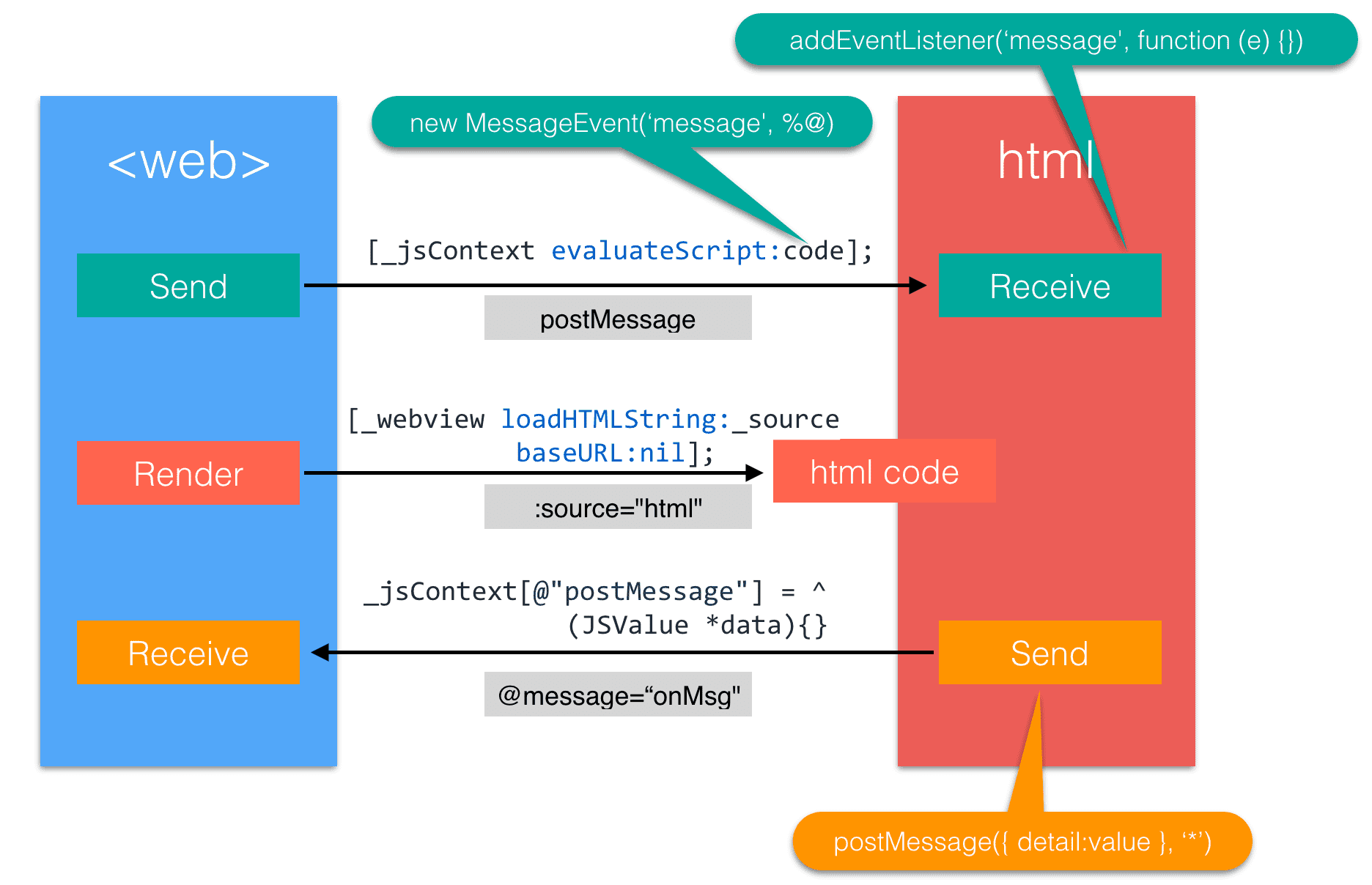 |
Specific ideas visible in [WEEX-233][iOS].
JSPatch
Let us think deeper about whether the above idea can be extended again. Can we directly interfere with iOS code running via JS? The answer is yes. Below I want to organize my understanding of JSPatch.
Suppose iOS wants to fix bug without releasing version
Suppose online APP has a piece of code with bug causing crash. Maybe Native crash will be much more serious than H5 problem. The former can release immediately, the latter may need to be modified and submitted to Apple Store for several days to go online, and then update rate may not go up, very troublesome.
Here can use JSPatch similar solution, issue a piece of code to overwrite original problematic method, so this bug can be fixed quickly.
Can see the above process through a simple example.
Wrote a blue Hello World with OC. We can issue a piece of JS code to change original blue font to red and modify text. After deleting JS code issuing code, can restore original blue Hello World.
| Before JS Issue | After JS Issue | After JS Deletion |
 |  | |
Main code roughly as follows:
  // A code showing blue Hello World
  @implementation ViewController
    - (void)viewDidLoad {
        [super viewDidLoad];
        [self simpleTest];
    }
    - (void)simpleTest {
        self.label.text = @"Hello World";
        self.label.textColor = [UIColor blueColor];
    }
  @end
// A piece of JS overwrite code complying with JSPatch rules
require('UIColor');
defineClass('ViewController', { simpleTest : function() {
self.label().setText("Your blue Hello World was changed to red by me");
var red = UIColor.redColor();
self.label().setTextColor(red);
},
})How is this done here? First need to introduce JSPatch:
JSPatch is an iOS dynamic update framework. By introducing JSCore, can use JS to call any native interface, can dynamically update modules for projects, replace native code to dynamically fix Bug.
That is JS passes string to OC, OC calls and replaces OC method via Runtime interface.
Why can call any native interface via JS? First can understand OC underlying Runtime principle.
Runtime
About 95% of OC language is C related writing method. Why didn’t Apple directly use C to write iOS at that time? One big reason is OC dynamic nature. Have a very powerful Runtime (A set of C language API, bottom layer implemented based on it). Core is Message Dispatch. Runtime will make different reactions according to whether message receiver can respond to the message.
Maybe above is obscure. Simply put OC method implementation and calling pointer relationship are decided at runtime, not compile time. In this way, we can do something at runtime to change original implementation, achieving purpose of hot fix.
OC method calling is not like JS language, directly array.push(foo) function call is ok. It is called through message mechanism. For example following insert foo into 5th place in array:
[array insertObject:foo atIndex:5];At bottom layer it is more obscure than this implementation. It sends message with selector through objc_msgSend method:
objc_msgSend(array, @selector(insertObject:atIndex:), foo, 5);Send message to object at runtime, how is message mapped to method?
Simply put, an object’s class saves method list, is a dictionary, key is selectors, IMPs are value. An IMP points to implementation of method in memory. Relationship between selector and IMP is decided at runtime, not compile time.
- (id)doSomethingWithInt:(int)aInt{}
  id doSomethingWithInt(id self, SEL _cmd, int aInt){}
By looking at Runtime Source Code, found following commonly used methods
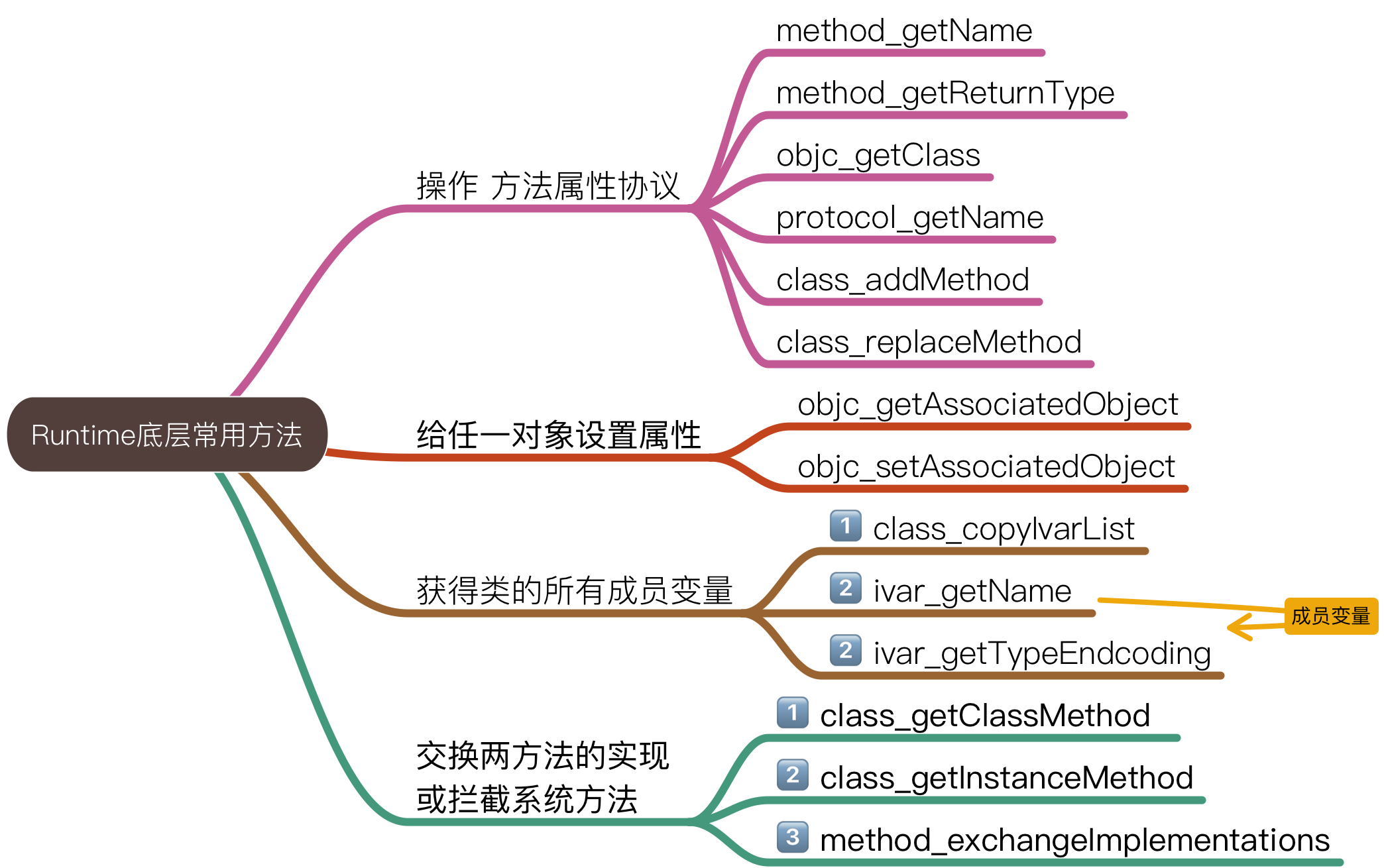
Through above methods can do many unexpected things, such as dynamic variable control, dynamically adding methods to an object, can forward message to desired object, even can dynamically exchange implementation of two methods.
JSPatch && Runtime
Precisely because of OC language dynamic nature, all method calls/class generation above are carried out at runtime via OC Runtime. Can get class and method via string of class name and method name, and instantiate and call:
  Class class = NSClassFromString("UIViewController");
  id viewController = [[class alloc] init];
  SEL selector = NSSelectorFromString("viewDidLoad");
  [viewController performSelector:selector];
Can also replace a class method with new implementation:
  static void newViewDidLoad(id slf, SEL sel) {}
  class_replaceMethod(class, selector, newViewDidLoad, @"");
Can also register a new class, add method for class:
  Class cls = objc_allocateClassPair(superCls, "JPObject", 0);
  objc_registerClassPair(cls);
  class_addMethod(cls, selector, implement, typedesc);
JSPatch utilizes exactly these good features to implement its hot fix function.
How JS calls OC in JSPatch
Here how JS in JSPatch is connected with arbitrary modification of OC code? Principle roughly as follows:
- JSPatch provides
requireto create a matching proxy variable on the JS global scope. This proxy object holds__clsNamestoring the native class name. After callingrequire("UIView"), you can invoke methods directly onUIView:
  UIView = require("UIView");

  var _require = function(clsName) {
    if (!global[clsName]) {
      global[clsName] = {__clsName: clsName}
    }
    return global[clsName]
}- Before JSCore execution, OC method calls are all completed through adding Object(JS) prototype method __c(methodName). If called directly, need JS to traverse all methods of current class, also loop to find parent class methods until top layer, undoubtedly very time consuming. Through uniqueness of
__c()meta function, can forward to a specified function to execute every time it is called, very elegant.

  Object.prototype.__c = function(methodName) {
  return function(){
    var args = Array.prototype.slice.call(arguments)
    return _methodFunc(self.__obj, self.__clsName, methodName,
      args, self.__isSuper)
    }
}- After handling JS interface problem, next only need to leverage previous JSCore knowledge to achieve message mutual transmission between JS and OC. That is bridge function established via JSContext in _c function, call corresponding method using Runtime interface to complete call:
- Forwarding in JS
 var _methodFunc = function(instance, clsName, methodName, args,  isSuper) {
     ....
var ret =_OC_callC(clsName, selectorName, args)
     return_formatOCToJS(ret)
}- Processing in OC
  context[@"_OC_callC"] = ^id(NSString *className, NSString*selectorName, JSValue *arguments) {
  return callSelector(className, selectorName, arguments, nil, NO);
 };
Reflections
This outlines the core mechanics behind dynamically inspecting and patching Objective-C runtime behavior via JavaScript. Even though Apple largely prohibited live JS hotpatching in production apps, the underlying architecture connecting JS to native internals is brilliant.
This post grew out of my internal tech talk “JS in iOS”. I wrote it up as a practical guide for anyone interested in cross-platform engineering, keeping explanations accessible whether your background is primarily web frontend or native iOS. You can also check out the Demo Source Code on GitHub.
As I’m still deepening my iOS foundation, feedback and discussions are always welcome.