Claude Code Deep Dive: Architecture, Governance, and Engineering Practices
Categories: Share
Preface
I wrote this handbook for engineers who already use Claude Code and want workflows that are more predictable, more controllable, and easier to verify.
Unless noted otherwise, the guidance here is based on my own usage, experiments, and public Anthropic materials available as of March 2026. Treat it as engineering guidance, not as an official specification of Claude Code internals.
TL;DR
Six months of heavy Claude Code use, two accounts, roughly $40 per month.
At first I treated it like a chatbot. Things went sideways pretty fast: context kept getting messy, tools multiplied while outcomes got worse, rule sets grew longer while compliance dropped. Spent some time working through those failures and studying how Claude Code operates, and finally understood where things were going wrong.
The most direct way to think about it: six layers.
| Layer | Responsibility |
|---|---|
CLAUDE.md / rules / memory |
Long-term context,tells Claude “what this is” |
Tools / MCP |
Action capabilities,tells Claude “what I can do” |
Skills |
On-demand methodologies,tells Claude “how to do it” |
Hooks |
Enforced behaviors that don’t rely on Claude’s judgment |
Subagents |
Context-isolated workers for controlled autonomy |
Verifiers |
Validation loops that make output testable, rollbackable, auditable |
Over-index on one layer and the system becomes unstable. CLAUDE.md grows too long and pollutes its own context. Too many tools make selection noisy. Too many subagents make state drift harder to control. Skip verification and you lose the ability to tell where things broke.
Execution Model
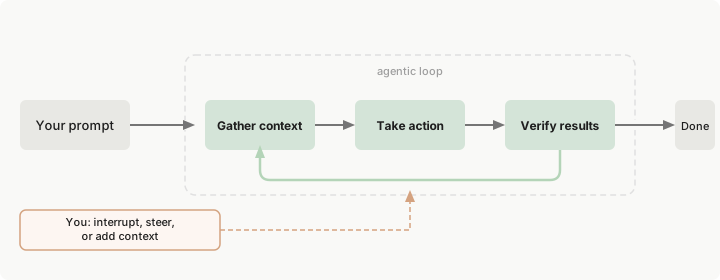
Claude Code runs an iterative agent loop at its core:
Gather context → Take action → Verify result → [Done or loop back]
     ↑                    ↓
  CLAUDE.md          Hooks / Permissions / Sandbox
  Skills             Tools / MCP
  Memory
After using it for a while, you realize that failures usually do not come from a lack of raw model capability. Wrong information is more dangerous than missing information. In many cases, the real problem is that something was produced, but you have no reliable way to validate it or roll it back.
Five Diagnostic Surfaces
| Surface | Core Question | Primary Carriers |
|---|---|---|
Context surface |
What’s always loaded vs. loaded on demand | CLAUDE.md, rules, memory, skills |
Action surface |
What actions can Claude currently take | Built-in tools, MCP, plugins |
Control surface |
What actions must be constrained, blocked, or audited | Permissions, sandbox, hooks |
Isolation surface |
What tasks need context and permission isolation | Subagents, worktrees, forked sessions |
Verification surface |
How to know a task is done and the result is trustworthy | Tests, lint, screenshots, logs, CI |
When something goes wrong, these surfaces are the right place to start. If results are unstable, inspect context loading order. If automation runs too far, inspect the control layer. If quality drops in long sessions, assume intermediate artifacts have polluted the context and start a fresh session instead of tuning prompts.
Concept Boundaries: MCP / Plugin / Tools / Skills / Hooks / Subagents
| Concept | Runtime Role | Solves What | Common Misuse |
|---|---|---|---|
CLAUDE.md |
Project-level persistent contract | Commands, boundaries, prohibitions that must hold every session | Writing it as a team knowledge base |
.claude/rules/* |
Path or language-specific rules | Directory, file type, or language-level local conventions | Dumping all rules into root CLAUDE.md |
Built-in Tools |
Built-in capabilities | Read files, modify files, run commands, search | Putting all integrations into shell |
MCP |
External capability protocol | Let Claude access GitHub, Sentry, databases | Connecting too many servers, tool definitions overwhelming context |
Plugin |
Packaging and distribution layer | Distribute skills/hooks/MCP together | Treating plugin as a runtime primitive |
Skill |
On-demand loaded knowledge/workflow | Give Claude a method package | Skill trying to be both encyclopedia and deployment script |
Hook |
Rule-enforcing interception layer | Execute rules around lifecycle events | Using hooks to replace all model judgment |
Subagent |
Context-isolated work unit | Parallel research, limit tools and permissions | Unbounded fan-out, governance loss |
Simple rule: use Tools and MCP to give Claude new actions, use Skills to provide reusable methods, use Subagents to isolate execution, use Hooks to enforce constraints and collect audit signals, and use Plugins for distribution. Blur these boundaries and the system becomes difficult to reason about.
Context Engineering: The Most Important System Constraint
Many people treat context as a “capacity problem,” but the real issue is usually noise,useful information drowned in irrelevant content.
The Real Context Cost Structure
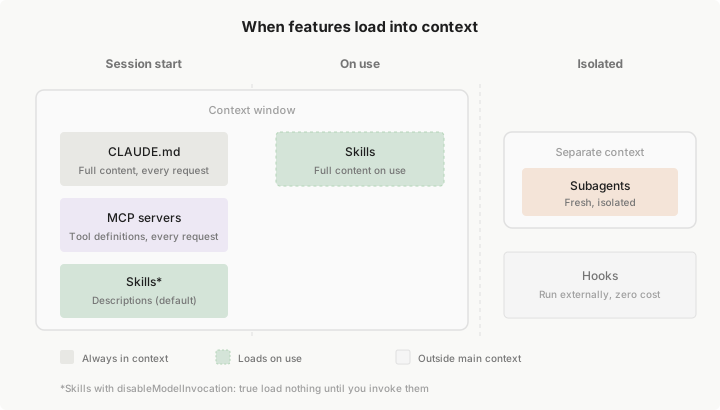
Claude Code’s large context window is not fully available for task-specific work:
200K total context
├── Fixed overhead (~15-20K)
│   ├── System instructions: ~2K
│   ├── All enabled Skill descriptors: ~1-5K
│   ├── MCP Server tool definitions: ~10-20K  ← Largest hidden overhead
│   └── LSP state: ~2-5K
│
├── Semi-fixed (~5-10K)
│   ├── CLAUDE.md: ~2-5K
│   └── Memory: ~1-2K
│
└── Dynamically available (~160-180K)
    ├── Conversation history
    ├── File contents
    └── Tool call results
A typical MCP server such as GitHub can expose 20-30 tool definitions at roughly 200 tokens each, which is 4,000-6,000 tokens. Connect five servers and you may be spending roughly 25,000 tokens (12.5%) on fixed overhead alone. In large codebases, that overhead is material.
Recommended Context Layering
Always resident    → CLAUDE.md: project contract / build commands / prohibitions
Path-loaded        → rules: language / directory / file-type specific
On-demand loaded   → skills: workflows / domain knowledge
Isolated loaded    → subagents: heavy exploration / parallel research
Never in context   → hooks: deterministic scripts / audit / blocking
Context Best Practices
- Keep
CLAUDE.mdshort, strict, and operational. Prioritize commands, constraints, and architectural boundaries. In Anthropic’s public examples, these files stay relatively compact; that is the right direction even if there is no universal token target. - Split large reference documents into supporting files for the skill; do not put them directly in
SKILL.md - Use
.claude/rules/for path- and language-specific rules; do not make rootCLAUDE.mdhandle every variation - Use
/contextproactively to inspect consumption; do not wait for automatic compression
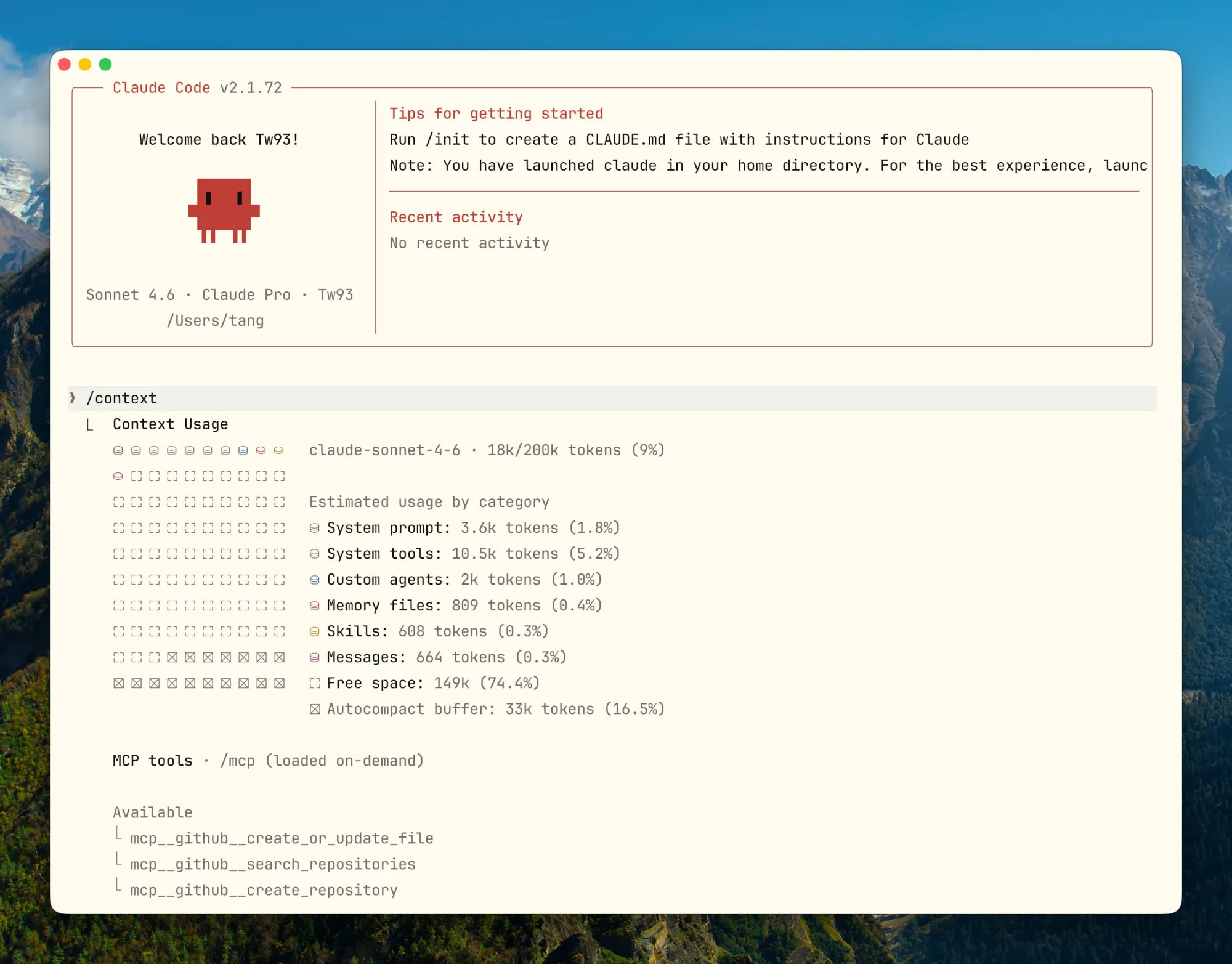
- For task switches, prefer
/clear; for a new phase of the same task, use/compact - Write Compact Instructions in
CLAUDE.md. You should decide what survives compression, not the algorithm.
Tool Output Noise: The Other Hidden Context Killer
The analysis above covers fixed overhead from MCP tool definitions. But dynamic context has its own trap: tool output. A single cargo test run can produce thousands of lines, git log fills up fast on any non-trivial repo, and find or grep can easily flood the window with irrelevant matches. Claude does not need all of it, but once it’s in context it consumes real tokens and crowds out conversation history and file contents.
I came across RTK (Rust Token Killer) and the idea clicked immediately: filter command output before it reaches Claude, keeping only what’s relevant to the next decision. For cargo test, instead of thousands of lines:
# Raw output Claude would see
running 262 tests
test auth::test_login ... ok
...(thousands of lines)

# After RTK
✓ cargo test: 262 passed (1 suite, 0.08s)
What Claude needs is “did it pass, and if not, where did it fail.” Everything else is noise. RTK rewrites commands transparently via a hook, so Claude Code never notices it. The difference from manually appending | head -30 to every command is that RTK covers all output automatically. The project is open source on GitHub.
The Compression Trap
The default compression algorithm optimizes for “re-readability.” Early tool outputs and file contents are often deleted first, which can also remove architectural decisions and constraint rationale. Two hours later, when you need to change something, the earlier decisions may already be gone. A surprising number of bugs start there.
The fix is to specify in CLAUDE.md:
## Compact Instructions

When compressing, preserve in priority order:

1. Architecture decisions (NEVER summarize)
2. Modified files and their key changes
3. Current verification status (pass/fail)
4. Open TODOs and rollback notes
5. Tool outputs (can delete, keep pass/fail only)
Compact Instructions help, but a HANDOFF.md is even more reliable. Before ending a session, have Claude record the current state: what it tried, what worked, what failed, and what should happen next. Then the next Claude instance can continue from that file instead of depending on compression quality:
Write the current progress in HANDOFF.md. Explain what you tried, what worked, what didn’t, so the next agent with fresh context can continue from just this file.
Review it quickly for gaps, then start the next session from the HANDOFF.md path.
Plan Mode’s Engineering Value
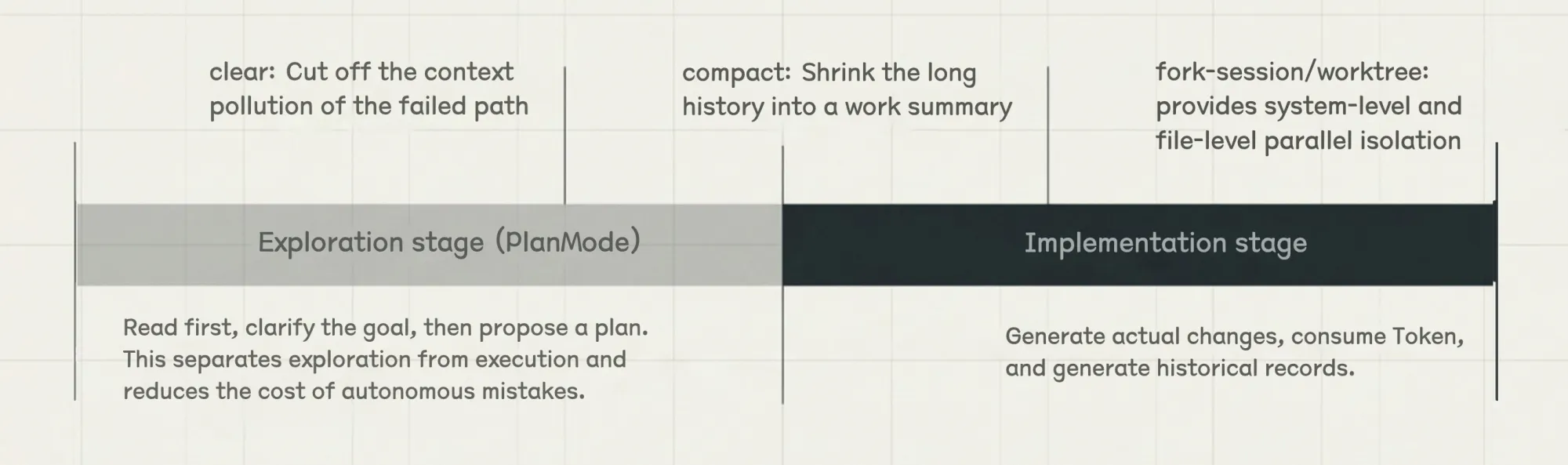
Plan Mode separates exploration from execution. Exploration stays read-only, and files are touched only after the plan is confirmed:
- The exploration phase is read-only
- Claude can clarify goals and boundaries before proposing a concrete plan
- Execution begins only after the plan is confirmed
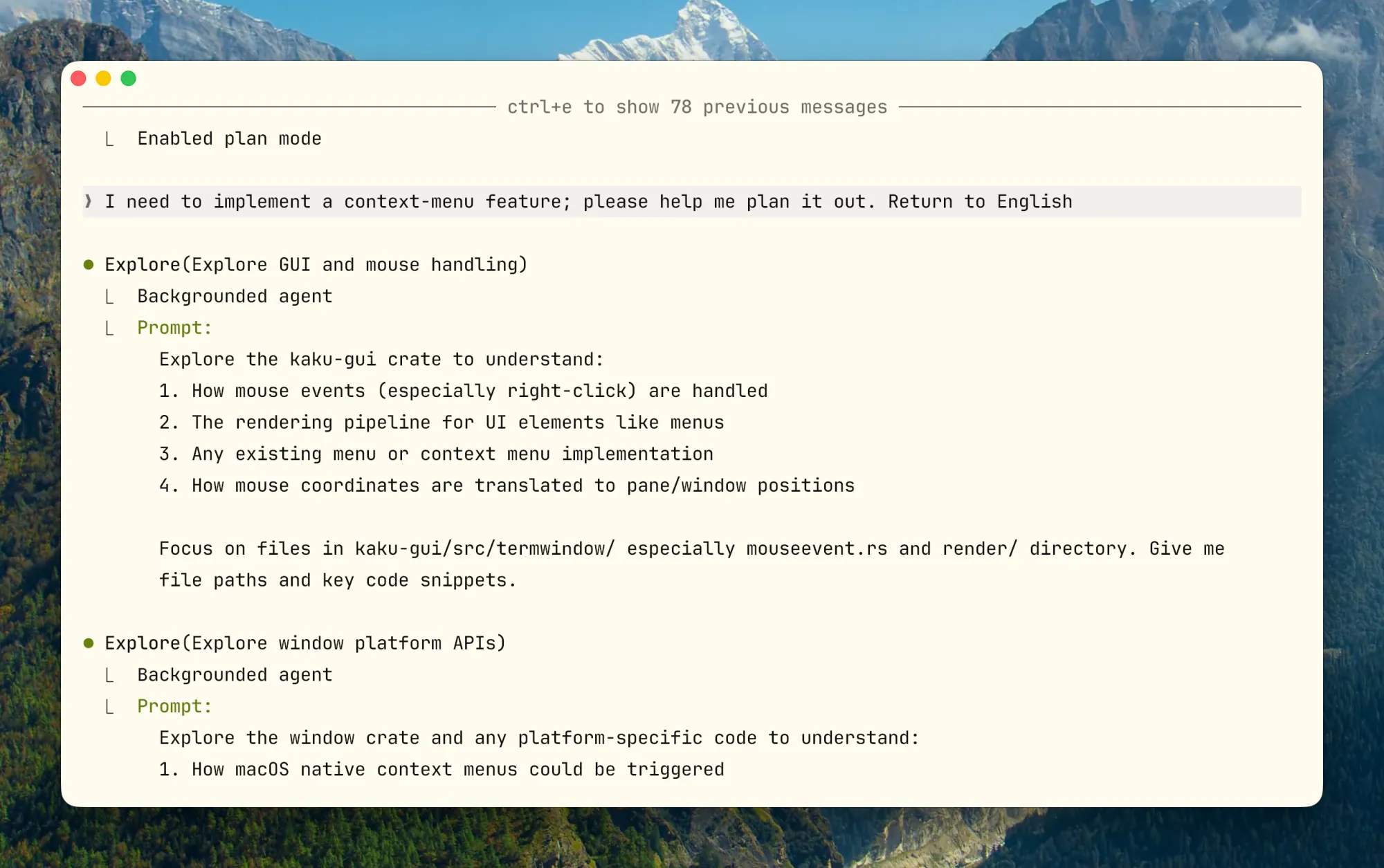
For complex refactors, migrations, and cross-module changes, this separation is usually better than editing immediately. Running with a bad assumption is much less likely when the plan is confirmed first. Double-tap Shift+Tab to enter Plan Mode. A useful pattern is to let one agent draft the plan and another review it before execution.
Skills Design: Not a Template Library, But Workflows Loaded On Demand
Skills are best understood as on-demand workflow packages. Their descriptors remain in context, while the full body is loaded only when needed. That makes them operationally different from saved prompts.
What Makes a Good Skill
- A good skill description tells the model when to use the skill, not just what it contains
- It defines complete steps, inputs, outputs, and stop conditions, not just an opening instruction
- The body should contain navigation and core constraints only; large reference material should live in supporting files
- Skills with side effects should explicitly disable model invocation; otherwise the model decides whether to run them
How Skills Achieve “On-Demand Loading”
A useful pattern here is progressive disclosure. Do not show the model everything at once. Give it an index and navigation first, then load details on demand:
SKILL.mddefines task semantics, boundaries, and execution skeleton- Supporting files provide domain details
- Scripts deterministically gather context or evidence
A stable structure looks like:
.claude/skills/
└── incident-triage/
    ├── SKILL.md
    ├── runbook.md
    ├── examples.md
    └── scripts/
        └── collect-context.sh
Three Typical Skill Types
These examples come from my own use in the open-source terminal project Kaku.
Type 1: Checklist (Quality Gate)
Run this before a release so nothing critical is missed:
---
name: release-check
description: Use before cutting a release to verify build, version, and smoke test.
---

## Pre-flight (All must pass)
- [ ] `cargo build --release` passes
- [ ] `cargo clippy -- -D warnings` clean
- [ ] Version bumped in Cargo.toml
- [ ] CHANGELOG updated
- [ ] `kaku doctor` passes on clean env

## Output
Pass / Fail per item. Any Fail must be fixed before release.
Type 2: Workflow (Standardized Operations)
Config migration is high risk, so use explicit invocation and a built-in rollback path:
---
name: config-migration
description: Migrate config schema. Run only when explicitly requested.
disable-model-invocation: true
---

## Steps
1. Backup: `cp ~/.config/kaku/config.toml ~/.config/kaku/config.toml.bak`
2. Dry run: `kaku config migrate --dry-run`
3. Apply: remove `--dry-run` after confirming output
4. Verify: `kaku doctor` all pass

## Rollback
`cp ~/.config/kaku/config.toml.bak ~/.config/kaku/config.toml`
Type 3: Domain Expert (Encapsulated Decision Framework)
When runtime issues occur, have Claude collect evidence along a fixed path instead of guessing:
---
name: runtime-diagnosis
description: Use when kaku crashes, hangs, or behaves unexpectedly at runtime.
---

## Evidence Collection
1. Run `kaku doctor` and capture full output
2. Last 50 lines of `~/.local/share/kaku/logs/`
3. Plugin state: `kaku --list-plugins`

## Decision Matrix
| Symptom | First Check |
|---|---|
| Crash on startup | doctor output → Lua syntax error |
| Rendering glitch | GPU backend / terminal capability |
| Config not applied | Config path + schema version |

## Output Format
Root cause / Blast radius / Fix steps / Verification command
Keep Descriptors Short,Every Skill Has Context Cost
Each enabled skill keeps its descriptor in context. The gap between optimized and unoptimized is huge:
# Inefficient (~45 tokens)
description: |
  This skill helps you review code changes in Rust projects.
  It checks for common issues like unsafe code, error handling...
  Use this when you want to ensure code quality before merging.

# Efficient (~9 tokens)
description: Use for PR reviews with focus on correctness.
Important invocation strategy:
- High frequency (>1 per session) → Keep auto-invoke and optimize the descriptor
- Low frequency (<1 per session) → Disable auto-invoke, trigger manually, keep the descriptor out of context
- Very low frequency (<1 per month) → Remove the skill and document it in
AGENTS.mdinstead
Skills Anti-Patterns
- Description too short:
description: help with backend(it triggers for almost any backend task) - Body too long: hundreds of lines of manual content stuffed into
SKILL.md - One skill covering review, deploy, debug, docs, incident,five different things
- Side-effect skills allowing model auto-invocation
Tool Design: Helping Claude Pick the Right Tool
The more I used Claude Code, the clearer this became: tools for Claude and APIs for humans should be designed differently. Human-facing APIs often optimize for feature completeness. Agent-facing tools should optimize for correct selection and correct use.
Good Tools vs. Bad Tools
| Dimension | Good Tools | Bad Tools |
|---|---|---|
| Name | jira_issue_get, sentry_errors_search |
query, fetch, do_action |
| Parameters | issue_key, project_id, response_format |
id, name, target |
| Return | Information directly relevant to next decision | UUIDs, internal fields, raw noise |
| Scope | Single purpose, clear boundaries | Multiple actions mixed, opaque side effects |
| Cost | Default output controlled, truncatable | Default returns oversized context |
| Errors | Include correction suggestions | Only return opaque error codes |
Practical design principles:
- Prefix names by system or resource layer:
github_pr_*,jira_issue_* - Support
response_format: concise / detailedfor large responses - Make error responses corrective; do not return opaque codes only
- When high-level task tools can be merged, do not expose too many low-level fragments. Avoid patterns like
list_all_*that force the model to filter the results itself.
Lessons from Claude Code’s Internal Tool Evolution
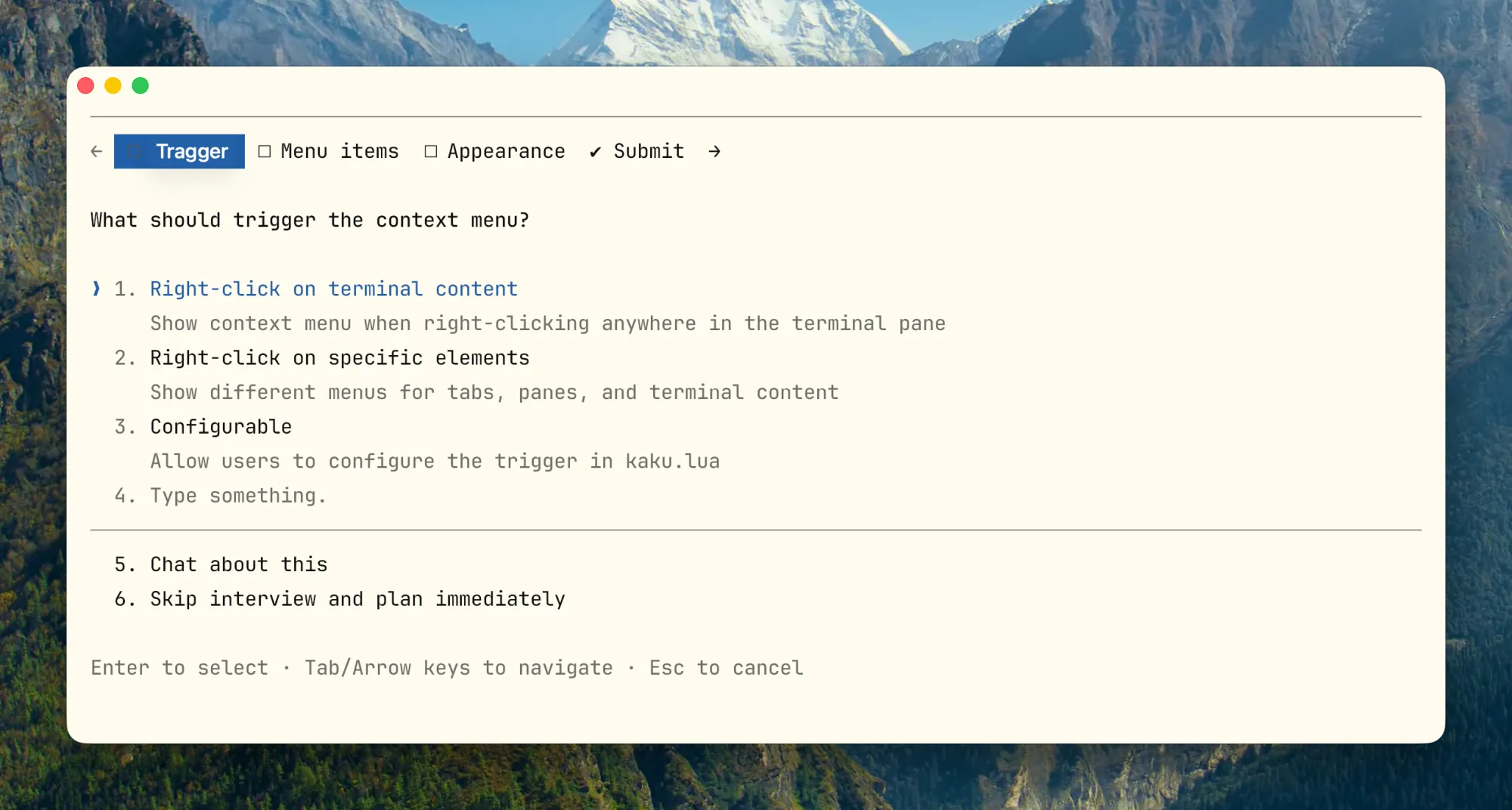
One useful lesson from Anthropic’s public discussion of Claude Code tooling is how they handled cases where the agent needed to stop mid-task and ask the user a question. They tried three approaches:
- Version 1: Add a
questionparameter to existing tools such as Bash, letting Claude ask while calling the tool. Result: Claude often ignored the parameter and continued without pausing. - Version 2: Require Claude to emit a specific markdown format that an outer layer parses to pause. Problem: there is no hard enforcement, so the questioning path remains fragile.
- Version 3: Make it a standalone
AskUserQuestiontool. Claude must explicitly call it to ask, and the tool call itself becomes the pause signal. Much more reliable than either previous approach.
This image shows why Version 3 is more stable:
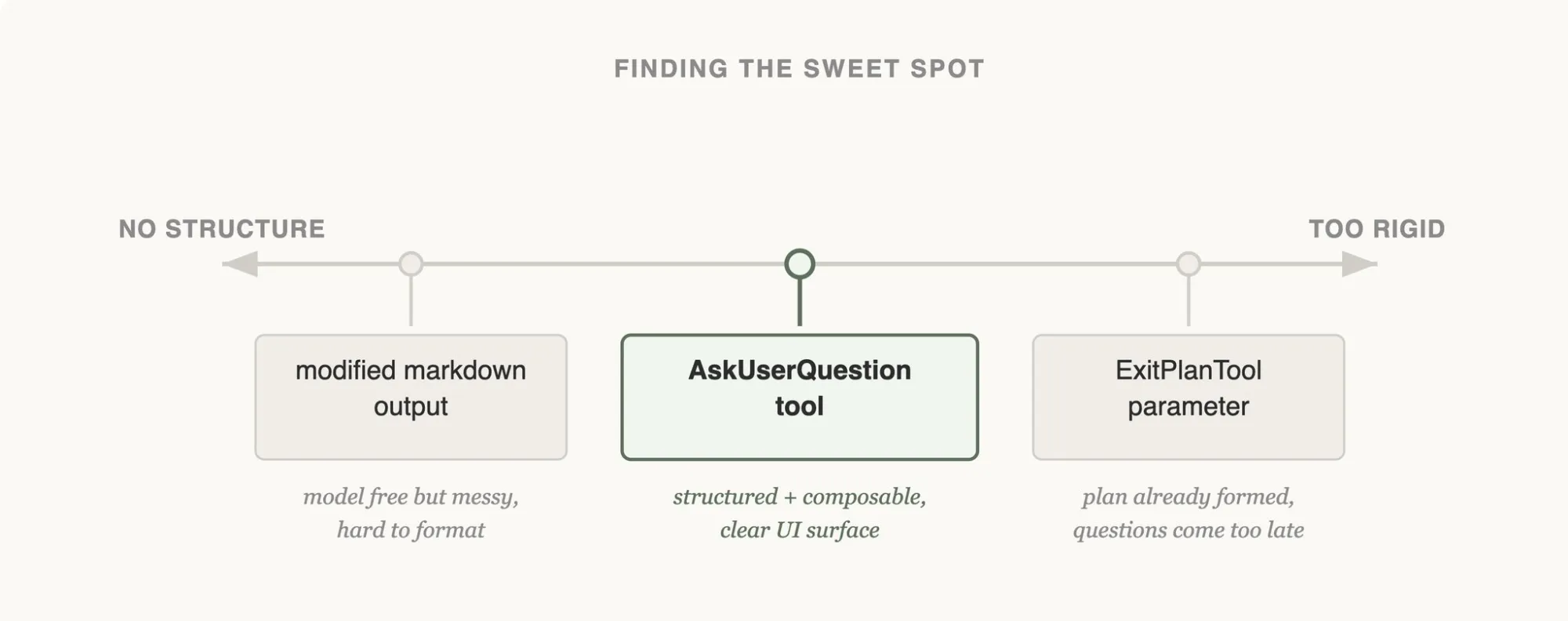
The left approach is too loose because parsing depends on free-form output. The right approach is too rigid because the model can ask only after exiting plan mode. AskUserQuestion as a dedicated tool sits in the middle: structured, explicit, and callable at any point.
The practical takeaway is straightforward: if you want Claude to stop and ask, give it a dedicated tool. Flags and output-format conventions are much easier for the model to skip.
Todo Tool Evolution:
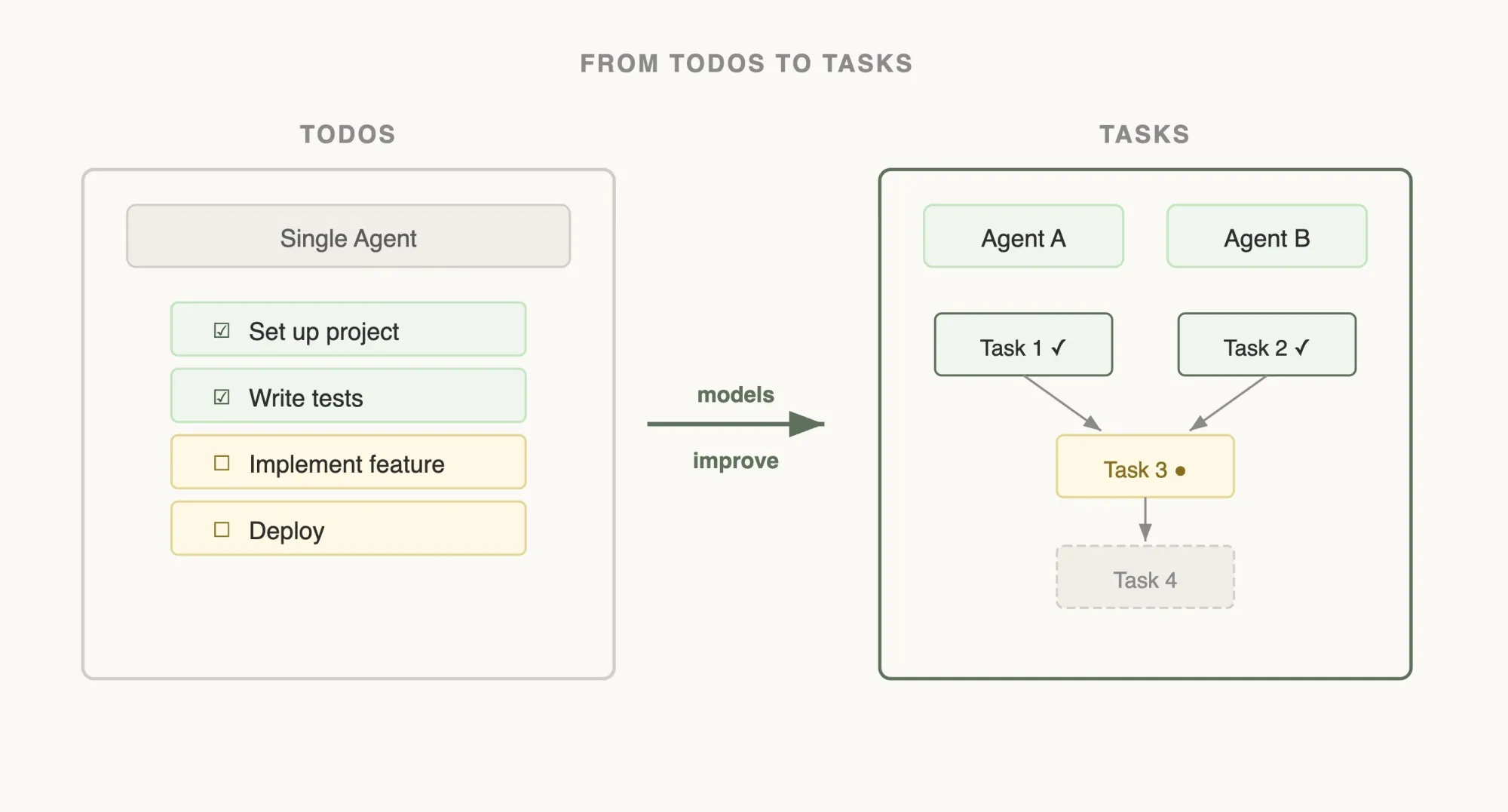
Early versions used a TodoWrite tool plus periodic reminders to keep Claude on task. As models improved, that tool became more of a constraint than a benefit. The broader lesson is worth keeping: controls that were useful for weaker models may become unnecessary friction later, so they should be reviewed periodically.
Search Tool Evolution: Early approaches relied on a RAG-style vector database. It was fast, but it required indexing and proved fragile across environments. More importantly, tool adoption by the model was poor. Switching to a Grep-style tool that let Claude search directly worked better in practice. A useful side effect is that Claude can read a skill file, follow references to other files, and load information recursively only when needed. That is a strong example of progressive disclosure.
When NOT to Add Another Tool
- Tasks the local shell can already perform reliably
- Cases where the model needs static knowledge, not external interaction
- Requirements that fit skill workflow constraints better than tool actions
- Cases where you have not yet validated that the description, schema, and return format are stable for model use
Hooks: Running Your Own Code Before/After Claude Acts
Hooks are easy to think of as “automatically running scripts,” but in practice they are better understood as a way to move work out of on-the-fly model judgment and into deterministic processes.
Examples include whether formatting should run, whether protected files can be modified, and whether to notify after task completion. These are not the kinds of controls you should rely on the model to remember every time.
Current Hook Points
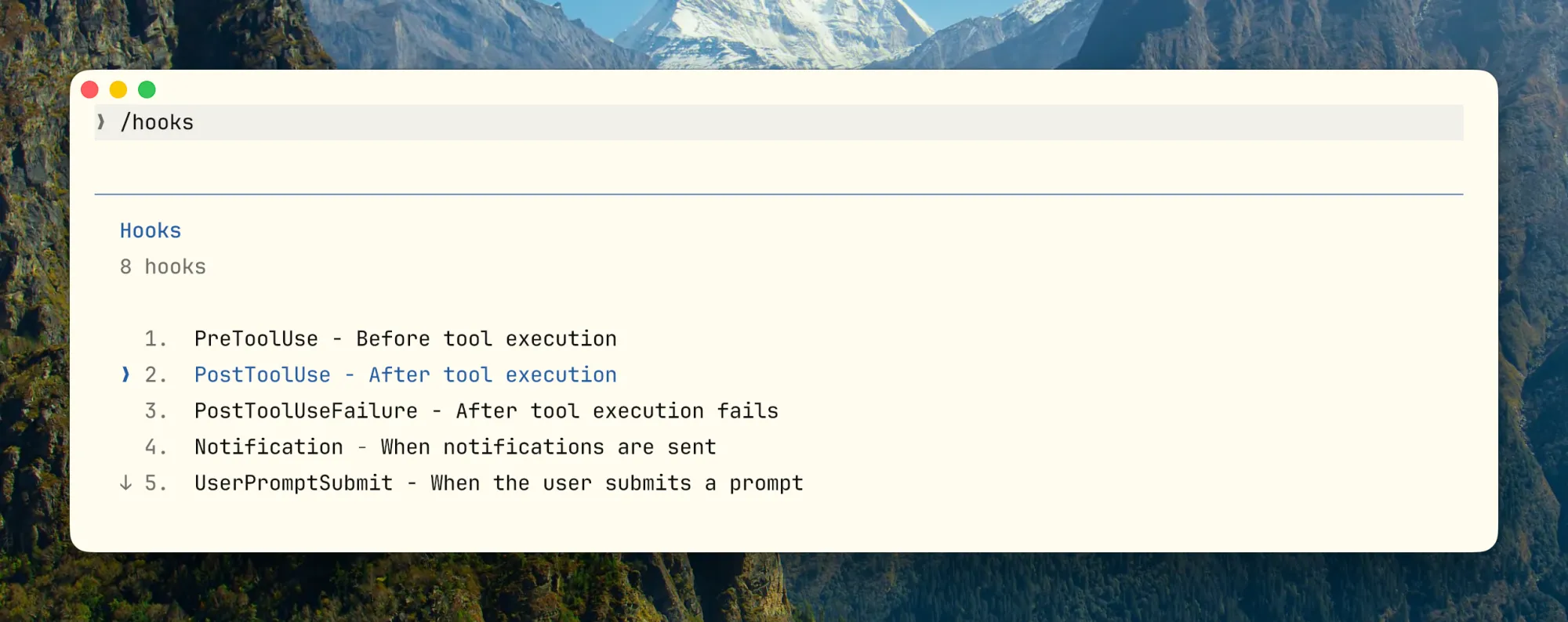
Suitable vs. Unsuitable for Hooks
Suitable: Blocking modifications to protected files, auto formatting/lint/light validation after Edit, injecting dynamic context after SessionStart (Git branch, env vars), pushing notifications after task completion.
Unsuitable: Complex semantic judgments requiring lots of context, long-running business processes, decisions requiring multi-step reasoning and tradeoffs,these belong in skills or subagents.
{
  "hooks": {
    "PostToolUse": [
      {
        "matcher": "Edit",
        "pattern": "*.rs",
        "hooks": [
          {
            "type": "command",
            "command": "cargo check 2>&1 | head -30",
            "statusMessage": "Running cargo check..."
          }
        ]
      }
    ],
    "Notification": [
      {
        "type": "command",
        "command": "osascript -e 'display notification \"Task completed\" with title \"Claude Code\"'"
      }
    ]
  }
}
Hooks: Earlier Error Detection Saves Time
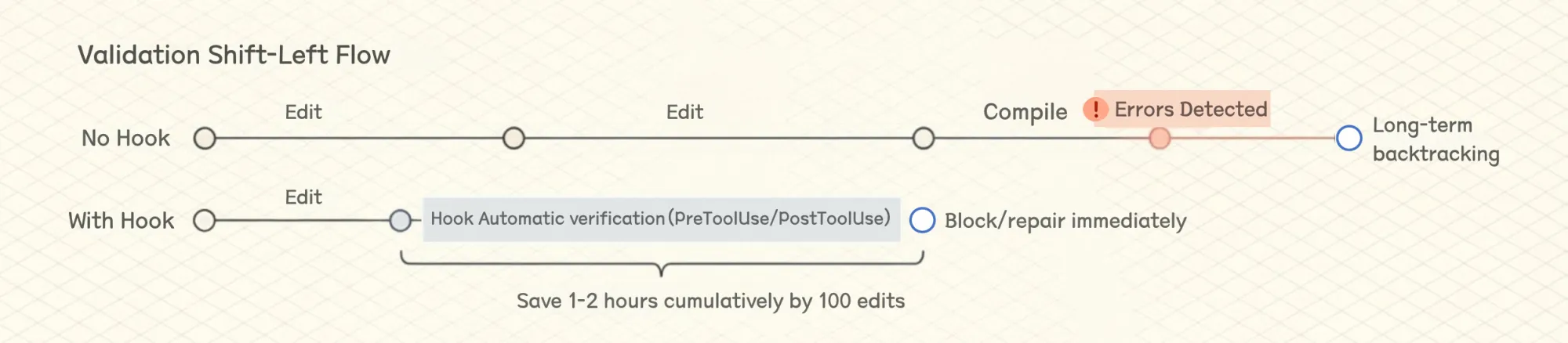
In a 100-edit session, saving 30-60 seconds each time adds up to 1-2 hours. That is material. Limit output length (| head -30) to avoid hook output polluting context. For a more systematic approach to output noise across all commands, see the RTK note in section 3.
Hooks + Skills + CLAUDE.md Three-Layer Stack
CLAUDE.md: Declare “must pass tests and lint before commit”Skill: Tell Claude in what order to run tests, how to read failures, how to fixHook: Hard validation on critical paths, block if necessary
In practice, any single layer has gaps. CLAUDE.md rules alone get ignored, hooks alone can’t handle judgment calls,all three together is what works.
Subagents: Sending an Independent Claude to Do One Specific Thing
A subagent is an independent Claude instance that branches off from the main conversation, with its own context window and only the tools you allow. The main value is isolation, not raw parallelism. Codebase scans, test runs, and review passes that generate large amounts of output can go to a subagent, while the main thread receives only the summary instead of carrying all intermediate output in its context window.
Claude Code has built-in Explore (read-only scan, runs Haiku to save cost), Plan (planning research), General-purpose (general), and custom options.
Explicit Constraints in Configuration
tools/disallowedTools: Limit what tools can be used; do not grant the same broad permissions as the main threadmodel: Exploration tasks use Haiku/Sonnet, important reviews use OpusmaxTurns: Prevent runawayisolation: worktree: Isolate filesystem when files need modification
Another practical detail: long-running bash commands can be moved to the background with Ctrl+B. Claude can check the results later with the BashOutput tool without blocking the main thread. The same pattern applies to subagents.
Common Anti-Patterns
- A subagent with the same broad permissions as the main thread; isolation becomes largely meaningless
- Output format not fixed, unusable by main thread
- Strong dependencies between subtasks, frequently sharing intermediate state,Subagent not suitable for this
Prompt Caching: A First-Class Design Constraint
Tutorials rarely cover this topic, but it has a major effect on Claude Code’s cost structure and design choices. Claude Code’s entire architecture is built around prompt caching. A high cache hit rate cuts cost, improves latency, and loosens rate limits. Anthropic monitors hit rates internally and treats low cache performance as an incident-level signal.
Prompt Layout Designed for Caching
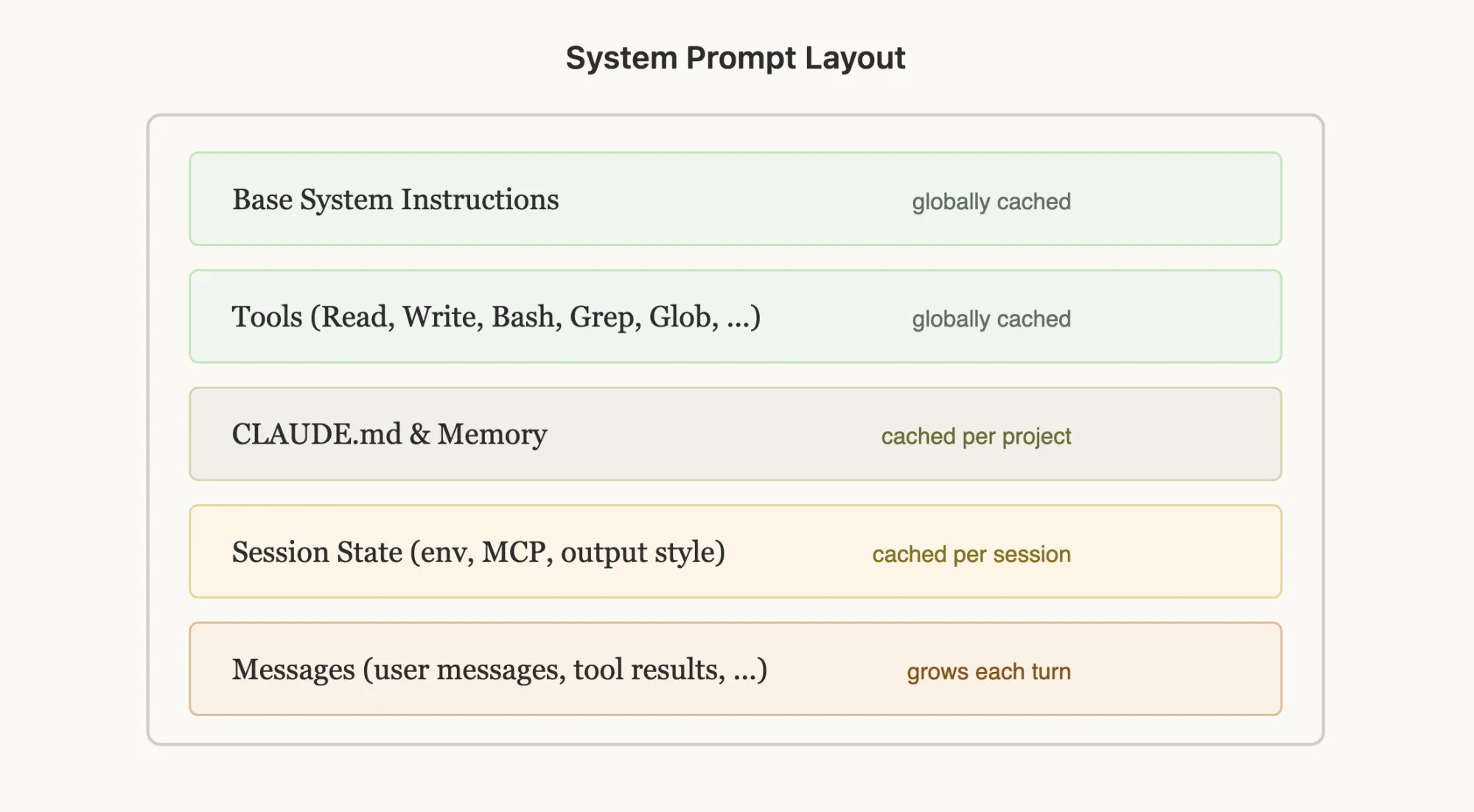
Prompt caching works by prefix matching,content from request start to each cache_control breakpoint gets cached. So order matters:
Claude Code prompt order:
1. System Prompt → Static, locked
2. Tool Definitions → Static, locked
3. Chat History → Dynamic, comes after
4. Current user input → Last
Common caching pitfalls:
- Putting timestamped content in static system prompt (makes it change every time)
- Non-deterministically shuffling tool definition order
- Adding/removing tools mid-session
What about dynamic information such as the current time? Do not put it in the system prompt. Put it in a later message instead. That preserves cache stability.
Don’t Switch Models Mid-Session
Prompt cache is model-specific. If you’ve chatted 100K tokens with Opus and want to ask a simple question, switching to Haiku is more expensive than continuing with Opus, because you have to rebuild the entire cache for Haiku.
If you really need to switch, hand off via subagent: Opus prepares a “handoff message” for another model explaining the task to complete.
Compaction’s Actual Implementation
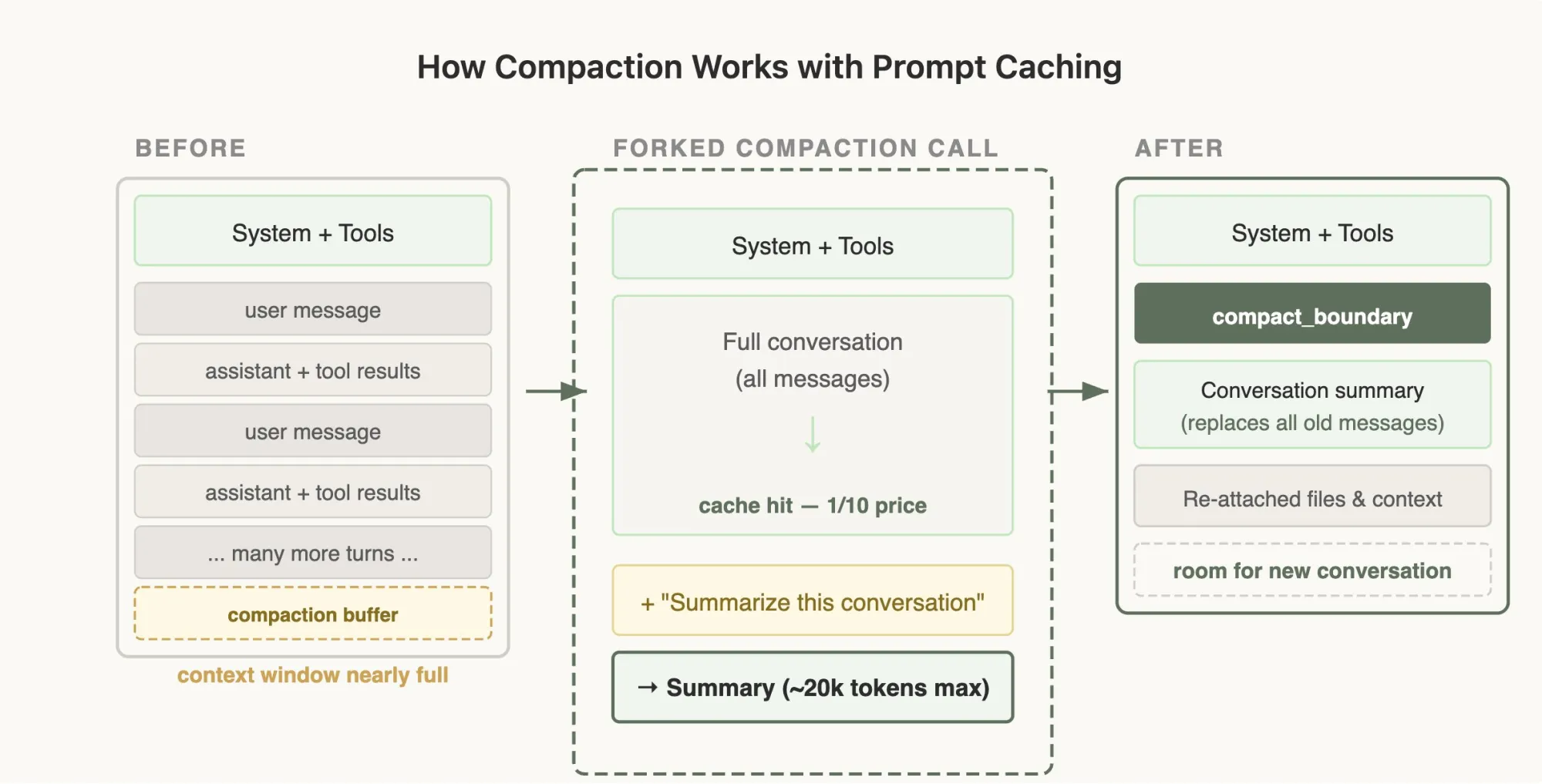
Above is the compaction flow. On the left, the context window is close to full. In the middle, Claude Code forks a summarization call over the existing conversation, which can benefit from caching. On the right, many turns have been compressed into a shorter summary while the system prompt, tool definitions, and previously referenced files remain available, freeing space for the session to continue.
At first glance, Plan Mode might seem like it should switch to a different read-only toolset, but that would hurt cache reuse. Anthropic has publicly described a tool-driven approach instead: the model can enter plan mode without changing the underlying tool prefix, which preserves cache stability.
defer_loading: Lazy Loading for Tools
Claude Code can have many MCP tools. Including every full definition in every request would be expensive, but adding and removing tools mid-session also hurts cache reuse. One approach Anthropic has described is to keep lightweight stubs in the stable prefix and load fuller schemas only when the model selects them.
Verification Loop: No Verifier, No Engineering Agent
“Claude says it’s done” has little engineering value. What matters is knowing whether it’s correct, whether you can roll back if something’s wrong, and whether the process is auditable.
Verifier Levels
- Lowest: command exit codes, lint, typecheck, unit test
- Middle: integration tests, screenshot comparison, contract test, smoke test
- Higher: production log verification, monitoring metrics, manual review checklists
Explicitly Define Verification in Prompt, Skill, and CLAUDE.md
## Verification

For backend changes:

- Run `make test` and `make lint`
- For API changes, update contract tests under `tests/contracts/`

For UI changes:

- Capture before/after screenshots if visual

Definition of done:

- All tests pass
- Lint passes
- No TODO left behind unless explicitly tracked
When writing task prompts or skills, define acceptance criteria upfront. Which commands must pass, what to check first if they fail, what screenshots and logs should show to pass,the earlier these are clear, the less trouble later.
My simple test: if you can’t clearly explain “how Claude knows it’s done correctly,” it’s probably not suitable to throw at Claude for autonomous completion.
Commands Worth Using Frequently
These commands serve one main purpose: manage context actively instead of waiting for the system to manage it for you.
The exact command set can change across releases, but the operational pattern is stable: inspect context usage, control loaded capabilities, and keep long sessions intentional.
Context Management
/context   # Inspect token consumption, including MCP and file-read ratios
/clear     # Reset the session; useful when the same issue has already been corrected twice
/compact   # Compress while retaining key points; works best with Compact Instructions
/memory    # Confirm which CLAUDE.md got loaded
Capabilities and Governance
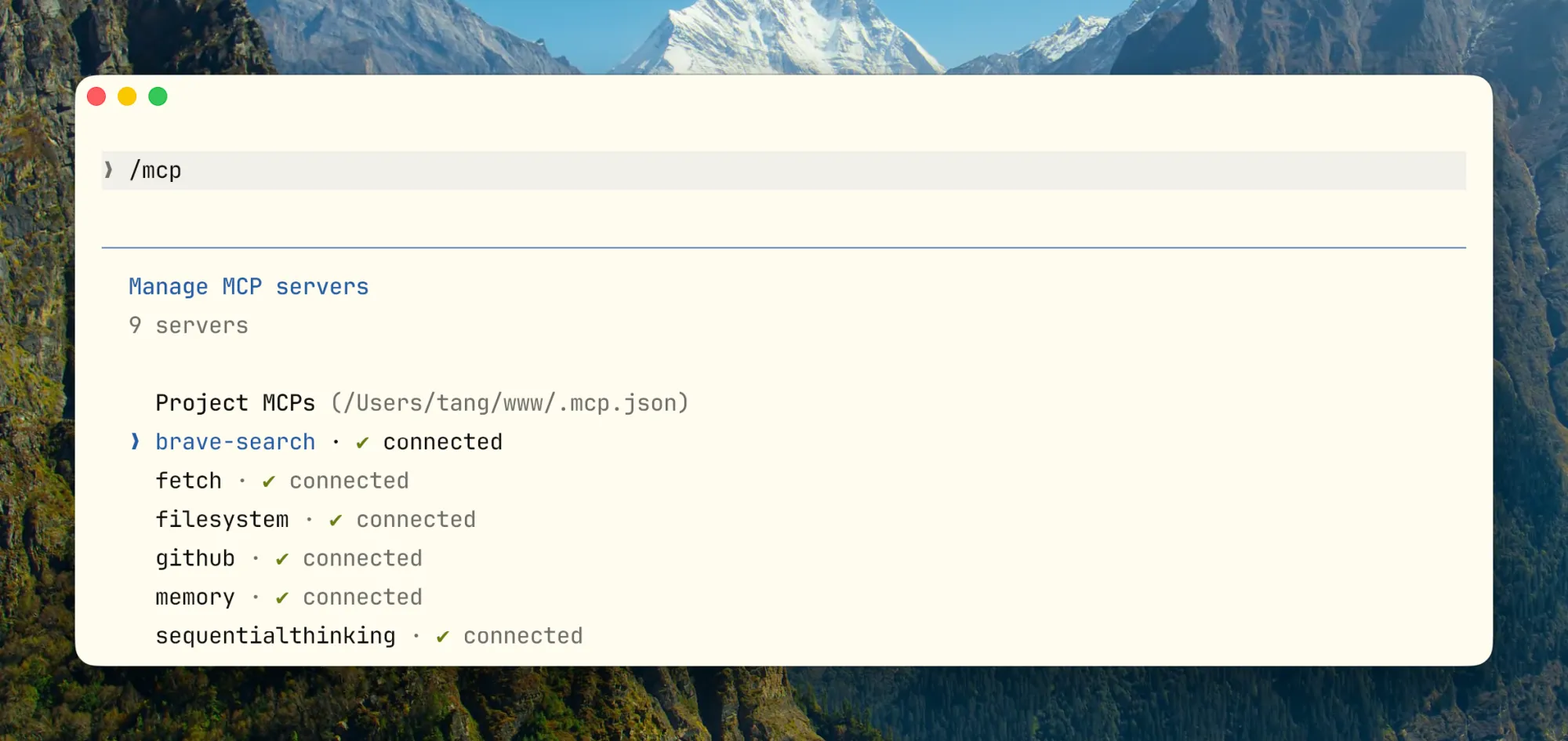
/mcp           # Manage MCP connections, check token costs, disconnect idle servers
/hooks         # Manage hooks; this is a key control-plane entry point
/permissions   # View or update permission whitelist
/sandbox       # Configure sandbox isolation, essential for high-automation scenarios
/model         # Switch models: Opus for deep reasoning, Sonnet for routine, Haiku for quick exploration
Session Continuity and Parallelism
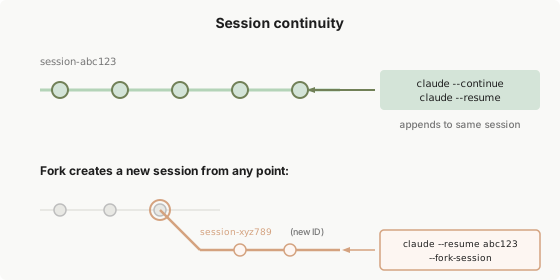
claude --continue               # Resume the latest session in the current directory; useful for picking work back up the next day
claude --resume                 # Open selector to resume historical session
claude --continue --fork        # Fork from an existing session to try a different approach from the same starting point
claude --worktree               # Create isolated git worktree
claude -p "prompt"              # Non-interactive mode for CI, pre-commit, or other scripts
claude -p --output-format json  # Structured output that scripts can consume directly
Several Less Common but Useful Commands
/simplify: Runs a quick pass over recently modified code with a focus on reuse, quality, and efficiency. Useful immediately after changing logic instead of waiting for later manual review.
/rewind: Not an “undo,” but a return to an earlier session checkpoint followed by a new summary. Useful when Claude went too far down the wrong path and you want to keep the early consensus but discard later failures.
/btw: Ask a quick side question without interrupting the main task. It works well for light tangents such as comparing two commands, but not for questions that require repository reads or tool calls.
claude -p --output-format stream-json: Emits a real-time JSON event stream. Useful for long-running task monitoring, incremental processing, or integration into your own tooling.
/insight: Ask Claude to analyze the current session and extract what should be codified in CLAUDE.md. Run it after some progress has accumulated; it can surface patterns such as “this convention came up repeatedly but was never written into the contract.”
Double-tap ESC to backtrack: Brings the previous input back for editing instead of retyping it. If Claude starts down the wrong path, or your last message was underspecified, this is often faster than restarting the session.
Conversation history is all local: Session records live under ~/.claude/projects/. Folder names are derived from the project path, and each session is stored as a .jsonl file. To find prior work on a topic, run grep -rl "keyword" ~/.claude/projects/ or ask Claude to search previous discussions about that topic.
How to Write a Good CLAUDE.md
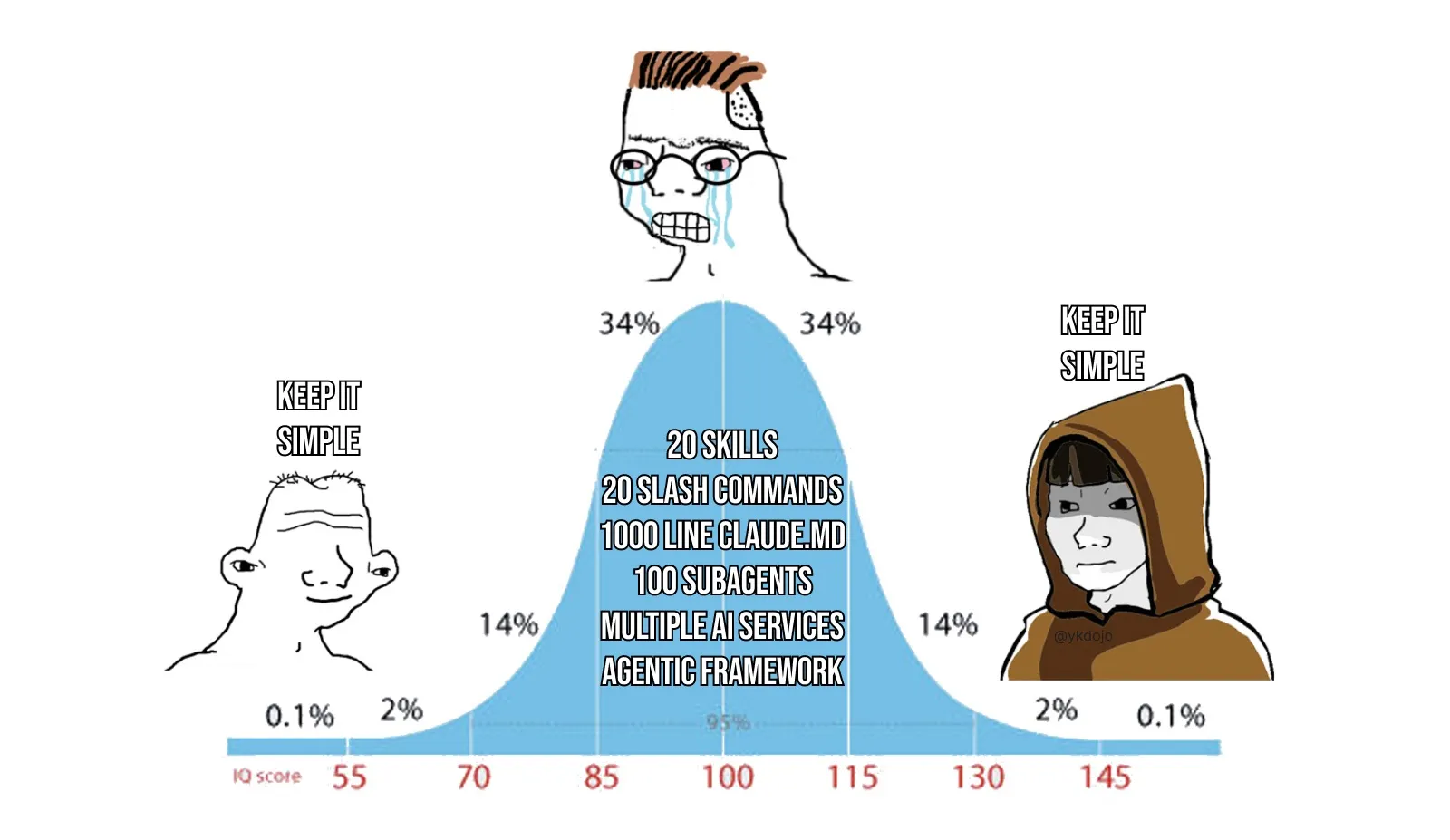
I think of CLAUDE.md as a collaboration contract between you and Claude. It is not team documentation and not a knowledge base. Put only the information that must hold across every session.
My advice is simple: start with nothing. Use Claude Code first, then add entries only when you notice yourself repeating the same instruction. To add an entry, type # to append the current conversation to CLAUDE.md, or tell Claude “add this to the project’s CLAUDE.md” and it will usually update the right file.
What to Include
- Build, test, lint, run commands (most important)
- Key directory structure and module boundaries
- Explicit code style and naming constraints
- Non-obvious environment dependencies and pitfalls
- Prohibitions and high-risk operations (NEVER list)
- Information that must survive compression (Compact Instructions)
What NOT to Include
- Long background introductions
- Complete API documentation
- Vague principles like “write high-quality code”
- Obvious information Claude can infer from reading the repo
- Large background materials and low-frequency task knowledge (put these in skills)
High-Quality Template
# Project Contract

## Build And Test

- Install: `pnpm install`
- Dev: `pnpm dev`
- Test: `pnpm test`
- Typecheck: `pnpm typecheck`
- Lint: `pnpm lint`

## Architecture Boundaries

- HTTP handlers live in `src/http/handlers/`
- Domain logic lives in `src/domain/`
- Do not put persistence logic in handlers
- Shared types live in `src/contracts/`

## Coding Conventions

- Prefer pure functions in domain layer
- Do not introduce new global state without explicit justification
- Reuse existing error types from `src/errors/`

## Safety Rails

## NEVER

- Modify `.env`, lockfiles, or CI secrets without explicit approval
- Remove feature flags without searching all call sites
- Commit without running tests

## ALWAYS

- Show diff before committing
- Update CHANGELOG for user-facing changes

## Verification

- Backend changes: `make test` + `make lint`
- API changes: update contract tests under `tests/contracts/`
- UI changes: capture before/after screenshots

## Compact Instructions

Preserve:

1. Architecture decisions (NEVER summarize)
2. Modified files and key changes
3. Current verification status (pass/fail commands)
4. Open risks, TODOs, rollback notes
Let Claude Maintain Its Own CLAUDE.md
One useful habit is to update CLAUDE.md immediately after correcting Claude’s mistake:
“Update your CLAUDE.md so you don’t make that mistake again.”
Claude is often reasonably good at writing these rules for itself, and repeated mistakes do usually become less frequent over time. Still, review the file periodically. Entries go stale, and constraints that once helped may stop paying for themselves. More on keeping it healthy in section 14.
Field Notes from a Real Project
Over the Spring Festival break, I built an open-source terminal called Kaku with Claude Code. It uses Rust and Lua at the core, plus a custom configuration system. That combination surfaced many of the collaboration problems that agentic coding workflows tend to expose. Here are the practices that helped most.
“Environment Transparency” Matters More Than You Think
Claude Code calls real shells, git, package managers, and local configurations. As long as one layer is opaque, it has to start guessing, and once it starts guessing environment, reliability drops fast.
I quickly added a doctor command to the terminal that collects environment state, dependencies, and configuration status into a structured health report. Running doctor before Claude Code starts work eliminates many cases where the agent begins from an incorrect understanding of the environment.
I also found that when the CLI exposes clearly semantic subcommands such as init, config, and reset, Claude Code uses them more reliably than when it has to infer where configuration files live. Converge state first, then expose edit entry points. Reversing that order creates unnecessary chaos.
Hooks Practice for Mixed-Language Projects
Two languages, two checks,Hooks are well-suited to trigger separately by file type:
{
  "hooks": {
    "PostToolUse": [
      {
        "matcher": "Edit",
        "pattern": "*.rs",
        "hooks": [{
          "type": "command",
          "command": "cargo check 2>&1 | head -30",
          "statusMessage": "Checking Rust..."
        }]
      },
      {
        "matcher": "Edit",
        "pattern": "*.lua",
        "hooks": [{
          "type": "command",
          "command": "luajit -b $FILE /dev/null 2>&1 | head -10",
          "statusMessage": "Checking Lua syntax..."
        }]
      }
    ]
  }
}
Knowing immediately that a file no longer compiles is much better than running a long sequence of steps only to discover it was broken from the start.
Complete Engineering Layout Reference
If you want a complete Claude Code setup for your project, here is a reference structure. Treat it as a reference, not a template:
Project/
├── CLAUDE.md
├── .claude/
│   ├── rules/
│   │   ├── core.md
│   │   ├── config.md
│   │   └── release.md
│   ├── skills/
│   │   ├── runtime-diagnosis/     # Uniformly collect logs, state, dependencies
│   │   ├── config-migration/      # Config migration rollback protection
│   │   ├── release-check/         # Pre-release validation, smoke test
│   │   └── incident-triage/       # Production incident triage
│   ├── agents/
│   │   ├── reviewer.md
│   │   └── explorer.md
│   └── settings.json
└── docs/
    └── ai/
        ├── architecture.md
        └── release-runbook.md
With global constraints (CLAUDE.md), path constraints (rules), workflows (skills), and deeper architectural detail separated cleanly, Claude Code behaves much more predictably. If you maintain multiple projects, keep stable personal defaults in ~/.claude/ and project-specific differences in each project’s .claude/ directory to reduce cross-project pollution.
Common Anti-Patterns
| Anti-Pattern | Symptom | Fix |
|---|---|---|
| CLAUDE.md as wiki | Pollutes context every load, key instructions diluted | Keep only contract, move materials to skills and rules |
| Skill grab-bag | Description can’t stably trigger, workflow conflicts | One skill does one thing, explicit side-effect control |
| Too many tools, vague descriptions | Wrong tool selection, schema overwhelms context | Merge overlapping tools, clear namespacing |
| No verification loop | Claude has no way to tell if it’s actually done | Bind verifier to every task type |
| Over-autonomy | Unbounded multi-agent parallelism that is hard to stop once it goes wrong | Minimize roles, permissions, and worktrees; set explicit maxTurns |
| No context segmentation | Research, implementation, and review all pile onto the main thread, diluting effective context | Use /clear for task switches, /compact for phase switches, and offload heavy exploration to a subagent (Explore → Main pattern) |
| Wide autonomy but insufficient governance | Multi-agent execution and external tools are open, but permission boundaries and recovery boundaries are weak | Combine permissions, sandbox, hooks, and subagents into a single control boundary |
| Approved commands pile up uncleaned | Dangerous operations such as rm -rf remain in settings.json; once triggered, they are irreversible |
Regularly review the allowedTools list in .claude/settings.json |
Configuration Health Check
Based on the six-layer framework in this handbook, I packaged these checks into an open-source skill project, tw93/claude-health, which can evaluate your Claude Code configuration in one pass.
npx skills add tw93/claude-health
After installing, run /health in any session. It evaluates project complexity, checks CLAUDE.md, rules, skills, hooks, allowedTools, and recurring behavior patterns, then outputs a prioritized report: fix now, structural issues, and gradual improvements.
If you want to know how far your configuration is from these principles after reading this handbook, running /health is the fastest way.
Conclusion
Using Claude Code typically involves three stages:
| Stage | Focus | Efficiency Perception |
|---|---|---|
| Tool User | “How do I use this feature?” | Helpful but limited |
| Process Optimizer | “How do I make collaboration smoother?” Start using CLAUDE.md and Skills intentionally | Significant improvement |
| System Designer | “How do I make the agent operate autonomously under constraints?” | Qualitative change |
One practical test matters more than most: if you cannot clearly articulate what “done” looks like, the task is probably not ready for autonomous execution by Claude. Without acceptance criteria, there is no reliable notion of a correct answer, no matter how capable the model is.
These are my takeaways from six months of sustained use. There is still more to learn, but this framework has held up well in practice. If you have found a better operating pattern, I would be interested in comparing notes.