Using React to Improve Angular's Rendering Performance
Categories: Study
Original article from: Faster Angular Rendering (Angular and React)
Have you ever encountered performance problems when using Angular? Using React can make pages render faster. Below, through several cases, compare the performance differences between using React to render Angular and directly using Angular to render.
I like Angular. I use it not only in some interesting small projects, but also in some large professional projects. I also try other frameworks, like BackboneJs and EmberJs. These two are also good tools. All three above belong to a class called MVC frameworks (can be called MVVC), but every time I use them, I encounter some performance deficiencies in rendering. For rendering list items, two-way data binding and one-way data binding have no actual difference. For me, BackboneJS rendering performance is superior to AngularJs when not considering two-way data binding.
Recently an excellent framework called React appeared. a library that looks a bit weak will have a big impact on JavaScript MVC frameworks in the coming period of time. In short, this library can improve webpage rendering performance. The main part ReactJs uses is for the View part in the MVC framework. At first I didn’t understand why designers would abandon Model and Controller. Isn’t the most interesting part in frameworks like EmberJs, BackboneJS and Angular the Model and Controller parts? After careful thinking, React actually has very characteristic places in the Controller part. However, React is not a large and comprehensive MVC framework. ReactJs works by maintaining a virtual DOM. Rendering only changes when the UI is updated. Does this make sense? It sounds novel but reasonable. By sending instructions to update the UI, React only changes and updates existing DOM (using virtual DOM is super fast). Through virtual DOM technology, differences in changes can be quickly displayed. Facebook and Instagram have already started using React in actual projects.
I heard React developer Pete Hunt’s podcast talking about React’s intentions. It is highly recommended that you also listen to this podcast. His purpose of open-sourcing reactjs is to make some noise in the View part of existing frameworks. I found that these existing frameworks are planning to adopt the same strategy in the UI part, and some new libraries that can be used will appear.
The V in React is easily compared with the V in existing frameworks, backbone, and angular’s ngRepeat. It can be used together with Coffeescript. So using React to render can come in handy in your application performance, for example by using ng-repeat to repeat hundreds of items. In my previous article, I wrote an article about how to make long lists effective in Angular, but all technologies that make rendering faster are implemented by rendering a part of the list. Using React to render Angular can make your rendering time less by 80%. When I played with ngReact, that performance improvement made me question if the code went wrong. Rendering time dropped from 4200ms using Angular directly to 120ms through using React rendering. You can also try it, or directly look at the examples below this article.
I still experience some problems when using Angular for large amounts of DOM binding, but another problem is special two-way data binding. If you are a bit worried about this problem, maybe you should consider using a framework more powerful than Angular. However, the major role of React is to help us render elements to the user’s screen as fast as possible.
I will use a small case to explain to you how to use React to render an Angular application. The steps are as follows:
-
By default you have already installed Bower, then create a new directory, install React and Angular to your directory:
$ mkdir fast-angular
$ cd fast-angular
$ bower install --save react
$ bower install --save angular
-
When these commands are finished, the Angular and React we need are already installed locally. Next, we create a simple HTML file and include these two scripts.
    <!doctype html>
    <html>
      <head>
        <meta charset="utf-8">
        <meta http-equiv="X-UA-Compatible" content="IE=edge">
        <title></title>
        <meta name="description" content="">
        <meta name="viewport" content="width=device-width">
      </head>
      <body>
        <h1>Fast AngularJs</h1> <h3>AngularJs with ReactJs</h3>
        <script src="bower_components/angular/angular.js"></script>
        <script src="bower_components/react/react.js"></script>
      </body>
    </html>
- We need to create a ReactJs component to render the string we input, so we use ReactJs to render our model. Create a component named MYAPP, pass props to it to present. Next we create a traditional angular directive and controller (add markup in our html to start this application). By using the directive to tell it to render, instead of calling the ReactJs component, we use $watch to re-render and update our framework. When the component is installed, we update the existing instance called createComponent. Actual code demo http://plnkr.co/edit/FXK3lU?p=preview
<!doctype html>
<html>
  <head>
    <meta charset="utf-8">
    <meta http-equiv="X-UA-Compatible" content="IE=edge">
    <title></title>
    <meta name="description" content="">
    <meta name="viewport" content="width=device-width">

  </head>
  <body ng-app="fasterAngular">
    <h1>Fast AngularJs</h1> <h3>AngularJs with ReactJs</h3>
    <div ng-controller="mycontroller">
        <input ng-model="framework"/>
        <hr>
        <fast-ng framework="framework"></fast-ng>
        <hr>
        Rendering with traditional AngularJs
    </div>

    <script src="bower_components/angular/angular.js"></script>
    <script src="bower_components/react/react.js"></script>
    <script >
        var MYAPP = React.createClass({
            displayName:'MYAPP',
            render:function(){
                return React.DOM.div(null,
                "Rendering faster in AngularJs with ",
                this.props.framework);

            }
        });
    </script>

    <script>
        angular.module('fasterAngular', []).
        controller('mycontroller', ['$scope', function($scope){
            $scope.framework = 'ReactJs';

        }]).directive('fastNg', function(){
            return{
                restrict:'E',
                scope:{
                    framework:'='
                },
                link:function(scope, el, attrs){
                    scope.$watch('framework', function(newValue, oldValue){
                        React.renderComponent(
                            MYAPP({framework:newValue}),
                            el[0]
                        );
                    })
                }
            }
        })
    </script>
</body>
</html>- Of course this example above didn’t let us see performance improvement, but it explained how to render our module through ReactJs. The following example of rendering a long string of numbers is the example showing performance. It is an example from ng-react. We generate an array containing 1500 pieces of data and render it into a table. If using native ng-repeat in Angular, it usually brings some performance problems. Look at this Plunkr using ReactJs to render, the other is Plunkr using native ng-repeat to render. The code using ReactJs to render is as follows:
<!doctype html>
<html>
  <head>
    <meta charset="utf-8">
    <meta http-equiv="X-UA-Compatible" content="IE=edge">
    <title></title>
    <meta name="description" content="">
    <meta name="viewport" content="width=device-width">

  </head>
  <body ng-app="fasterAngular">
    <h1>Fast AngularJs</h1> <h3>AngularJs with ReactJs</h3>
    <div ng-controller="mycontroller">

        <fast-repeat data="data"></fast-repeat>

    </div>

    <script src="bower_components/angular/angular.js"></script>
    <script src="bower_components/react/react.js"></script>

    <script >
        var MYLIST = React.createClass({displayName: 'MYLIST',
            render: function() {

              var data = this.props.data;

              var rows = data.map(function(datum) {
                var clickHandler = function(ev){
                    console.log("Still in reactJs");
                    console.log(ev);
                }

                return (
                  React.DOM.tr( {onClick:clickHandler},
                    React.DOM.td(null, datum['0']),
                    React.DOM.td(null, datum['1']),
                    React.DOM.td(null, datum['2']),
                    React.DOM.td(null, datum['3']),
                    React.DOM.td(null, datum['4'])
                  )
                );
              });

              return (
                React.DOM.table(null,
                  rows
                )
              );
            }
        });
    </script>
    <script>
        angular.module('fasterAngular', []).
        controller('mycontroller', ['$scope', function($scope){
            $scope.framework = 'ReactJs';
            $scope.data = [];
            // Fill the data map with random data
            for(var i = 0; i < 1500; ++i) {
                $scope.data[i] = {};
                for(var j = 0; j < 5; ++j) {
                    $scope.data[i][j] = Math.random();
                }
            }
        }]).directive('fastRepeat', function(){
            return{
                restrict: 'E',
                scope:{
                    data: '='
                },
                link:function(scope, el, attrs){
                    scope.$watch('data', function(newValue, oldValue){
                        React.renderComponent(
                            MYLIST({data:newValue}),
                            el[0]
                        );
                    })
                }
            }
        })
    </script>
</body>
</html>- We can update our data through a button, for native Angular and using React:
<!doctype html>
<html>
  <head>
    <meta charset="utf-8">
    <meta http-equiv="X-UA-Compatible" content="IE=edge">
    <title></title>
    <meta name="description" content="">
    <meta name="viewport" content="width=device-width">

  </head>
  <body ng-app="fasterAngular">
    <h1>Fast AngularJs</h1> <h3>AngularJs with ReactJs</h3>
    <div ng-controller="mycontroller">
        <button ng-click="refresh()">Refresh Data</button>
        <fast-repeat data="data"></fast-repeat>
        <!-- <table>
          <tr ng-repeat="line in data" ng-click="clickHandler(ev)">
            <td></td>
            <td></td>
            <td></td>
            <td></td>
            <td></td>
          </tr>
        </table> -->
    </div>

    <script src="bower_components/angular/angular.js"></script>
    <script src="bower_components/react/react.js"></script>

    <script >
        var MYLIST = React.createClass({displayName: 'MYLIST',
            render: function() {

              var data = this.props.data;

              var rows = data.map(function(datum) {
                var clickHandler = function(ev){
                    console.log("Still in reactJs");
                    console.log(ev);
                }

                return (
                  React.DOM.tr( {onClick:clickHandler},
                    React.DOM.td(null, datum['0']),
                    React.DOM.td(null, datum['1']),
                    React.DOM.td(null, datum['2']),
                    React.DOM.td(null, datum['3']),
                    React.DOM.td(null, datum['4'])
                  )
                );
              });

              return (
                React.DOM.table(null,
                  rows
                )
              );
            }
        });
    </script>
    <script>
        angular.module('fasterAngular', []).
        controller('mycontroller', ['$scope', function($scope){
            $scope.framework = 'ReactJs';
            $scope.data = [];
            // Fill the data map with random data

            $scope.clickHandler = function(){
                console.log("in AngularJS");
            }
            $scope.refresh = function(){
                for(var i = 0; i < 1500; ++i) {
                    $scope.data[i] = {};
                    for(var j = 0; j < 5; ++j) {
                        $scope.data[i][j] = Math.random();
                    }
                }
            }
            $scope.refresh()
        }]).directive('fastRepeat', function(){
            return{
                restrict: 'E',
                scope:{
                    data: '='
                },
                link:function(scope, el, attrs){
                    scope.$watchCollection('data', function(newValue, oldValue){
                        React.renderComponent(
                            MYLIST({data:newValue}),
                            el[0]
                        );
                    })
                }
            }
        })
    </script>
</body>
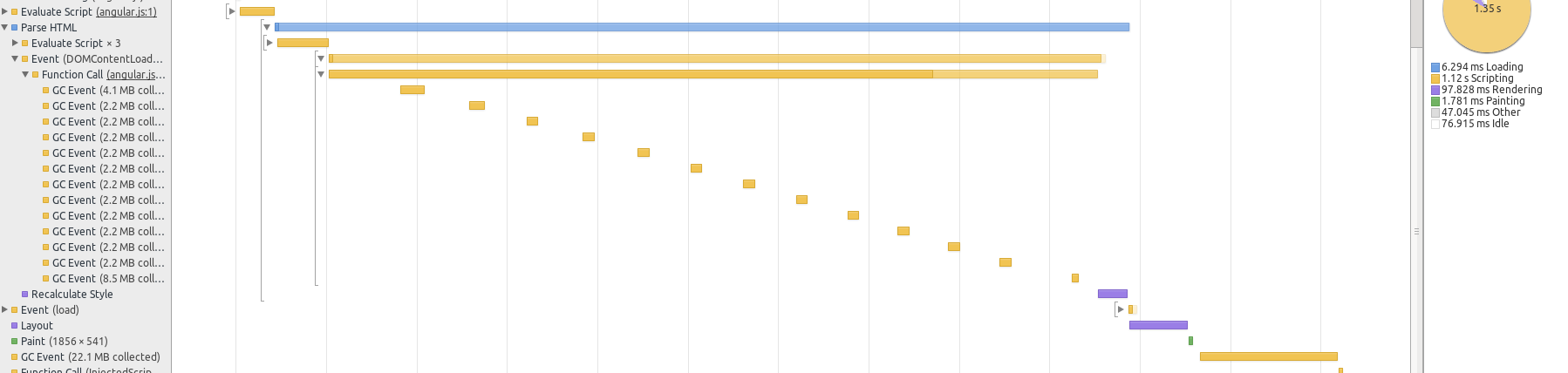
</html>- Rendering 1500 rows using Angular took about 1.35 seconds, however using React rendering took only 320ms. Detailed in the two screenshots from chrome developer tools below:
Using ReactJs rendering 320ms

Using native AngularJs rendering 1200ms
Summary
This is just a brief introduction about using React to improve Angular’s rendering performance. In some of my next projects, undoubtedly I will use React to render parts that I think have insufficient performance. As Pete Hunt said, ReactJs is a complete game changer. The intention behind it is to change general ideas about internal operations. I am sure soon all mainstream frameworks will have a similar idea to use React thinking, or be designed to be easily integrated with React. I like React. The idea of using virtual DOM makes me feel it is of great significance.