From Mole CLI to Mole for Mac: What I Learned
Share

Lately I’ve piled up a lot of thoughts on indie development and wanted to pull them together, so this is the story of taking Mole from an open source CLI to a paid Mac app. What I was thinking at the time, and which parts actually turned out to matter.
Mole lives at mole.fit, and the CLI is open source on GitHub. Feel free to play with it first.
Last National Day holiday I sat by a pool in Sanya and wrote a few hundred lines of code. It became Mole CLI, a command line cleaner for the Mac, and I put it on GitHub mostly for myself and a few coworkers. Less than a year later it has 60K stars, 50-odd releases, code from 121 developers around the world, and nearly 800 feature requests and bugs closed.
I honestly had no sense of how many people were using it. Then one month two images I’d hosted on Vercel from the README blew past the bandwidth allowance and left me owing them 80 dollars. That was when it clicked that a desktop version was worth building.
The most common email I got came from users outside China, and they all said roughly the same thing. My parents use a Mac. So does my sister. Neither of them will open a terminal. Could you make a version they can just click? I sat on it for a long time, mostly because the CLI itself didn’t feel finished. I only started on the desktop version after the CLI had run for most of a year and I knew what was safe to delete and how far to go, and I didn’t ship it until I was using it every day myself. It shipped at ten at night. Notifications kept coming in through the small hours, payments from France, Germany and elsewhere, and I turned the email alerts off so I could sleep. I kept adding to it over the months that followed. A group of people paid first and then stayed around while I finished it. Nothing changed on the CLI side, it stays open source, free and updated, and the desktop app is the only paid part.
Three Kinds of Junk AI Leaves Behind
After the desktop version shipped, the feature I ended up using most was the cleaner, because my own Mac kept warning me it was running out of space. I have Claude Code and Codex running most of the day, and I noticed that the files AI leaves behind differ from what I used to find.
It’s mostly three things. The most obvious is build output. You used to hand-write a few hundred lines a day and compile three or five times. Now you let an agent run a dozen rounds in an afternoon and every round compiles. Rust target directories, .next and dist on the front end, Xcode’s DerivedData, they all grow fast. I once cleared 86GB in one go and it was entirely this. Second is old copies of the AI tools themselves. Claude Code and Cursor Agent self-update silently by downloading the whole new version, around 250MB each, and leave the old ones behind. After a few months there are a dozen versions sitting there. Then there are local model files pulled through Ollama or LM Studio, easily eating up tens of gigabytes.
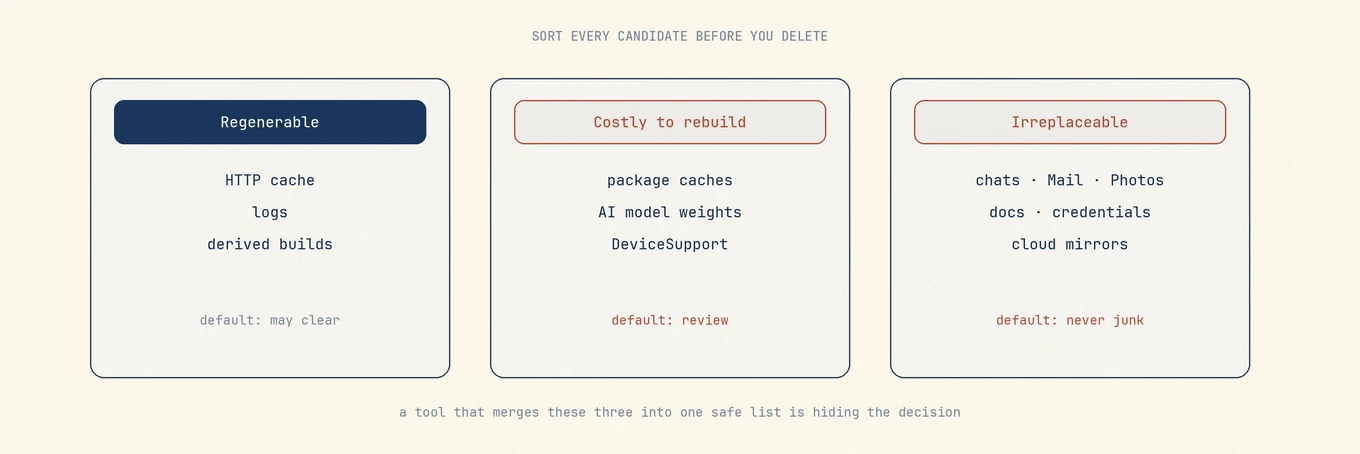
Collapsing all of these into a single “safe to delete” list is certainly easier, but the cost is making high-risk decisions on the user’s behalf. Now I handle this data based on what it costs to get it back. When a candidate is scanned, its ownership is determined before deciding whether it gets checked by default.
For build output, most logs, and HTTP and GPU caches, deleting them means recompiling or refreshing a page, and the price is a few minutes of CPU. As long as the owning app has quit, they can be checked by default. But node_modules, Pods and venv are different. They look like similar dependency directories, but deleting them means downloading them all over again, and on a plane or a train you’re just stuck waiting. The two are easy to lump together. Mole CLI did exactly that early on, and later I pulled every download-only directory out of the Mac app’s clean list. The user needs to look at those first.
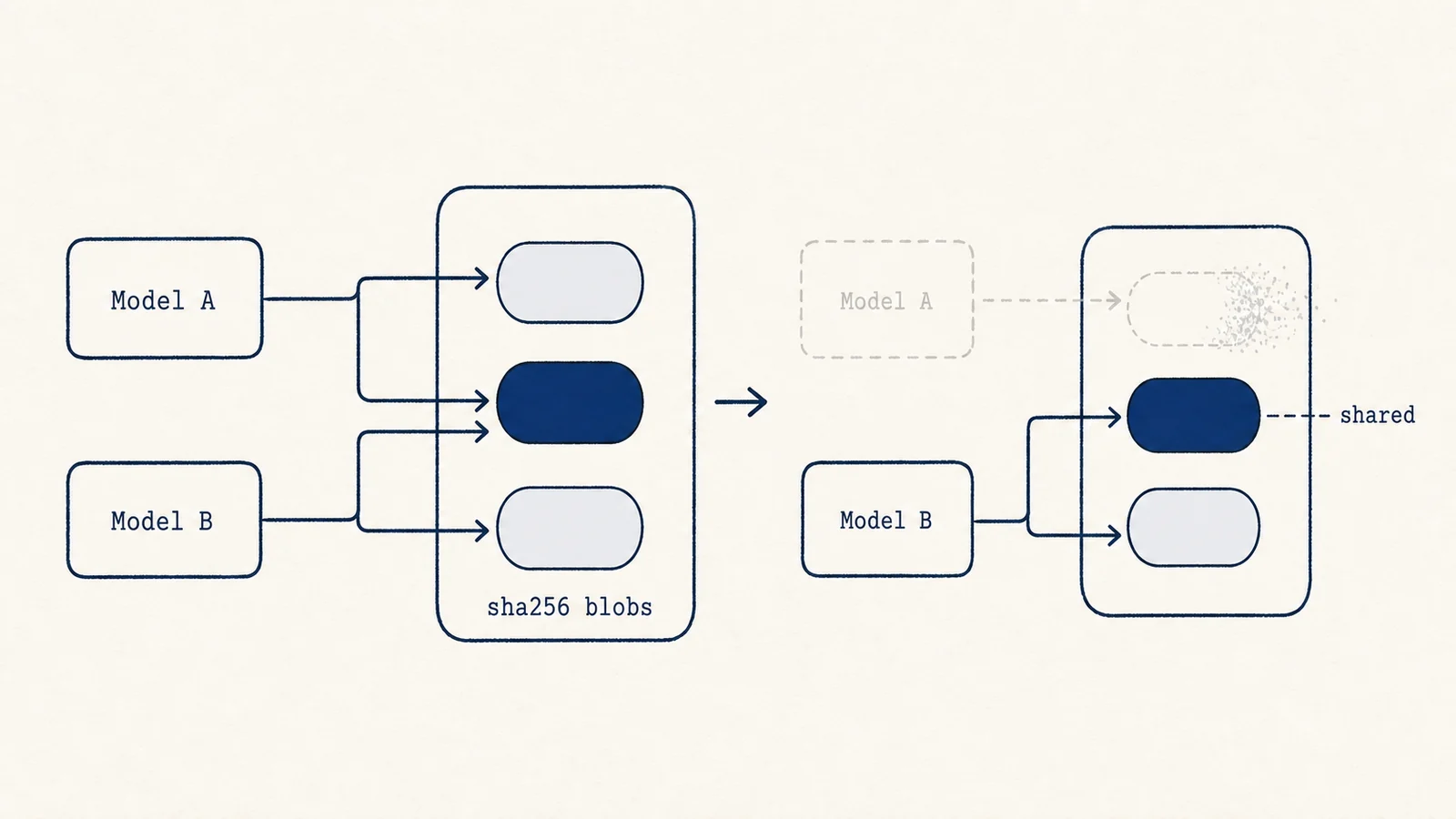
Models are the heaviest thing in here, and redownloading tens of gigabytes takes a long time. A general purpose cleaner couldn’t delete them correctly even if it wanted to. Ollama splits a model into hash-named blocks and several models can share the same block. Delete a large-looking block straight off the filesystem and you may well break a different model. Only the tool itself knows those relationships.
So ~/.ollama/models and ~/.cache/huggingface are hardcoded into a protected list. They never appear during a scan, they only show up in the disk analyzer as a size, and the models themselves stay under Ollama’s and LM Studio’s own management.
There’s one thing even more off-limits than models, and that’s AI chat history. ~/.codex/sessions, ~/.claude/projects and ~/.grok/sessions hold months of full conversations, sometimes a year. Your thinking at the time, the approaches you rejected, the reason behind every change. Delete it and it’s gone, and in a way it’s worth more than the code. Those paths can never be cleaned in Mole, no matter how long they’ve sat untouched, and the same protection covers memories, plans, skills and generated images.
None of that protected list was designed up front. It was mostly learned the hard way. The dumbest one was com.apple.e5rt.e5bundlecache. The name says Caches, it lives in the cache directory, everything about it reads as a cache, and it’s actually where Apple’s Neural Engine keeps compiled models. The CLI cleared it as a cache early on, and every app using recognition features broke for those users until they rebooted. Since then I run three questions in my head whenever I see a directory with cache in the name. Who writes it? Who reads it after a reboot? If I get this wrong, how do I get it back? If I can’t answer one of them, I leave it alone.
Show It Before You Delete It
What I care about most in a tool like this isn’t how much it can clear. It’s whether it lets you see things first.
Mole scans, then lists every item with what it is, where it lives and how big it is. Anything uncertain is unchecked by default. You confirm, then it deletes, and it prefers the Trash so you can change your mind. Scanning and cleaning happen entirely on your machine, and no file or result leaves it. The cost is that it’s slower, there’s an extra step, and it feels fussy on the days you just want it done. I’d still rather it miss something than delete something it shouldn’t.
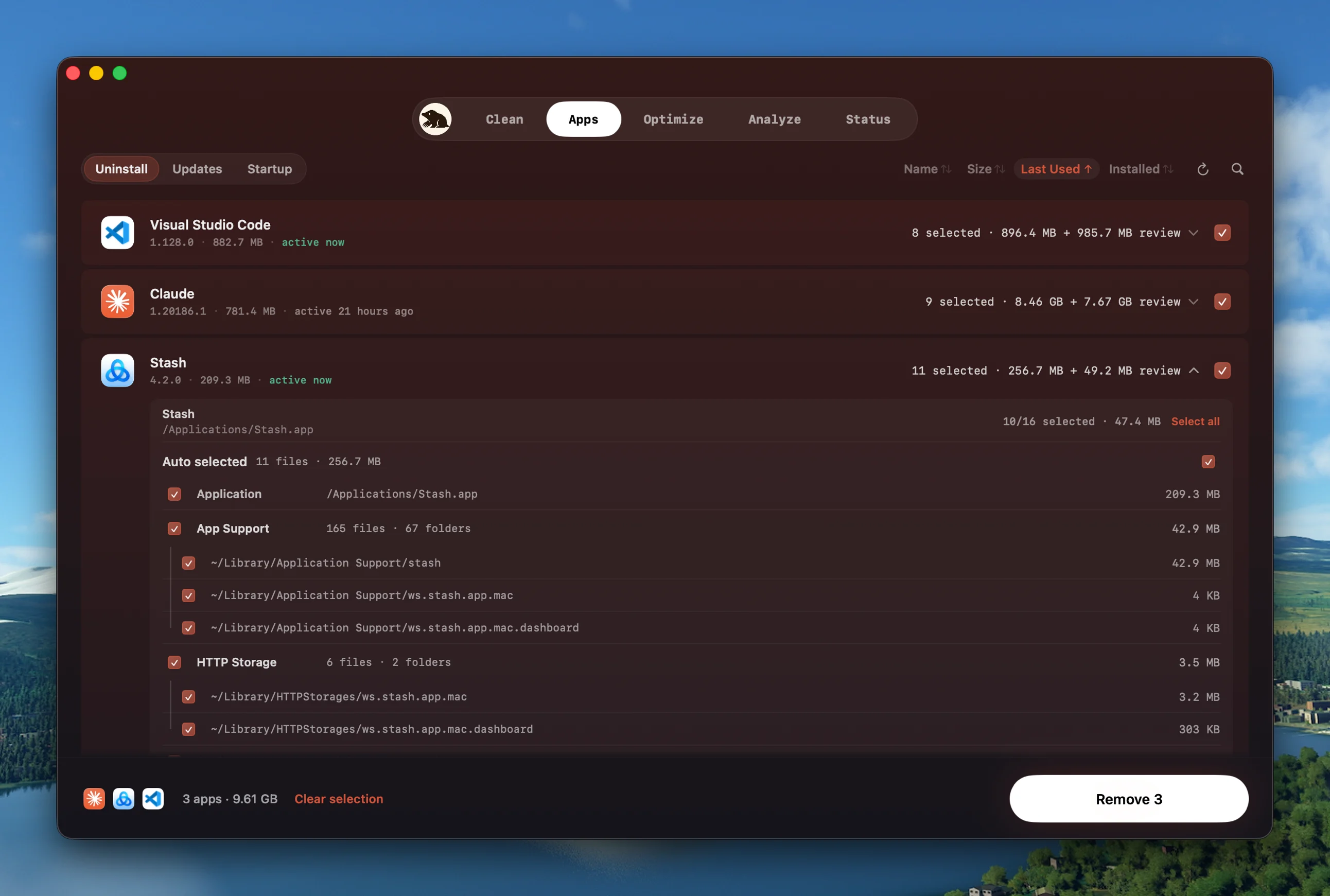
Uninstall follows the same logic. Pick an app and Mole pulls up everything it has scattered around the system, each item labelled with its path and size. In the screenshot above Claude itself is 781MB while ~/Library/Application Support/claude is 7.67GB, which is usually the case: the app bundle is never the part taking up space. Login items and background services live on the same page, so you don’t have to hunt through System Settings for them.
Take macOS update payloads, the /macOS Install Data directory. It’s often more than ten gigabytes and it looks like a perfect thing to clear. But the system may still need it to finish installing, and removing it too early can leave the machine unable to boot. So it’s a review-only item in Mole, unchecked by default, behind three gates. If there’s a pending system update the row is hidden. If anything in the payload was written in the last 14 days it’s hidden. If an installer process is still running it’s hidden. If any of those signals can’t be read, it’s treated as risky and doesn’t show at all.
At the moment of deletion the root helper runs all of those checks again and exits nonzero if any of them fails, so you don’t end up with a report claiming it freed 12GB when it didn’t touch a byte.
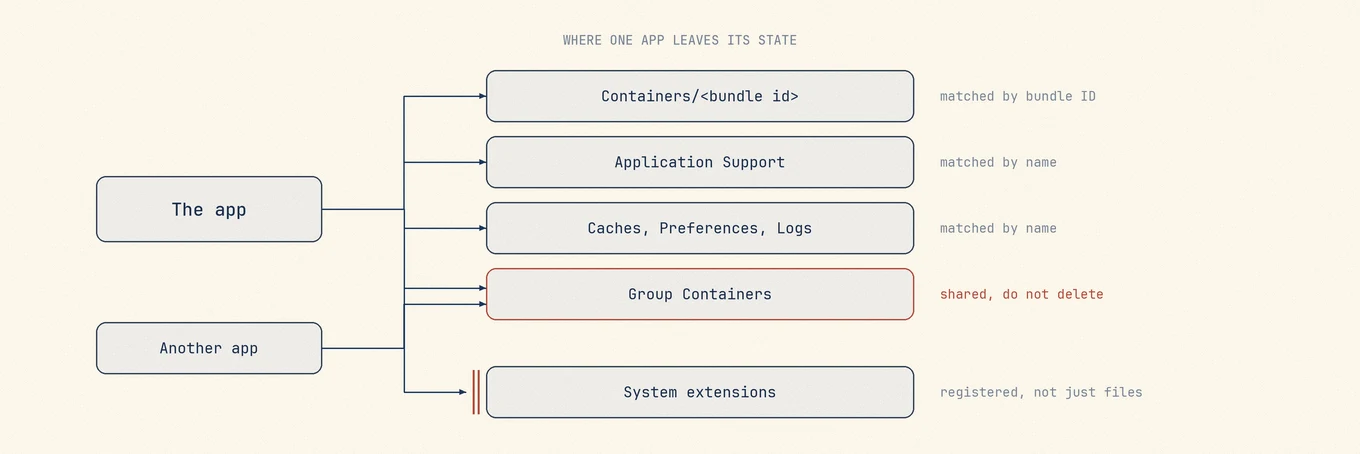
I have a crude way of judging any cleaner. Install two products from the same vendor, uninstall only one of them, and see whether the tool offers up the Application Support parent directory or the group container that both of them share. If it does, it’s matching on names rather than reasoning about ownership. I’m not comfortable letting a tool batch-delete anything if it can’t tell me who owns what.
It Doesn’t Come Looking for You
It looks everywhere it should, it just doesn’t come looking for you.
It won’t pop up every few days to remind you it’s time to clean, and it won’t finish a scan and announce how much danger your computer is in. Open it when you want to clean something. The rest of the time it may as well not be installed.
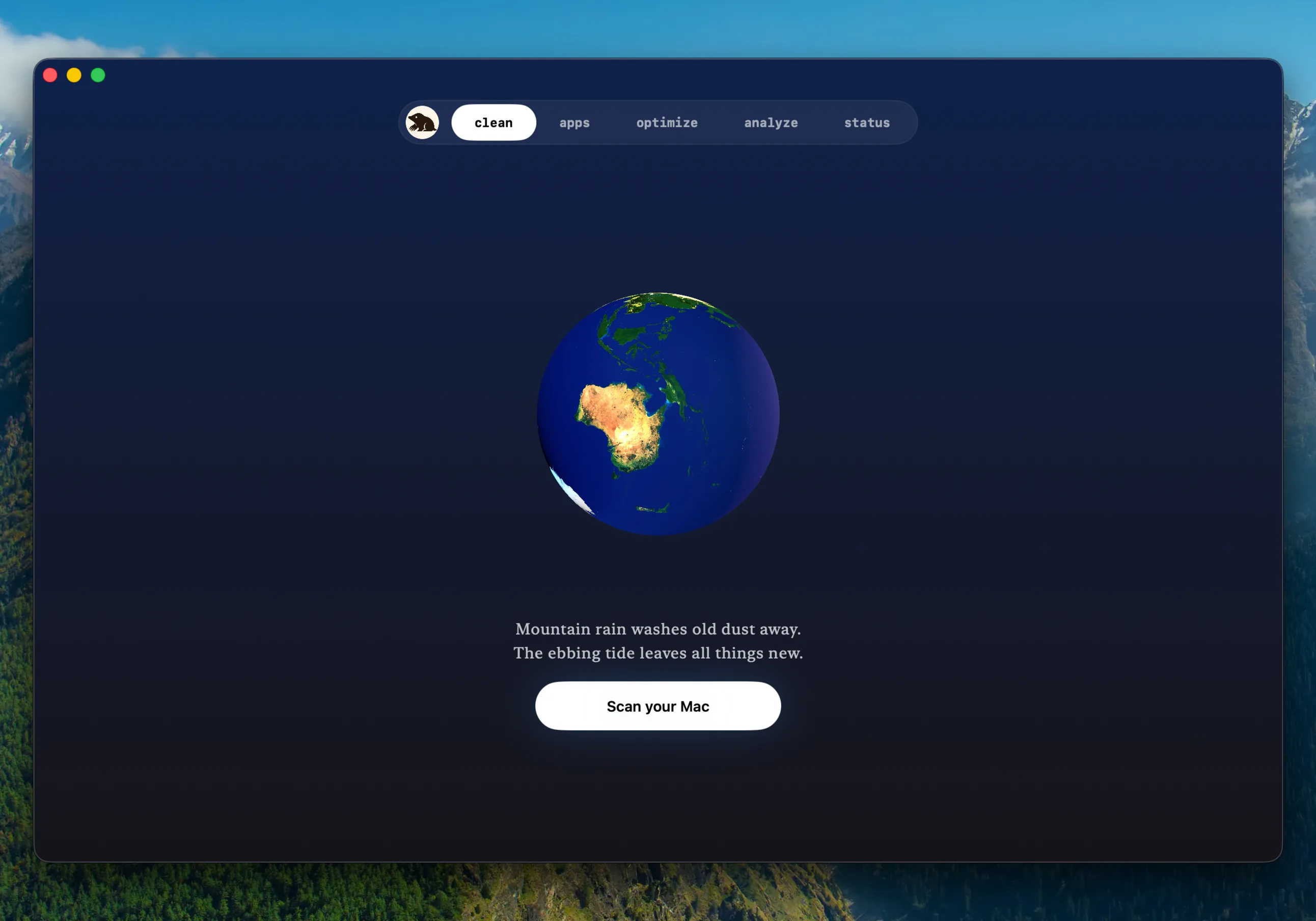
The interface follows the same idea. The result page doesn’t appear until the scan is done, a short wait shows no spinner at all and only a longer one brings up a working animation, and the completion screen reserves its space in advance so the window doesn’t jump when the result lands. Each of these rules is small, and together they’re why the app feels steady.
The work underneath is unpredictable by nature, and animation doesn’t fix that. What fixes it is the flow itself being reliable. I don’t want a maintenance tool that needs watching. I want to start a task, let it finish, then come back to the results without a blinking light constantly asking for my attention.
The same goes for accessibility. Reading order, keyboard operation, whether focus stays put, none of that is separate from how quiet the thing looks. With Reduce Motion turned on the planets stop their decorative spin and state changes move around less, and nothing you do depends on understanding an animation.
Building for Someone in Their Seventies
I used to build things thinking only about whether the people around me found them handy. Going from a CLI to a desktop app taught me that getting it usable for someone in their seventies takes a lot more, and it’s a lot more interesting. Everything below came out of three months of user email, and it’s where most of what I learned came from.
A British user in his late sixties wrote to say he’d had a senior moment and bought Mole twice. “Consider the second payment a gift. Thank you for this excellent tool, it has saved me far more pounds than CleanMyMac ever did.” I suggested a refund, or giving the extra licence to someone. He asked around and wrote back the next day: “None of my neighbours use a Mac, and neither do my Bluesky followers. This round is on me.” Getting a letter like that makes you feel you have to make the thing better to deserve it.
An American user corrected something I’d had backwards about regional habits. I’d assumed Americans wanted Fahrenheit, so that’s what the US default was. He wrote: “Americans use Celsius in every technical context. Only weather and body temperature are Fahrenheit. I installed Mole, saw 110, and got a fright. Apple publishes US specs in Celsius, and fastfetch and neofetch both default to Celsius on American systems. Keep the Fahrenheit toggle, but default everyone to Celsius.” It now defaults to Celsius with Fahrenheit available. He followed up about pricing too. The number I’d picked didn’t read like a deliberate price, he said, more like something converted from another currency. Then he added: “When I say foreign I don’t mean anti-China. People want to feel the author understands them.” Honestly, that price was something I made up on the spot. I’d never thought seriously about pricing before selling anything, and having a stranger point it out was a bit embarrassing. It hadn’t occurred to me that the price number itself shapes how people decide.
A user with mild vision impairment wrote: “Looks like a very nice app. Shame I can’t use it, it seems to hardcode dark mode. My system is set to light and I only use light mode apps.” Mole being dark-only was a deliberate call. The menu bar panel floats over the wallpaper like a HUD, dark glass glares less, and it saved adding a theme switch. But that reasoning doesn’t hold for him. I’d been telling myself I took accessibility seriously here, and it never occurred to me that light mode is itself an accessibility need. That email arrived a while ago. Mole is still dark-only and light mode is still sitting on the list. A product that claims to care about accessibility has left someone who told me plainly that he can’t use it waiting this long, and that one bothers me.
A lecturer at a German university wrote asking about an educational licence, describing it as “not only support for me personally, but a meaningful kind of support at the educational level.” I had no idea teachers were using this in a classroom setting. A doctor in Hungary left the most honest bad review I’ve had: “To be blunt, this is a little expensive for something a free app can also do.” That one doesn’t sting at all. Purchasing power varies enormously between countries, and he wasn’t complaining, he was helping me locate a problem.
My favourite features in Mole didn’t originate with me. The low battery alert for AirPods came out of the battery health work, and I never hit the case myself until one afternoon it actually fired, which felt thoughtful without being noisy. Keep Screen On grew three different behaviours after a user pointed out what was missing. Now if I head out on a weekend the AI coding session keeps running, which has saved me a lot of waiting. Seeing the iPhone’s battery level in the status view was hard to implement for a while, and eventually there was a way. Users told me to build all of these, and I’m the one who got the most out of them.
I Still Answer Every Email Myself
Support questions, refunds and licence resets add up to well under 1% of users. Half an hour of scripting would automate all of it, and I haven’t written that script. Handling them one at a time is the only way to feel what people actually want, why they refunded, and where the thing made them uncomfortable. That’s usually not what they asked in the first sentence. My bar for automating is three things holding at once: the question keeps coming up, the answer is stable, and I understand the exceptions. Until then I’d rather answer each one myself. It still works, I’ve spent nothing on marketing, growth is mostly word of mouth, and refunds are under 0.8%. A good number of buyers were long-time CLI users first.
I also didn’t build a ticketing system, a support platform or a knowledge base before launch. Engineers like standing up the support machinery first because it’s familiar work, and AI compressing it into half a day makes it even easier to start too early. Building it takes half a day, maintaining it is long-term work, and nobody needs it yet. The day the inbox starts dropping requests, or response times get murky, or the same question gets two different answers, that’s when a new system is actually needed. AI shrinks the building time to a few days, but talking to people isn’t something you can hand off, or making a product stops being interesting. Handling every email yourself is how the trust builds up.
A Few Things That Actually Helped
Writing code is actually a small part of it. The real time goes into figuring out where the pain actually is, how to make it usable without a manual, and how to get it in front of the right people. Doing every step yourself feels very different from just writing code.
For a cleaner, what you don’t delete matters far more than what you do, which is where those protected lists came from. A lot of feature ideas are perfectly good, but if they don’t fit what Mole is for, I keep them out. Otherwise it turns into a pile and becomes a nightmare to maintain.
You need a rough roadmap in your head so you know which requests to turn down. If a piece of software needs no manual for people to pick it up, it passes. I’ve declined plenty of nice suggestions the moment they threatened to make the app louder or more complex. If one Mac user in a hundred finds it useful, that’s enough.
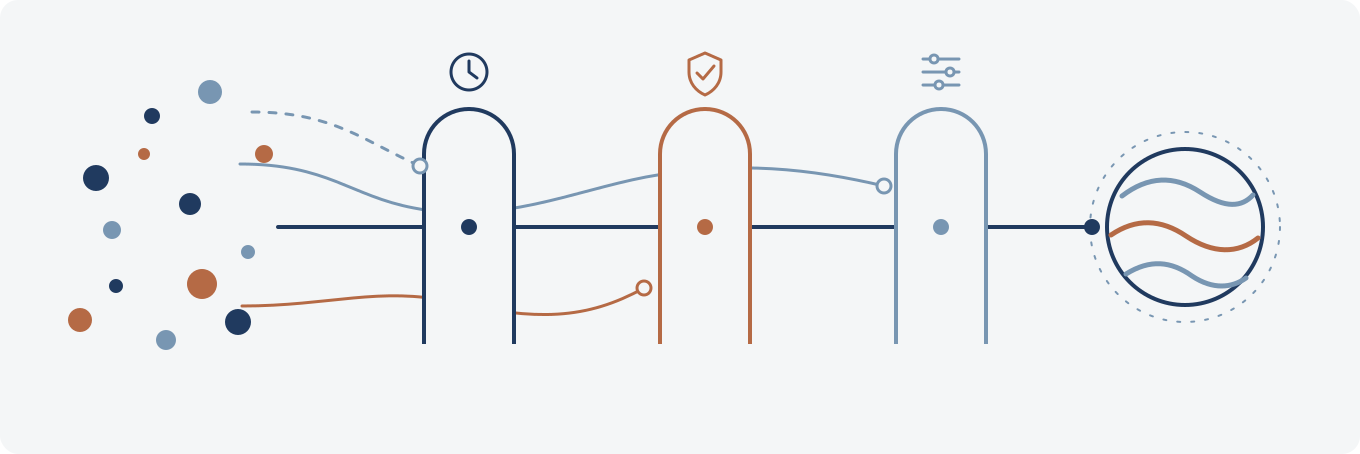
A feature has to pass three gates before it reaches the roadmap now. No always-on timers, listeners or sampling cost while the user isn’t in that feature. No expanding the privileged helper or adding a system permission for a small convenience. No new setting when a sensible default exists. That isn’t a universal principle for all software, it’s a rule Mole set for itself. Every extra bit of always-on work, privilege and configuration is one more thing users have to trust you with.
I’ve never saved up for a big release. I aim to ship something every week, which keeps user problems moving and keeps the back and forth going. Every release, update and announcement is a good excuse to talk to people, and it gives anyone who missed the earlier ones a way to find out what you’re doing.
Now that AI writes code, the time it saves is exactly what you should spend figuring out what people need. Things like talking a problem through, looking properly at the data, or writing copy that makes sense on the first read. I don’t mind spending tokens, as long as they make a difference users can feel.
Mole has been global since day one, and I publish more in English than in Chinese. What struck me is how large the world is and how far users are spread, and that they’re willing to trust you from the start. People you helped in passing often become your users later, because there was something real between you. I’ve never paid for promotion either. Posts on X get a burst of attention that fades quickly, whereas things posted to YouTube keep getting views for much longer, and if the thing is good and someone recommends it, it stays alive there for a long time.
I spent a fair amount of time looking at the data. Putting sales, traffic, comments, refund reasons and GitHub issues side by side surfaces plenty of blind spots I wouldn’t have seen, and shows exactly where people walk away.
The last one is mindset. Chasing follower counts just to sell things makes you anxious. Posting the real process, the mistakes and the updates shows people you’re actually building something, and trust follows naturally. With so much over-promised noise around right now, nobody pays attention if they don’t trust you. Staying honest and playing the long game gets you much further.
Why Five Planets
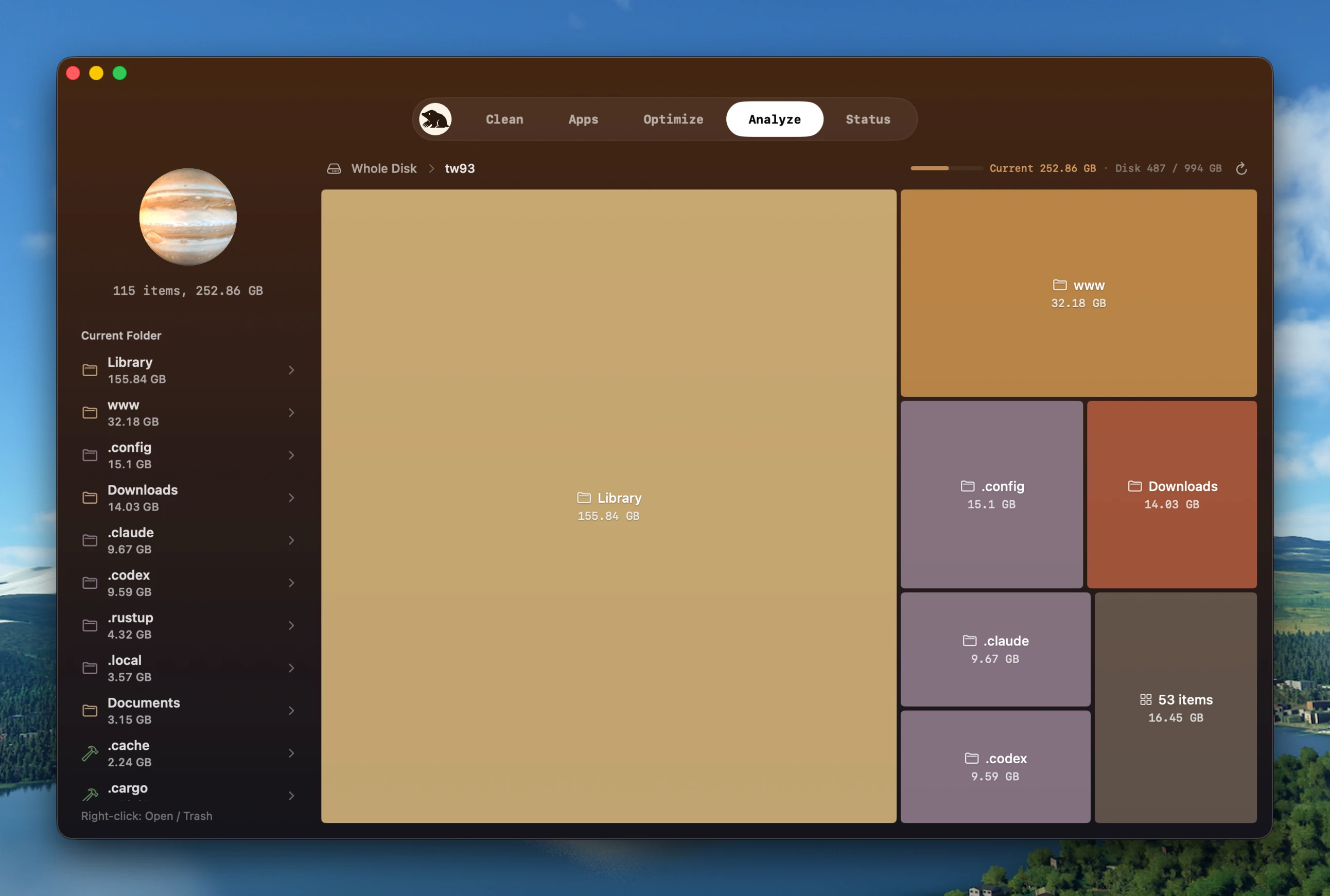
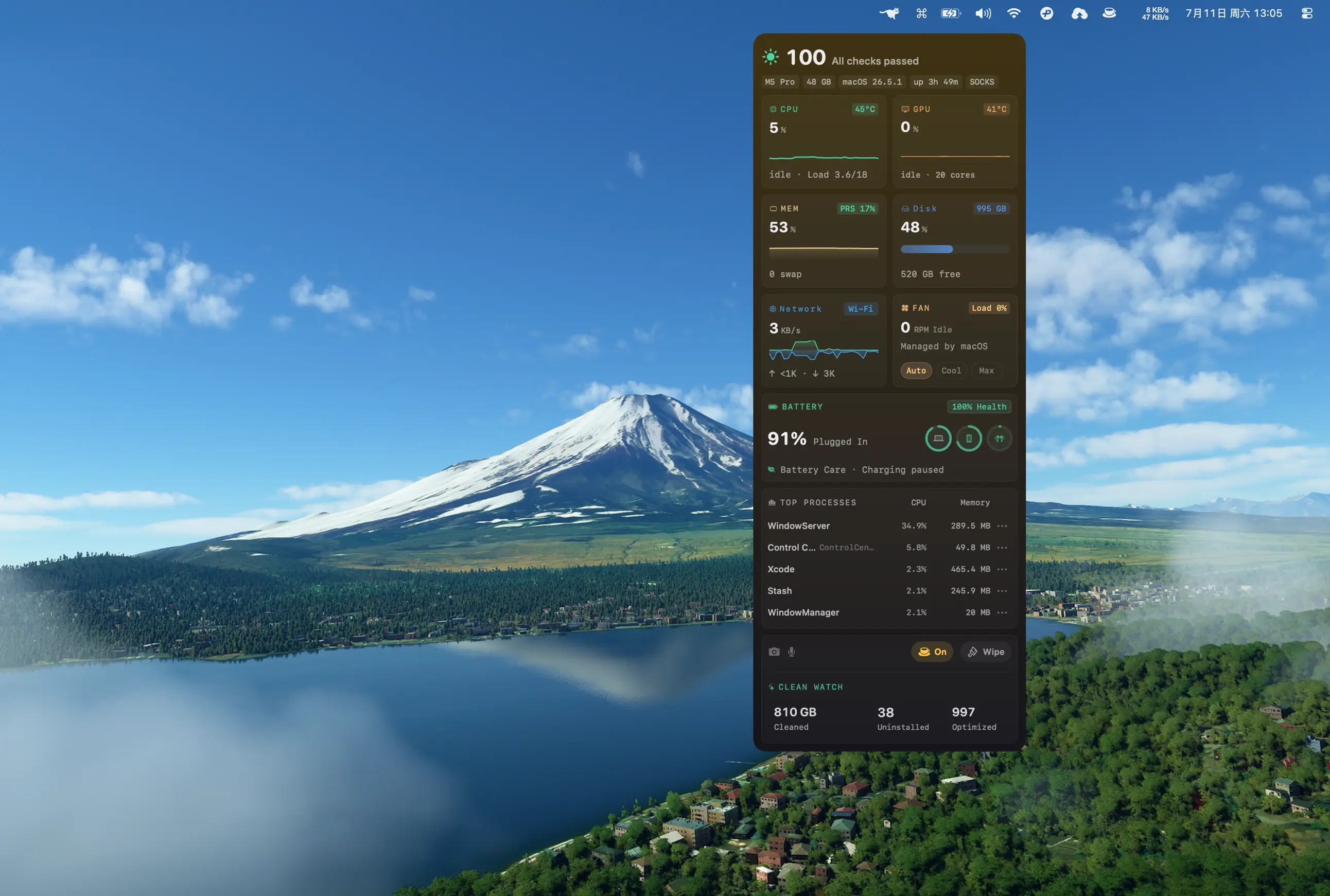
Mole for Mac is five parts: Clean, Apps, Optimize, Analyze and Status. Each one has a planet in the interface. Clean is Earth, Apps is Mars, Optimize is Mercury, Analyze is Jupiter, Status is the Sun. It comes from liking planetary motion as a kid, and from WebGL being the first thing I badly wanted to learn after picking up front end work ten years ago. The two happened to meet. I swapped the planet textures more than ten times and pulled a lot of them from NASA before settling. The spin direction, the rotation speed and the flight at the end all follow how the real bodies behave.
None of this had to exist. A menu bar item with a clean button would have worked. But there’s more than enough AI-generated cyber junk already, and rather than spend tokens stacking up another interface that merely runs, I’d rather make something pleasant. It doesn’t waste my tokens and it doesn’t pollute your timeline.
I like things arriving in their own time, and I try not to rush the schedule. That’s only been reinforced these past three months. Building something I enjoy using and others are willing to pay for is already a great place to be.
The CLI is free and open source on GitHub, and the Mac app is at mole.fit.
This is my first time selling something, so there are definitely things I missed, and I welcome any advice. Looking back, the changes that shaped this most all came from someone’s email or an issue. Listening to people complain has honestly been the biggest help.