React Native Animation Research
Categories: Study
The title of this special article is “ReactNative Animation Research”. Since it is called research, we strive to clarify the content related to RN animation at once, researching in the way of posing questions - proving questions - solving questions.
Questions
- How is ReactNative animation support?
- Is ReactNative animation convenient to use?
- How is the performance of ReactNative animation compared with H5 performance?
- How to optimize the performance of ReactNative animation?
RN Animation Support

From the MineNode above, we can see that there are 3 places in RN where animation can be used:
- Animated used for creating more refined interactive control animations;
- LayoutAnimation used for global layout animations;
- Used for building Navigator different page switching animations;
This article is mainly about content related to Animated. It is also the most used in usual animations. The other two can be easily used through documents.
Usage of RN Animation
An animation implementation of No work tomorrow, enlarging from small and rotating at the same time. We can see the implementation steps of RN animation from comments. Code Tw93 Gist is as follows:
import React, {Component} from 'react';
import {
  AppRegistry,
  StyleSheet,
  Text,
  View,
  Animated,   //Use Animated component
  Easing,     //Introduce Easing gradient function
} from 'react-native';

class ReactNativeDemo extends Component {
  constructor(props: any) {
    super(props);
    //Use Animated.Value to set initial value (scale, angle, etc.)
    this.state = {
      bounceValue: new Animated.Value(0),
      rotateValue: new Animated.Value(0),
    };
  }

  componentDidMount() {
    //Call animation execution function immediately after initial rendering execution
    this.startAnimation();
  }

  startAnimation() {
    this.state.bounceValue.setValue(0);
    this.state.rotateValue.setValue(0);
    Animated.parallel([
      //Set animation parameters through functions like Animated.spring
      //Optional basic animation types: spring, decay, timing
      Animated.spring(this.state.bounceValue, {
        toValue: 3,      //Change target value
        friction: 20,    //friction friction coefficient, default 40
      }),
      Animated.timing(this.state.rotateValue, {
        toValue: 1,
        duration: 800,
        easing: Easing.out(Easing.quad),
      }),
      //Call start to start animation, start can callback a function, thereby realizing animation loop
    ]).start(()=>this.startAnimation());
  }

  render() {
    return (
      <View style={styles.container}>
        <Animated.Image
          source={require('./bsb.jpeg')}
          style={ {
            width: 100,
            height: 100,
            transform: [
              //Bind initial value to style attribute of animation target
              {scale: this.state.bounceValue},
              //Use interpolate interpolation function, realizing mapping conversion from numerical unit
              {
                rotateZ: this.state.rotateValue.interpolate({
                  inputRange: [0, 1],
                  outputRange: ['0deg', '360deg']
                })
              }
            ]
          }}>
        </Animated.Image>
      </View>
    );
  }
}
const styles = StyleSheet.create({
  container: {
    flex: 1,
    justifyContent: 'center',
    alignItems: 'center',
  }
});
From the demo above, it can be seen that the usage logic of animation is quite clear. Although it is not as simple as css3 animation writing, and does not need secondary encapsulation, it can be used directly as above.
The specific effect is like this:

Comparison between RN Animation and H5 Animation
-
Animations in RN are all JavaScript animations, that is, controlling the changes of various parameter values of images through JavaScript code to produce animation effects on the timeline. RN implements efficient and smooth animation effects by encapsulating an Animated element, internally changing elements through data binding and DOM operations, perfecting memory management combining React life cycle, solving race conditions, and behaving the same as native components externally.
-
CSS3 animation vs ReactNative animation recording:
-
The above animation css3 uses animation: rotate 0.2s linear infinite; implementation:

-
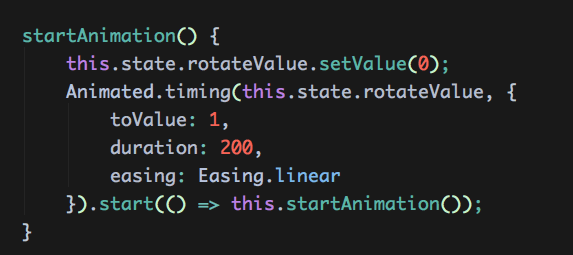
RN adopts the following implementation:
-
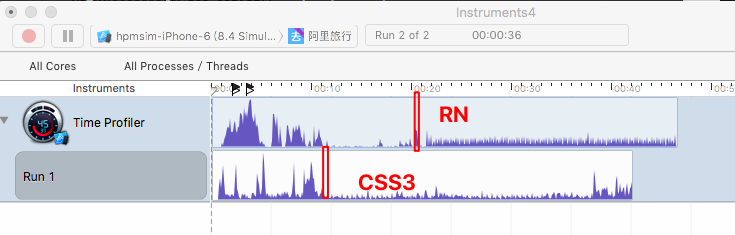
Regarding performance testing, both use instruments to test Time Profiler data. Among them, the red line is when the animation starts. From the figure, it can be seen that both consumption are low, but the performance of css3 animation is slightly better than RN animation.
Comprehensive
React Native’s animation support is still very broad
- Animations achievable by CSS3 can basically be achieved by RN. At the same time, it also wraps many things similar to syntactic sugar, such as 3 animation types (spring, decay, timing), Interpolation interpolation function, 4 animation combinations (parallel, sequence, stagger, delay), animation execution callback, tracking dynamic values, Animated.event input event, responding to current animation value, and other functions;
- Regarding React Native supported Easing types, you can go to the source code to find animation types that meet your project requirements, Easing.js;
- Navigator page switching animations are also very rich. We can find supported switching animations from the mindNode above, and we can also find supported types from the source code, NavigatorSceneConfigs.js;
- For particularly complex animations, you can use react-native-animatable to supplement redundant animation types;
-
- For animations of some components, such as drawing of data charts, it is recommended to directly use RN drawing library ART to implement, react-native-svgkit;
-
React Native writing and using is also very convenient and logical
- Use basic Animated components, such as Animated.View, Animated.Image, Animated.Text and others (use AnimatedImplementation to wrap);
- Use Animated.Value to set one or more initial values, such as position attributes, transparency attributes, angle attributes, etc.;
- Bind initial value to style attribute of animation target;
- Set animation parameters through animation type Api, such as spring, decay, timing three animation types;
- Call start to start animation, and can callback related functions inside start;
React Native animation performance is not that bad, or better than imagined
for Animated
- By encapsulating an Animated element;
- Internally change elements through data binding and DOM operations;
- Combine React life cycle to perfect memory management, solving race conditions;
- Behave the same as native components externally, realizing efficient and smooth animation effects;
For Navigator page switching animation not smooth
- Use InteractionManager in the process of transition animation, making the new page only render necessary small amount of content.
- InteractionManager.runAfterInteractions only has one function type parameter. When transition animation ends, this callback function will be triggered (all animations based on AnimatedAPI will trigger InteractionManager.runAfterInteractions).
Reference
- https://facebook.github.io/react-native/docs/animations.html#content
- https://facebook.github.io/react-native/docs/navigator.html#content
- https://facebook.github.io/react-native/docs/layoutanimation.html#content
- ReactNative Animated Animation Explanation - Web Frontend Tencent AlloyTeamBlog
- react-native-animation-book